

Multi-script support for HTTP Scripting
Linking multiple scripts to the same virtual server
FortiADC supports the use of a single script file containing multiple scripts and applies them to a single virtual server in one execution. Different scripts can contain the same event. You can specify the priority for each event in each script file to control the sequence in which multiple scripts are executed or allow the system to execute the individual scripts in the order they are presented in the multi-script file.
Currently, up to 16 individual scripts can be added to create a large multi-script file.
If desired, you can disable the processing of remaining scripts in the multi-script, or you can even complete disable the processing of certain events (for example, you can disable the processing of the HTTP RESPONSE event in a HTTP REQUEST script). FortiADC also supports multiple calls of HTTP:redirect(), HTTP:redirect_with_cookie(), LB:routing(), and HTTP:close() functions such that the final call prevails.
In practice, instead of creating a single large and complex script containing all necessary logic, it's often more advantageous to decompose it into smaller functional components represented by individual scripts. This approach offers several benefits. Firstly, executing multiple scripts concurrently is more efficient than running them sequentially. Additionally, breaking down a massive script into smaller units enhances flexibility, particularly when applying scripts to various virtual servers. Some servers may require only specific scripts, while others may utilize all available ones. With smaller, modular scripts, you have the flexibility to select and combine only the necessary components to construct a comprehensive multi-script file, each with its designated priority, and apply them collectively to a virtual server.
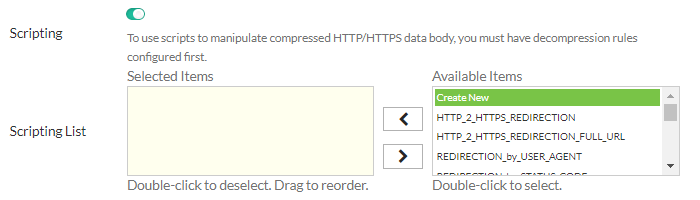
Apply multiple scripts shows how to link multiple scripts to a single virtual server from the GUI.
Setting script priority
Priority in a multi-script is optional, but is highly recommended. When executing a big multiple-script file, care must be taken to avoid conflicting commands among the scripts. You can set the priority for each script using the script editor on FortiADC's GUI. Valid values range from 1 to 1,000, with 500 being the default. The smaller the value, the higher the priority. Below is an example script with a set priority:
when HTTP_REQUEST priority 100 {
LB:routing(“cr1”)
}
To display the priority information in the GUI, you can define one and only one event in each script file, as shown below:
Script 1:
when HTTP_REQUEST priority 500 {
LB:routing(“cr1”)
}
Script 2:
when HTTP_RESPONSE priority 500 {
HTTP:close()
}
Script 3:
when HTTP_REQUEST priority 400 {
LB:routing(“cr2”)
}
Script 4:
when HTTP_RESPONSE priority 600 {
HTTP:close()
}
Individual script files are loaded separately into the Lua stack. A numeric value (starting from 1) is appended to each event (e.g., for HTTP_REQUEST event, there are functions HTTP_REQUEST1, HTTP_REQUEST2, and so on so forth).
To support multiple scripts, FortiADC:
- Supports multiple calls of redirect/routing/close function, making them re-entrant so that the final one prevails. For that purpose, the system checks the behavior of multiple calls across
redirect(), close(), and routing(). Ifredirect()comes first, followed byclose(),thenclose()prevails. Ifclose()comes first, followed byredirect(), thenredirect()prevails. If you want toclose(), you must disable the event afterclose(). - Allows enabling or disabling events. There are times when you may want to disable the processing of the remaining scripts while a multi-script file is being executed, or want to disable processing the response completely. The mechanism serves that purpose.
- Allows enabling or disabling automatic event-enabling behavior. In the HTTP keep-alive mode, the system by default re-enables HTTP REQUEST and HTTP RESPONSE processing for the next transaction (even if they are disabled in the current transaction using the above enable or disable event mechanism). Now you can disable or enable this automatic enabling behavior.
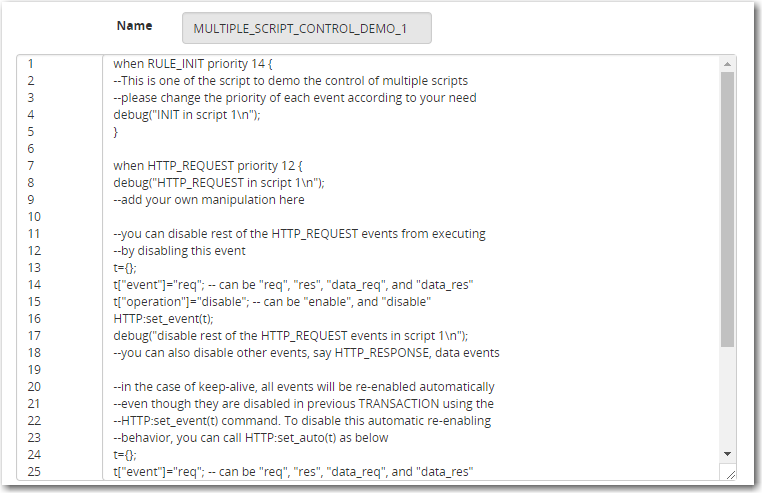
Script priority shows a sample multi-script with priority information.
Compiling principles
- All individual scripts should be pre-compiled when they are linked to a virtual server, where they can be combined into one big multi-script.
- For the same event, combine the commands in different scripts according to their priorities and orders.
- For commands of different priorities, FortiADC processes the high-priority commands first, and then the low-priority ones; for commands of the same priority, it processes them in the order they appear in the combined script.
- And if you are using multiple scripts with overlapping events for bidirectional traffic, you must ensure that the response traffic traverses the overlapping events in the expected order. By default, the scripts applied to the same virtual server will run in the order in which they are applied, regardless of the direction of traffic flow.
- For a specified event, you must make sure to avoid the conflict commands in different scripts. For example, if you have multiple scripts applied to the same virtual server and the scripts contain both request and response logic, the default execution order is like this:

but NOT like this:

As shown above, FortiADC cannot control the order in which events in the scripts are executed. The only way to enforce the execution order for response traffic is to use the event priority command, as we have discussed above. When setting the priorities, pay special attention to both request and response flows.
Special notes
When using the multi-script feature, keep the following in mind:
- The multi-script feature is supported on all FortiADC hardware platforms.
- Currently, the feature can be applied to Layer 2 and Layer 7 virtual servers on HTTP/HTTPS protocol only.
- Scripts are VDOM-specific, and cannot be shared among different VDOMs.
- Session tables set up using scripts must be synced through high-availability (HA) configuration.
- Each multi-script configuration can contain up to 256 individual scripts, each being no more than 32 kilobytes.