
Fortinet white logo
Fortinet white logo

Script Reference Guide

Predefined HTTP scripts

Predefined HTTP scripts

FortiADC provides system predefined scripts for HTTP Scripting.

Scripts and predefined commands highlights the functions of these scripts and commands and shows how to use them.
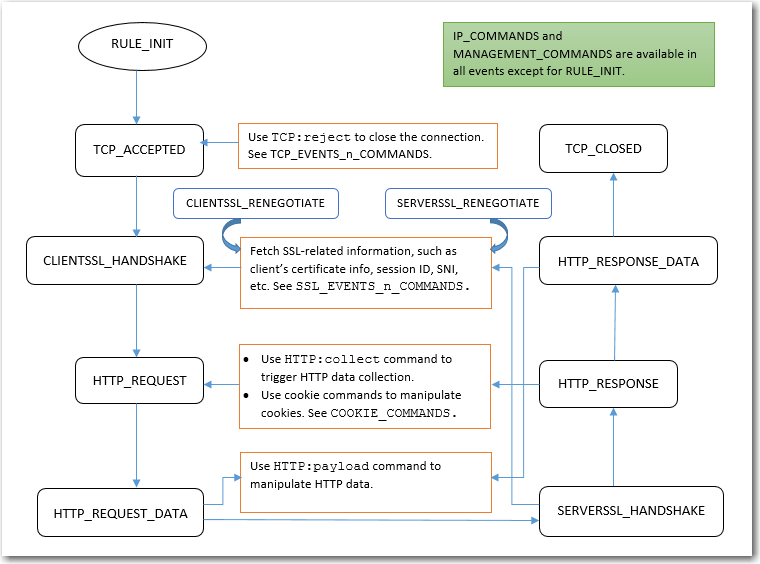
Scripts and predefined commands

  • UTILITY_FUNCTIONS_DEMO and CLASS_SEARCH_n_MATCH provide various utility commands.
  • MULTIPLE_SCRIPT_CONTROL_DEMO_1 and MULTIPLE_SCRIPT_CONTROL_DEMO_2 show how to use multiple-script support.
  • HTTP_DATA_FIND_REMOVE_REPLACE_DEMO and HTTP_DATA_FETCH_SET_DEMO show how to manipulate HTTP data.
  • SPECIAL_CHARACTERS_HANDLING_DEMO shows how to handle certain special characters.
  • INSERT_RANDOM_MESSAGE_ID_DEMO shows how to generate random message IDs.
  • OPTIONAL_CLIENT_AUTHENTICATION shows how to perform optional client authentication based on a request URL.
  • COMPARE_IP_ADDR_2_ADDR_GROUP_DEMO shows how to perform IP address match.
  • USE_REQUEST_HEADERS_in_OTHER_EVENTS shows how to share information across events.
  • Many more predefined scripts are provided for load balance content routing, HTTP redirection, and HTTP content rewriting.

The following table lists the FortiADC predefined scripts available for users to apply and customize.

Group

Predefined script

Usage

Authentication

AUTH_COOKIE_BAKE Allows you to retrieve the baked cookie and edit the cookie content.
AUTH_EVENTS_n_COMMANDS Lists the authentication event and commands.
CUSTOMIZE_AUTH_KEY Demonstrates how to customize the crypto key for authentication cookie.
TWO_STEP_VERIFICATION Demonstrates how to perform 2-Step Verification using FortiToken. One needs have authentication policy configured and selected in a virtual-server.
TWO_STEP_VERIFICATION_2_NEW Demonstrates how to perform 2-Step Verification using FortiToken for the second authentication group.
TWO_STEP_VERIFICATION_2_SAME Demonstrates how to perform 2-Step Verification for the second authentication group using the same token group.
TWO_STEP_VERIFICATION_CHANGE_KEY Demonstrates how to change the AES key and its size for stored token group.

Cookie

COOKIE_COMMANDS

Lists the two cookie commands and shows how to use them.

COOKIE_COMMANDS_USAGE

Demonstrates the sub-function to handle the cookie attribute "SameSite" and others.

COOKIE_CRYPTO_COMMANDS

Used to perform cookie encryption/decryption on behalf of the real server.

Feature

WAITING_ROOM

The sample Waiting Room script demonstrates how you can place visitors in a virtual queue instead of denying them service directly when the server side reaches its configured capacity limit during high-demand situations. In this virtual Waiting Room, visitors can see their position in line and when their turn arrives, they are redirected to the requested page.

Configuration parameters include the waiting room name, total resource limit threshold (default is 1000), and the Resource URL applicable to the waiting room. You can also customize the message displayed to users when they are placed in the waiting room by editing the HTML page section of the script.

Required data structures such as atomic counters and shared tables are already built into the script; however, you have the option to apply user-defined atomic counters and shared tables to customize the script.

HTTP

GENERAL_REDIRECT_DEMO

Redirects requests to a URL with user-defined code and cookie.

Note: Do not use this script "as is". Instead, copy and customize the code, URL, and cookie.

HTTP_2_HTTPS_REDIRECTION

Redirects requests to the HTTPS site.

Note: This script can be used directly without making any changes.

HTTP_2_HTTPS_REDIRECTION_FULL_URL

Redirects requests to the specified HTTPS URL.

Note: This script can be used directly without making any changes.

HTTP_DATA_FETCH_SET_DEMO

Collects data in HTTP request body or HTTP response body. In HTTP_REQUEST or HTTP_RESPONSE, you could collect specified size data with “size” in collect().In HTTP_DATA_REQUEST or HTTP_DATA_RESPONSE. You could print the data use “content”, calculate data length with “size”, and rewrite the data with “set”.

Note: Do not use this script "as is". Instead, copy it and manipulate the collected data.

HTTP_DATA_FIND_REMOVE_REPLACE_DEMO

Finds a specified string, removes a specified string, or replaces a specified string to new content in HTTP data.

Note: Do not use this script "as is". Instead, copy it and manipulate the collected data.

INSERT_RANDOM_MESSAGE_ID_DEMO

Inserts a 32-bit hex string into the HTTP header with a parameter “Message-ID”.

Note: This script can be used directly without making any changes.

REDIRECTION_by_STATUS_CODE

Redirects requests based on the status code of server HTTP response (for example, a redirect to the mobile version of a site).

Note: Do not use this script "as is". Instead, copy it and customize the condition in the server HTTP response status code and the URL values.

REDIRECTION_by_USER_AGENT

Redirects requests based on User Agent (for example, a redirect to the mobile version of a site).

Note: You should not use this script "as is". Instead, copy it and customize the User Agent and URL values.

REWRITE_HOST_n_PATH

Rewrites the host and path in the HTTP request, for example, if the site is reorganized. You should not use this script as is. Instead, copy it and customize the "old" and "new" hostnames and paths.

REWRITE_HTTP_2_HTTPS_in_LOCATION

Rewrites HTTP location to HTTPS, for example, rewrite “Location:http://www.example.com” to “Location:https://www.example.com”.

Note: This script can be used directly without making any changes.

REWRITE_HTTP_2_HTTPS_in_REFERER

Rewrites HTTP referer to HTTPS, for example, rewrite “Referer: http://www.example.com” to “Referer: https://www.example.com”.

Note: This script can be used directly without making any changes.

REWRITE_HTTPS_2_HTTP_in_LOCATION

Rewrites HTTPS location to HTTP, for example, rewrite “Location:https://www.example.com” to “Location:http://www.example.com”.

Note: This script can be used directly without making any changes.

REWRITE_HTTPS_2_HTTP_in_REFERER

Rewrites HTTPS referer to HTTP, for example, rewrite “Referer: https://www.example.com” to “Referer: http://www.example.com”.

Note: This script can be used directly without making any changes.

SPECIAL_CHARACTERS_HANDLING_DEMO

Shows how to use those "magic characters" which have special meanings when used in a certain pattern. The magic characters are ( ) . % + - * ? [ ] ^ $

USE_REQUEST_HEADERS_in_OTHER_EVENTS

Stores a request header value in an event and uses it in other events. For example, you can store a URL in a request event, and use it in a response event.

Note: Do not use this script "as is". Instead, copy it and customize the content you want to store, use collect() in HTTP_REQUEST to trigger HTTP_DATA_REQUEST,or use collect() in HTTP_ RESPONSE to trigger HTTP_DATA_ RESPONSE.

IP

IP_COMMANDS

Used to get various types IP Address and port number between client and server side.

Optimization

MULTIPLE_SCRIPT_CONTROL_DEMO_1

Uses demo_1 and demo_2 script to show how multiple scripts work. Demo_1 with priority 12 has a higher priority.

Note: You could enable or disable other events. Do NOT use this script "as is". Instead, copy it and customize the operation.

MULTIPLE_SCRIPT_CONTROL_DEMO_2

Uses demo_1 and demo_2 script to show how multiple scripts work. Demo_2 with priority 24 has a lower priority.

Note: You can enable or disable other events. Do not use this script "as is". Instead, copy it and customize the operation.

RAM_CACHING_COMMANDS

Lists the RAM caching event and commands.

RAM_CACHING_DYNAMIC

Demonstrates how to use script to do dynamic RAM caching.

Note: Dynamic caching is identified by a configured ID. Ensure the RAM caching configuration is selected in the HTTP or HTTPS profile.

RAM_CACHING_GROUPING

Demonstrates how to create multiple variations based on client IP address. The sort of grouping applies to both regular caching and dynamic caching.

Note: Ensure the RAM caching configuration is selected in HTTP or HTTPS profile.

Routing

CONTENT_ROUTING_by_URI

Routes to a pool member based on URI string matches.

Note: You should not use this script as is. Instead, copy it and customize the URI string matches and pool member names.

CONTENT_ROUTING_by_X_FORWARDED_FOR

Routes to a pool member based on IP address in the X-Forwarded-For header.

Note: You should not use this script as is. Instead, copy it and customize the X-Fowarded-For header values and pool member names.

PERSIST_COMMANDS

Demonstrates how to use persistence commands and event.

The PERSISTENCE event is triggered when FortiADC receives the HTTP REQ and is ready to dispatch to the real server.

You can set the entry in PERSISTENCE, then look up it in POST_PERSIST.

FortiADC will dispatch to the dedicated server according to your entry set in PERSISTENCE if this session has not been assigned to the real server before.

SSL

OPTIONAL_CLIENT_AUTHENTICATION

Performs optional client authentication.

Note: Before using this script, you must have the following four parameters configured in the client-ssl-profile:

  • client-certificate-verify—Set to the verify you'd like to use to verify the client certificate.
  • client-certificate-verify-option—Set to optional
  • ssl-session-cache-flag—Disable.
  • use-tls-tickets—Disable.

SSL_EVENTS_n_COMMANDS

Demonstrates how to fetch the SSL certificate information and some of the SSL connection parameters between server and client side.

TCP

SNAT_COMMANDS

Allows you to overwrite client source address to a specific IP for certain clients, also support IPv4toIPv6 or IPv6toIPv4 type.

Note: Make sure the flag SOURCE ADDRESS is selected in the HTTP or HTTPS type of profile.

SOCKOPT_COMMAND_USAGE

Allows user to customize the TCP_send buffer and TCP_receive buffer size.

SOCKOPT_COMMANDS

Demonstrates how to the TCP:sockopt with usage examples.

TCP_EVENTS_n_COMMANDS

Demonstrates how to reject a TCP connection from a client in TCP_ACCEPTED event.

Utility

AES_DIGEST_SIGN_2F_COMMANDS

Demonstrates how to use AES to encryption/decryption data and some tools to generate the digest.

ATOMIC_COUNTER_COMMANDS

Allows you to create and configure shared atomic counters that are accessible by multiple httproxy processes within one VS. The stored data is located in shared memories.

In the Waiting Room setup, the atomic counters track variables at running time, including the current resource count, the current position in line, and the current total number of users in the waiting queue.

CLASS_SEARCH_n_MATCH

Demonstrates how to use the class_match and class_search utility function.

COMPARE_IP_ADDR_2_ADDR_GROUP_DEMO

Compares an IP address to an address group to determine if the IP address is included in the specified IP group. For example ,192.168.1.2 is included in 192.168.1.0/24.

Note: Do not use this script "as is". Instead, copy it and customize the IP address and the IP address group.

GEOIP_UTILITY

Used to fetch the GEO information country and possible province name of an IP address.

MANAGEMENT_COMMANDS Allow you to disable/enable rest of the events from executing.

SHARED_TABLE_COMMANDS

Allows you to create and configure shared hash tables that are accessible by multiple httproxy processes within one VS. Both the table and stored data are located in shared memories.

In the Waiting Room setup, the shared table is used to track current active resource occupiers such as active sessions.

URL_UTILITY_COMMANDS

Demonstrates how to use those URL tools to encode/decode/parser/compare.

UTILITY_FUNCTIONS_DEMO

Demonstrates how to use the basic string operations and random number/alphabet, time, MD5, SHA1, SHA2, BASE64, BASE32, table to string conversion, network to host conversion utility function

WAF

WAF_COMMANDS

Demonstrates how to use WAF related functions and events.

Predefined HTTP scripts

Predefined HTTP scripts

FortiADC provides system predefined scripts for HTTP Scripting.

Scripts and predefined commands highlights the functions of these scripts and commands and shows how to use them.

Scripts and predefined commands

  • UTILITY_FUNCTIONS_DEMO and CLASS_SEARCH_n_MATCH provide various utility commands.
  • MULTIPLE_SCRIPT_CONTROL_DEMO_1 and MULTIPLE_SCRIPT_CONTROL_DEMO_2 show how to use multiple-script support.
  • HTTP_DATA_FIND_REMOVE_REPLACE_DEMO and HTTP_DATA_FETCH_SET_DEMO show how to manipulate HTTP data.
  • SPECIAL_CHARACTERS_HANDLING_DEMO shows how to handle certain special characters.
  • INSERT_RANDOM_MESSAGE_ID_DEMO shows how to generate random message IDs.
  • OPTIONAL_CLIENT_AUTHENTICATION shows how to perform optional client authentication based on a request URL.
  • COMPARE_IP_ADDR_2_ADDR_GROUP_DEMO shows how to perform IP address match.
  • USE_REQUEST_HEADERS_in_OTHER_EVENTS shows how to share information across events.
  • Many more predefined scripts are provided for load balance content routing, HTTP redirection, and HTTP content rewriting.

The following table lists the FortiADC predefined scripts available for users to apply and customize.

Group

Predefined script

Usage

Authentication

AUTH_COOKIE_BAKE Allows you to retrieve the baked cookie and edit the cookie content.
AUTH_EVENTS_n_COMMANDS Lists the authentication event and commands.
CUSTOMIZE_AUTH_KEY Demonstrates how to customize the crypto key for authentication cookie.
TWO_STEP_VERIFICATION Demonstrates how to perform 2-Step Verification using FortiToken. One needs have authentication policy configured and selected in a virtual-server.
TWO_STEP_VERIFICATION_2_NEW Demonstrates how to perform 2-Step Verification using FortiToken for the second authentication group.
TWO_STEP_VERIFICATION_2_SAME Demonstrates how to perform 2-Step Verification for the second authentication group using the same token group.
TWO_STEP_VERIFICATION_CHANGE_KEY Demonstrates how to change the AES key and its size for stored token group.

Cookie

COOKIE_COMMANDS

Lists the two cookie commands and shows how to use them.

COOKIE_COMMANDS_USAGE

Demonstrates the sub-function to handle the cookie attribute "SameSite" and others.

COOKIE_CRYPTO_COMMANDS

Used to perform cookie encryption/decryption on behalf of the real server.

Feature

WAITING_ROOM

The sample Waiting Room script demonstrates how you can place visitors in a virtual queue instead of denying them service directly when the server side reaches its configured capacity limit during high-demand situations. In this virtual Waiting Room, visitors can see their position in line and when their turn arrives, they are redirected to the requested page.

Configuration parameters include the waiting room name, total resource limit threshold (default is 1000), and the Resource URL applicable to the waiting room. You can also customize the message displayed to users when they are placed in the waiting room by editing the HTML page section of the script.

Required data structures such as atomic counters and shared tables are already built into the script; however, you have the option to apply user-defined atomic counters and shared tables to customize the script.

HTTP

GENERAL_REDIRECT_DEMO

Redirects requests to a URL with user-defined code and cookie.

Note: Do not use this script "as is". Instead, copy and customize the code, URL, and cookie.

HTTP_2_HTTPS_REDIRECTION

Redirects requests to the HTTPS site.

Note: This script can be used directly without making any changes.

HTTP_2_HTTPS_REDIRECTION_FULL_URL

Redirects requests to the specified HTTPS URL.

Note: This script can be used directly without making any changes.

HTTP_DATA_FETCH_SET_DEMO

Collects data in HTTP request body or HTTP response body. In HTTP_REQUEST or HTTP_RESPONSE, you could collect specified size data with “size” in collect().In HTTP_DATA_REQUEST or HTTP_DATA_RESPONSE. You could print the data use “content”, calculate data length with “size”, and rewrite the data with “set”.

Note: Do not use this script "as is". Instead, copy it and manipulate the collected data.

HTTP_DATA_FIND_REMOVE_REPLACE_DEMO

Finds a specified string, removes a specified string, or replaces a specified string to new content in HTTP data.

Note: Do not use this script "as is". Instead, copy it and manipulate the collected data.

INSERT_RANDOM_MESSAGE_ID_DEMO

Inserts a 32-bit hex string into the HTTP header with a parameter “Message-ID”.

Note: This script can be used directly without making any changes.

REDIRECTION_by_STATUS_CODE

Redirects requests based on the status code of server HTTP response (for example, a redirect to the mobile version of a site).

Note: Do not use this script "as is". Instead, copy it and customize the condition in the server HTTP response status code and the URL values.

REDIRECTION_by_USER_AGENT

Redirects requests based on User Agent (for example, a redirect to the mobile version of a site).

Note: You should not use this script "as is". Instead, copy it and customize the User Agent and URL values.

REWRITE_HOST_n_PATH

Rewrites the host and path in the HTTP request, for example, if the site is reorganized. You should not use this script as is. Instead, copy it and customize the "old" and "new" hostnames and paths.

REWRITE_HTTP_2_HTTPS_in_LOCATION

Rewrites HTTP location to HTTPS, for example, rewrite “Location:http://www.example.com” to “Location:https://www.example.com”.

Note: This script can be used directly without making any changes.

REWRITE_HTTP_2_HTTPS_in_REFERER

Rewrites HTTP referer to HTTPS, for example, rewrite “Referer: http://www.example.com” to “Referer: https://www.example.com”.

Note: This script can be used directly without making any changes.

REWRITE_HTTPS_2_HTTP_in_LOCATION

Rewrites HTTPS location to HTTP, for example, rewrite “Location:https://www.example.com” to “Location:http://www.example.com”.

Note: This script can be used directly without making any changes.

REWRITE_HTTPS_2_HTTP_in_REFERER

Rewrites HTTPS referer to HTTP, for example, rewrite “Referer: https://www.example.com” to “Referer: http://www.example.com”.

Note: This script can be used directly without making any changes.

SPECIAL_CHARACTERS_HANDLING_DEMO

Shows how to use those "magic characters" which have special meanings when used in a certain pattern. The magic characters are ( ) . % + - * ? [ ] ^ $

USE_REQUEST_HEADERS_in_OTHER_EVENTS

Stores a request header value in an event and uses it in other events. For example, you can store a URL in a request event, and use it in a response event.

Note: Do not use this script "as is". Instead, copy it and customize the content you want to store, use collect() in HTTP_REQUEST to trigger HTTP_DATA_REQUEST,or use collect() in HTTP_ RESPONSE to trigger HTTP_DATA_ RESPONSE.

IP

IP_COMMANDS

Used to get various types IP Address and port number between client and server side.

Optimization

MULTIPLE_SCRIPT_CONTROL_DEMO_1

Uses demo_1 and demo_2 script to show how multiple scripts work. Demo_1 with priority 12 has a higher priority.

Note: You could enable or disable other events. Do NOT use this script "as is". Instead, copy it and customize the operation.

MULTIPLE_SCRIPT_CONTROL_DEMO_2

Uses demo_1 and demo_2 script to show how multiple scripts work. Demo_2 with priority 24 has a lower priority.

Note: You can enable or disable other events. Do not use this script "as is". Instead, copy it and customize the operation.

RAM_CACHING_COMMANDS

Lists the RAM caching event and commands.

RAM_CACHING_DYNAMIC

Demonstrates how to use script to do dynamic RAM caching.

Note: Dynamic caching is identified by a configured ID. Ensure the RAM caching configuration is selected in the HTTP or HTTPS profile.

RAM_CACHING_GROUPING

Demonstrates how to create multiple variations based on client IP address. The sort of grouping applies to both regular caching and dynamic caching.

Note: Ensure the RAM caching configuration is selected in HTTP or HTTPS profile.

Routing

CONTENT_ROUTING_by_URI

Routes to a pool member based on URI string matches.

Note: You should not use this script as is. Instead, copy it and customize the URI string matches and pool member names.

CONTENT_ROUTING_by_X_FORWARDED_FOR

Routes to a pool member based on IP address in the X-Forwarded-For header.

Note: You should not use this script as is. Instead, copy it and customize the X-Fowarded-For header values and pool member names.

PERSIST_COMMANDS

Demonstrates how to use persistence commands and event.

The PERSISTENCE event is triggered when FortiADC receives the HTTP REQ and is ready to dispatch to the real server.

You can set the entry in PERSISTENCE, then look up it in POST_PERSIST.

FortiADC will dispatch to the dedicated server according to your entry set in PERSISTENCE if this session has not been assigned to the real server before.

SSL

OPTIONAL_CLIENT_AUTHENTICATION

Performs optional client authentication.

Note: Before using this script, you must have the following four parameters configured in the client-ssl-profile:

  • client-certificate-verify—Set to the verify you'd like to use to verify the client certificate.
  • client-certificate-verify-option—Set to optional
  • ssl-session-cache-flag—Disable.
  • use-tls-tickets—Disable.

SSL_EVENTS_n_COMMANDS

Demonstrates how to fetch the SSL certificate information and some of the SSL connection parameters between server and client side.

TCP

SNAT_COMMANDS

Allows you to overwrite client source address to a specific IP for certain clients, also support IPv4toIPv6 or IPv6toIPv4 type.

Note: Make sure the flag SOURCE ADDRESS is selected in the HTTP or HTTPS type of profile.

SOCKOPT_COMMAND_USAGE

Allows user to customize the TCP_send buffer and TCP_receive buffer size.

SOCKOPT_COMMANDS

Demonstrates how to the TCP:sockopt with usage examples.

TCP_EVENTS_n_COMMANDS

Demonstrates how to reject a TCP connection from a client in TCP_ACCEPTED event.

Utility

AES_DIGEST_SIGN_2F_COMMANDS

Demonstrates how to use AES to encryption/decryption data and some tools to generate the digest.

ATOMIC_COUNTER_COMMANDS

Allows you to create and configure shared atomic counters that are accessible by multiple httproxy processes within one VS. The stored data is located in shared memories.

In the Waiting Room setup, the atomic counters track variables at running time, including the current resource count, the current position in line, and the current total number of users in the waiting queue.

CLASS_SEARCH_n_MATCH

Demonstrates how to use the class_match and class_search utility function.

COMPARE_IP_ADDR_2_ADDR_GROUP_DEMO

Compares an IP address to an address group to determine if the IP address is included in the specified IP group. For example ,192.168.1.2 is included in 192.168.1.0/24.

Note: Do not use this script "as is". Instead, copy it and customize the IP address and the IP address group.

GEOIP_UTILITY

Used to fetch the GEO information country and possible province name of an IP address.

MANAGEMENT_COMMANDS Allow you to disable/enable rest of the events from executing.

SHARED_TABLE_COMMANDS

Allows you to create and configure shared hash tables that are accessible by multiple httproxy processes within one VS. Both the table and stored data are located in shared memories.

In the Waiting Room setup, the shared table is used to track current active resource occupiers such as active sessions.

URL_UTILITY_COMMANDS

Demonstrates how to use those URL tools to encode/decode/parser/compare.

UTILITY_FUNCTIONS_DEMO

Demonstrates how to use the basic string operations and random number/alphabet, time, MD5, SHA1, SHA2, BASE64, BASE32, table to string conversion, network to host conversion utility function

WAF

WAF_COMMANDS

Demonstrates how to use WAF related functions and events.