

config load-balance auth-policy
The Access Policy is a core component of the Agentless Application Gateway (AAG), enabling authentication enforcement and access control for applications delivered through the App Portal. Previously known as the Authentication Policy, it was limited to controlling user access to HTTP/HTTPS virtual servers. With AAG, the Access Policy extends authentication and authorization capabilities to a broader range of applications, integrating with external identity providers and supporting multiple authentication mechanisms.
Each Access Policy is configured as an App Access User Auth Policy, applied at the virtual server level. The policy defines authentication parameters, user group membership, and access conditions for application resources.
How Access Policies Work
Authorization and authentication illustrates the client-server communication when authorization is required.
Authorization and authentication
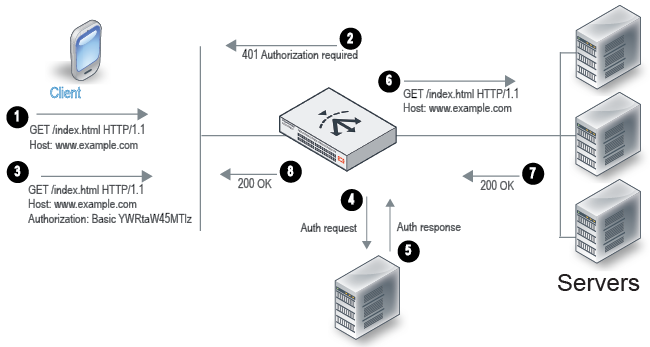
An Access Policy consists of authentication conditions and an associated user group. When a client attempts to access a virtual server that requires authentication, the following process occurs:
- The client sends an HTTP request for a URL belonging to a FortiADC virtual server that has an authorization policy.
- FortiADC replies with an HTTP 401 to require authorization. On the client computer, the user might be prompted with a dialog box to provide credentials.
- The client reply includes an Authorization header that gives the credentials.
- FortiADC sends a request to the server (local, LDAP, or RADIUS) to authenticate the user.
- The authentication server sends its response, which can be cached according to your user group configuration.
- If authentication is successful, FortiADC continues processing the traffic and forwards the request to the real server.
- The real server responds with an HTTP 200 OK.
- FortiADC processes the traffic and forwards the server response to the client.
For example, you can define an access policy that has the following logic: if the Host header matches example.com and the URI matches /index.html, then the group example-group is authorized. FortiADC supports the Basic Authentication Scheme described in RFC 2617.
Before you begin:
- You must have created the user groups to be authorized with the policy. You also configure users and authentication servers separately. See config user user-group.
- You must have read-write permission for Server Load Balance settings.
After you have configured an access policy, you can select it in the applicable virtual server configuration.
Configuring an Access Policy for AAG
In an Agentless Application Gateway (AAG) deployment, the Access Policy controls authentication and authorization for users accessing the App Portal. This policy determines how users authenticate, which authentication providers are used, and what applications they can access after logging in.
This section provides the steps to configure an App Access User Auth Policy for an AAG virtual server, including defining authentication methods (Standard or SAML), associating user groups, and assigning an App Portal configuration. Once applied to the virtual server, the policy ensures that only authenticated users can access the applications presented in the App Portal.

|
Multi-factor authentication (MFA), OAuth Proxy, and AD FS Proxy are not currently supported for AAG. These authentication methods are only applicable to HTTP/HTTPS virtual server access scenarios. |
Syntax
config load-balance auth-policy
  edit <name>
    set app-access enable
    config idp
      edit <idp_name>
        set type {standard|SAML}
        set user-group <datasource>
        set saml-sp <datasource>
        set app-portal <datasource>

      next
    end
  next
end
app-access
|
Enable APP Portal Access to configure the Access Policy for the AAG virtual server. |
| config idp | |
type
|
Select either of the following:
|
user-group
|
Select the user group that is authorized to access the protected resource. Available only if standard is selected as the type. |
saml-sp
|
Specify the SAML SSO ID that is authorized to access the protected resource. Available only if SAML is selected as the type. Note: SSO is not currently supported for AAG portal access. |
app-portal
|
Associates the policy with a configured App Portal, defining the available applications. |
Example
config load-balance auth-policy
  edit "AccessPolicy1"
    set app-access enable
    config  idp
      edit "guess-access-resourceAonly"
        set user-group userOnADCgroup-guess
        set app-portal adcPublishedPortal-forGuessUser
      next
      edit "adv-access-resourceAB"
        set user-group userOnADCgroup-adv
        set app-portal adcPublishedPortal-forAdvance
      next
    end
  next
end
Configuring an Access Policy for a non-AAG virtual server
For non-AAG virtual servers, the Access Policy enforces authentication for users accessing protected HTTP/HTTPS resources. Unlike in AAG, where authentication applies to the App Portal, here, authentication is triggered when users attempt to access a specific host and URI path.
This section outlines the steps to configure an Access Policy for a standard HTTP/HTTPS virtual server, including defining authentication settings (Standard, SAML, or OAuth), specifying host-based access control, and assigning user groups or authentication proxies. Once applied, FortiADC challenges incoming requests with authentication before granting access to the backend servers.
Define an auth policy for a standard authentication server type
Define the auth policy to use standard authentication with set type standard and reference the user group data source.
Syntax
config load-balance auth-policy
edit <name>
set app-access disable
config member
edit 1
set host-status {enable|disable}
set host <hostname>
set type standard
set user-realm <string>
set auth-path <path>
set user-group <datasource>
next
end
next
end
app-access
|
The APP Portal Access option is disabled by default. Keep the option disabled to configure the Access Policy for a non-AAG virtual server. |
|
host-status |
If enabled, require authorization only for the specified host. If disabled, ignore hostname in the HTTP request header and require authorization for requests with any Host header. Disabled by default. |
|
host |
Specify the HTTP Host header. If host-status is enabled, the policy matches only if the hostname header matches this value. Complete, exact matching is required. For example, |
|
user-realm |
Realm to which the auth-path URI belongs. If a request is authenticated and a realm specified, the same credentials should be valid for all other requests within this realm. |
|
auth-path |
Require authorization only if the URI of the HTTP request matches this pathname. If none is specified, requests to any URI require authorization. The value is parsed as a match string prefix. For example, |
|
user-group |
User group that is authorized to access the protected resource. |
Define an auth policy for a SAML authentication server type
Define the auth policy to use SAML authentication with set type SAML and reference the SAML SSO ID data source.
Syntax
config load-balance auth-policy
edit <name>
set app-access disable
config member
edit 1
set host-status {enable|disable}
set host <hostname>
set type SAML
set auth-path <path>
set saml-sp <saml-sso-id>
next
end
next
end
app-access
|
The APP Portal Access option is disabled by default. Keep the option disabled to configure the Access Policy for a non-AAG virtual server. |
|
host-status |
If enabled, require authorization only for the specified host. If disabled, ignore hostname in the HTTP request header and require authorization for requests with any Host header. Disabled by default. |
|
host |
Specify the HTTP Host header. If host-status is enabled, the policy matches only if the hostname header matches this value. Complete, exact matching is required. For example, |
|
auth-path |
Require authorization only if the URI of the HTTP request matches this pathname. If none is specified, requests to any URI require authorization. The value is parsed as a match string prefix. For example, |
|
saml-sp |
SAML SSO ID that is authorized to access the protected resource. |
Define an auth policy for an OAuth authentication server type
Define the auth policy to use OAuth authentication with set type OAuth and reference the OAuth data source.
Syntax
config load-balance auth-policy
edit <name>
set app-access disable
config member
edit 1
set host-status {enable|disable}
set host <hostname>
set type OAuth
set auth-path <path>
set oauth <oauth-policy>
next
end
next
end
app-access
|
The APP Portal Access option is disabled by default. Keep the option disabled to configure the Access Policy for a non-AAG virtual server. |
|
host-status |
If enabled, require authorization only for the specified host. If disabled, ignore hostname in the HTTP request header and require authorization for requests with any Host header. Disabled by default. |
|
host |
Specify the HTTP Host header. If host-status is enabled, the policy matches only if the hostname header matches this value. Complete, exact matching is required. For example, |
|
auth-path |
Require authorization only if the URI of the HTTP request matches this pathname. If none is specified, requests to any URI require authorization. The value is parsed as a match string prefix. For example, |
|
oauth |
OAuth policy that is authorized to access the protected resource. |