
Fortinet white logo
Fortinet white logo

Administration Guide

SAML authentication in a proxy policy using SCIM

SAML authentication in a proxy policy using SCIM

The existing SCIM client support extends to authentication scheme using SAML, allowing scim-client to be used as user-database.

config authentication scheme
    edit <name>
        set method saml
        set saml-server <string>
        set user-database <Authentication server name>
    next
end

Example

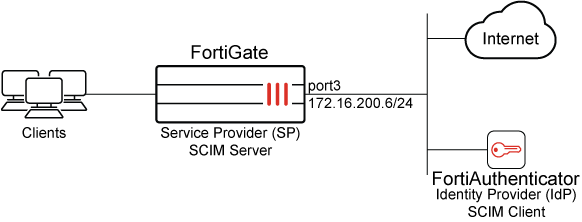
In this example, FortiGate is configured as the SCIM server Service Provider (SP), and FortiAuthenticator is configured as the SCIM client Identity Provider (IdP). Two groups are configured on FortiAuthenticator: scim_group and scim_group2. The scim_group contains one user: example@fortinet-us.com.

Upon successful configuration, users and groups are provisioned on FortiGate. This setup can leverage SAML to provide access to authenticated users when using explicit web proxy policy.

Ensure the IdP root CA is imported into the FortiGate. Without this, the FortiGate will be unable to verify the IdP server certificate during the synchronization of SCIM client user information. In this example, we are using FortiAuthenticator as the IdP, and after importing, the FortiAuthenticator root certificate is referred to as REMOTE_Cert_2 in the FortiGate.
To configure SAML authentication using SCIM with an explicit web proxy:
  1. Configure FortiGate as an SCIM server:

    1. Allow SCIM access on an interface:

      config system interface 
          edit port3
              append allowaccess scim
          next
      end
    2. Configure SCIM client entries:

      config user scim
          edit "fac-scim"
              set status enable 
              set base-url "https://172.16.200.6/fac-scim/scim/v2/"
              set auth-method base
              set secret **********
              set certificate REMOTE_Cert_2
              set client-identity-check disable
          next
      end
  2. Configure FortiAuthenticator as an SCIM client:

    1. On FortiAuthenticator, use your admin account to log in.

    2. Click Authentication > SCIM > Service Provider.

    3. Click Create New.

    4. Configure the following settings:

      Field

      Value

      Name

      Test-SCIM

      SCIM endpoint

      https://172.16.200.6:44559/fac-scim/scim/v2

      Access token

      ********

    5. Configure the remaining settings as required.

    6. Click Save.

    7. Once the setting is saved, double-click the newly created entry to open the settings pane, and click Sync to automatically add existing users to the SCIM server.

      See Service providers for more information.

      The SCIM endpoint and access token must match the base-url and secret respectively, as configured on the FortiGate.

      Furthermore, an initial synchronization is necessary to commence provisioning for the first time. However, when alterations to identities occur in the IdP, including creation, updating, and deletion, these changes are automatically synchronized with SP in accordance with the SCIM protocol.

  3. Verify whether users and groups are provisioned on the FortiGate:

    # diagnose test scim list-users fac-scim
    example@fortinet-us.com 
    total:1
    # diagnose test scim list-groups fac-scim
    displayName     externalId
    scim_group      1                                   
    scim_group2     2
    total:2
    
    # diagnose test scim get-user fac-scim example@fortinet-us.com 
    schemas num: 1
            [0]:schema: 1
    id: user_2
    userName: example@fortinet-us.com   
    externalId: local3
    name:
    meta: resourceType:User, created:2025-05-27T22:54:15Z, lastModified:2025-05-29T18:11:20Z, location:https://172.16.200.6/fac-scim/scim/v2//Users/user_2,version: 1.0
    emails num: 0
    groups num:1
            groups[0]: value:group_3, $ref:https://172.16.200.6/fac-scim/scim/v2//Groups/group_3, display:scim_group
    Active: 1
    index: 0

    For brevity, only the commands relevant to this enhancement are included. See SAML for more information about configuring SP and IdP.

  4. Configure an authentication scheme and authentication rule to use scim-client as a user-database:

    config authentication scheme
        edit "saml"
            set method saml
            set saml-server "test_example_saml"
            set user-database "fac-scim"   
        next
    end
    config authentication rule
        edit "saml"
            set srcaddr "all"
            set active-auth-method "saml"
        next
    end
  5. Configure the user group:

    config user group
        edit "ldap-group-saml"
            set member "ldap-10.1.100.198"
        next
    end
  6. Enable the web proxy:

    config web-proxy explicit
        set status enable
        set http-incoming-port 8080
    end
    
  7. Apply SAML authentication using SCIM with an explicit web proxy:

    config firewall proxy-policy
       edit 1
            set name "saml"
            set proxy explicit-web
            set dstintf "port3"
            set srcaddr "all"
            set dstaddr "all"
            set service "webproxy"
            set action accept
            set schedule "always"
            set logtraffic all
            set groups "saml"
        next
    end

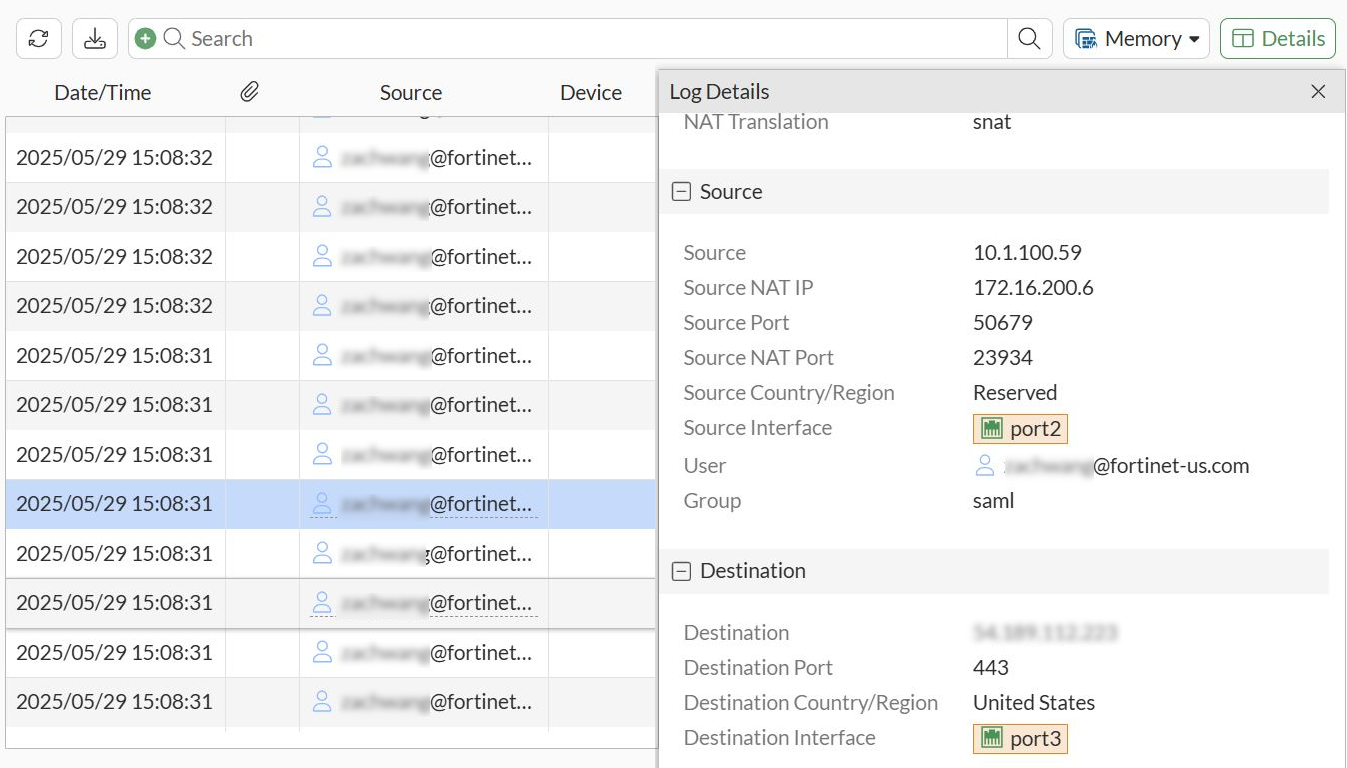
    When a user goes to www.fortinet.com in a browser that is configured to use the FortiGate as a proxy, the authentication window will pop-up in the browser.

    After entering user credentials and successfully passing authentication, the Fortinet page opens successfully.

    Log are displayed in Log & Report.
SAML authentication in a proxy policy using SCIM

SAML authentication in a proxy policy using SCIM

The existing SCIM client support extends to authentication scheme using SAML, allowing scim-client to be used as user-database.

config authentication scheme
    edit <name>
        set method saml
        set saml-server <string>
        set user-database <Authentication server name>
    next
end

Example

In this example, FortiGate is configured as the SCIM server Service Provider (SP), and FortiAuthenticator is configured as the SCIM client Identity Provider (IdP). Two groups are configured on FortiAuthenticator: scim_group and scim_group2. The scim_group contains one user: example@fortinet-us.com.

Upon successful configuration, users and groups are provisioned on FortiGate. This setup can leverage SAML to provide access to authenticated users when using explicit web proxy policy.

Ensure the IdP root CA is imported into the FortiGate. Without this, the FortiGate will be unable to verify the IdP server certificate during the synchronization of SCIM client user information. In this example, we are using FortiAuthenticator as the IdP, and after importing, the FortiAuthenticator root certificate is referred to as REMOTE_Cert_2 in the FortiGate.

To configure SAML authentication using SCIM with an explicit web proxy:
  1. Configure FortiGate as an SCIM server:

    1. Allow SCIM access on an interface:

      config system interface 
          edit port3
              append allowaccess scim
          next
      end
    2. Configure SCIM client entries:

      config user scim
          edit "fac-scim"
              set status enable 
              set base-url "https://172.16.200.6/fac-scim/scim/v2/"
              set auth-method base
              set secret **********
              set certificate REMOTE_Cert_2
              set client-identity-check disable
          next
      end
  2. Configure FortiAuthenticator as an SCIM client:

    1. On FortiAuthenticator, use your admin account to log in.

    2. Click Authentication > SCIM > Service Provider.

    3. Click Create New.

    4. Configure the following settings:

      Field

      Value

      Name

      Test-SCIM

      SCIM endpoint

      https://172.16.200.6:44559/fac-scim/scim/v2

      Access token

      ********

    5. Configure the remaining settings as required.

    6. Click Save.

    7. Once the setting is saved, double-click the newly created entry to open the settings pane, and click Sync to automatically add existing users to the SCIM server.

      See Service providers for more information.

      The SCIM endpoint and access token must match the base-url and secret respectively, as configured on the FortiGate.

      Furthermore, an initial synchronization is necessary to commence provisioning for the first time. However, when alterations to identities occur in the IdP, including creation, updating, and deletion, these changes are automatically synchronized with SP in accordance with the SCIM protocol.

  3. Verify whether users and groups are provisioned on the FortiGate:

    # diagnose test scim list-users fac-scim
    example@fortinet-us.com 
    total:1
    # diagnose test scim list-groups fac-scim
    displayName     externalId
    scim_group      1                                   
    scim_group2     2
    total:2
    
    # diagnose test scim get-user fac-scim example@fortinet-us.com 
    schemas num: 1
            [0]:schema: 1
    id: user_2
    userName: example@fortinet-us.com   
    externalId: local3
    name:
    meta: resourceType:User, created:2025-05-27T22:54:15Z, lastModified:2025-05-29T18:11:20Z, location:https://172.16.200.6/fac-scim/scim/v2//Users/user_2,version: 1.0
    emails num: 0
    groups num:1
            groups[0]: value:group_3, $ref:https://172.16.200.6/fac-scim/scim/v2//Groups/group_3, display:scim_group
    Active: 1
    index: 0

    For brevity, only the commands relevant to this enhancement are included. See SAML for more information about configuring SP and IdP.

  4. Configure an authentication scheme and authentication rule to use scim-client as a user-database:

    config authentication scheme
        edit "saml"
            set method saml
            set saml-server "test_example_saml"
            set user-database "fac-scim"   
        next
    end
    config authentication rule
        edit "saml"
            set srcaddr "all"
            set active-auth-method "saml"
        next
    end
  5. Configure the user group:

    config user group
        edit "ldap-group-saml"
            set member "ldap-10.1.100.198"
        next
    end
  6. Enable the web proxy:

    config web-proxy explicit
        set status enable
        set http-incoming-port 8080
    end
    
  7. Apply SAML authentication using SCIM with an explicit web proxy:

    config firewall proxy-policy
       edit 1
            set name "saml"
            set proxy explicit-web
            set dstintf "port3"
            set srcaddr "all"
            set dstaddr "all"
            set service "webproxy"
            set action accept
            set schedule "always"
            set logtraffic all
            set groups "saml"
        next
    end

    When a user goes to www.fortinet.com in a browser that is configured to use the FortiGate as a proxy, the authentication window will pop-up in the browser.

    After entering user credentials and successfully passing authentication, the Fortinet page opens successfully.

    Log are displayed in Log & Report.