
Fortinet white logo
Fortinet white logo

Administration Guide

FGCP

FGCP

High availability (HA) is usually required in a system where there is high demand for little downtime. There are usually hot-swaps, backup routes, or standby backup units and as soon as the active entity fails, backup entities will start functioning. This results in minimal interruption for the users.

The FortiGate Clustering Protocol (FGCP) is a proprietary HA solution whereby FortiGates can find other member FortiGates to negotiate and create a cluster. A FortiGate HA cluster consists of at least two FortiGates (members) configured for HA operation. All FortiGates in the cluster must be the same model and have the same firmware installed. Cluster members must also have the same hardware configuration (such as the same number of hard disks). All cluster members share the same configurations except for their host name and priority in the HA settings. The cluster works like a device but always has a hot backup device.
All FortiGates that are in the same HA cluster must be registered under the same FortiCare account. Registering cluster members to different FortiCare accounts will result in licensing issues and potential downtime.

Critical cluster components

The following are critical components in an HA cluster:

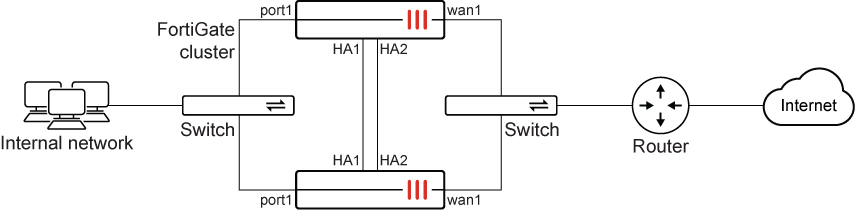
  • Identical heartbeat connections and interfaces: members will use this to communicate with each other. In general, a two-member cluster is most common. We recommend double back-to-back heartbeat connections (as demonstrated in the topology).

  • Identical connections for internal and external interfaces: we recommend similar connections from each member to the switches for the cluster to function properly (as demonstrated in the topology).

The HA heartbeat interface communicates with each unit in the cluster using the same heartbeat interface for each member.

For example, if port1 and port2 are the heartbeat interfaces for the HA cluster, then in a cluster consisting of two members:

  • port1 of the primary FortiGate should be connected to port1 of the secondary FortiGate.

  • port2 of the primary FortiGate should be connected to port2 of the secondary FortiGate.

General operation

The following are best practices for general cluster operation:

  • Ensure that heartbeat communication is present (see HA heartbeat interface).

  • Enable the session synchronization option in daily operation (see FGSP basic peer setup).

  • Monitor traffic flowing in and out of the interfaces.

Failover

FGCP provides failover protection in the following scenarios:

  • The active device loses power.

  • A monitored interface loses a connection.

After failover occurs, the user will not notice any difference, except that the active device has changed. See Failover protection for more information.

Synchronizing the configuration

FGCP uses a combination of incremental and periodic synchronization to make sure that the configuration of all cluster units is synchronized to that of the primary unit.

The following settings are not synchronized between cluster units:

  • The FortiGate host name

  • GUI Dashboard widgets

  • HA override

  • HA device priority

  • The virtual cluster priority

  • The system interface settings of the HA reserved management interface

  • The HA default route for the reserved management interface, set using the ha-mgmt-interface-gateway option of the config system ha command

Most subscriptions and licenses are not synchronized, as each FortiGate must be licensed individually. FortiToken Mobile is an exception; they are registered to the primary unit and synchronized to the secondary units.

The primary unit synchronizes all other configuration settings, including the other HA configuration settings.

All synchronization activity takes place over the HA heartbeat link using TCP/703 and UDP/703 packets.

Topics

The following topics provide more information about FGCP:

Topic

Summary

Cluster operation

Defines how multiple units function as a single system using the FGCP protocol to negotiate roles and manage traffic. It includes the election logic for selecting a primary unit and configuring Active-Passive or Active-Active modes.

HA heartbeat

Explains the communication mechanism used to synchronize configurations and monitor peer health via "hello" packets. It details interface configuration, timing intervals, and how lost packets trigger a failover.

Session synchronization and failover

Describes the automatic transfer of traffic to a standby unit if the primary device fails. It focuses on session synchronization and pickup to preserve active user connections with minimal interruption.

Management access

Details how to establish reliable administrative connections to all cluster members using In-band or Out-of-band methods. It explains reserving dedicated interfaces to isolate management traffic from production data.

Maintenance

Covers procedures for upgrading firmware securely while minimizing downtime. It outlines standard upgrade paths as well as multi-version clusters for testing new firmware in a mixed environment.

Advanced operations

Explores complex scenarios like geographically distributed HA and clustering over managed switches. It addresses specialized needs such as Virtual MAC assignment and handling asymmetric routing or mixed power supplies.

Troubleshooting

Provides diagnostic steps and CLI commands to identify formation errors and synchronization discrepancies. It includes procedures for manually forcing failovers to test redundancy and verifying cluster health.

Best practices

Lists architectural standards to eliminate single points of failure, such as using redundant, isolated heartbeat links. It recommends performance optimizations like filtering session synchronization and ensuring hardware consistency.

FGCP

FGCP

High availability (HA) is usually required in a system where there is high demand for little downtime. There are usually hot-swaps, backup routes, or standby backup units and as soon as the active entity fails, backup entities will start functioning. This results in minimal interruption for the users.

The FortiGate Clustering Protocol (FGCP) is a proprietary HA solution whereby FortiGates can find other member FortiGates to negotiate and create a cluster. A FortiGate HA cluster consists of at least two FortiGates (members) configured for HA operation. All FortiGates in the cluster must be the same model and have the same firmware installed. Cluster members must also have the same hardware configuration (such as the same number of hard disks). All cluster members share the same configurations except for their host name and priority in the HA settings. The cluster works like a device but always has a hot backup device.

All FortiGates that are in the same HA cluster must be registered under the same FortiCare account. Registering cluster members to different FortiCare accounts will result in licensing issues and potential downtime.

Critical cluster components

The following are critical components in an HA cluster:

  • Identical heartbeat connections and interfaces: members will use this to communicate with each other. In general, a two-member cluster is most common. We recommend double back-to-back heartbeat connections (as demonstrated in the topology).

  • Identical connections for internal and external interfaces: we recommend similar connections from each member to the switches for the cluster to function properly (as demonstrated in the topology).

The HA heartbeat interface communicates with each unit in the cluster using the same heartbeat interface for each member.

For example, if port1 and port2 are the heartbeat interfaces for the HA cluster, then in a cluster consisting of two members:

  • port1 of the primary FortiGate should be connected to port1 of the secondary FortiGate.

  • port2 of the primary FortiGate should be connected to port2 of the secondary FortiGate.

General operation

The following are best practices for general cluster operation:

  • Ensure that heartbeat communication is present (see HA heartbeat interface).

  • Enable the session synchronization option in daily operation (see FGSP basic peer setup).

  • Monitor traffic flowing in and out of the interfaces.

Failover

FGCP provides failover protection in the following scenarios:

  • The active device loses power.

  • A monitored interface loses a connection.

After failover occurs, the user will not notice any difference, except that the active device has changed. See Failover protection for more information.

Synchronizing the configuration

FGCP uses a combination of incremental and periodic synchronization to make sure that the configuration of all cluster units is synchronized to that of the primary unit.

The following settings are not synchronized between cluster units:

  • The FortiGate host name

  • GUI Dashboard widgets

  • HA override

  • HA device priority

  • The virtual cluster priority

  • The system interface settings of the HA reserved management interface

  • The HA default route for the reserved management interface, set using the ha-mgmt-interface-gateway option of the config system ha command

Most subscriptions and licenses are not synchronized, as each FortiGate must be licensed individually. FortiToken Mobile is an exception; they are registered to the primary unit and synchronized to the secondary units.

The primary unit synchronizes all other configuration settings, including the other HA configuration settings.

All synchronization activity takes place over the HA heartbeat link using TCP/703 and UDP/703 packets.

Topics

The following topics provide more information about FGCP:

Topic

Summary

Cluster operation

Defines how multiple units function as a single system using the FGCP protocol to negotiate roles and manage traffic. It includes the election logic for selecting a primary unit and configuring Active-Passive or Active-Active modes.

HA heartbeat

Explains the communication mechanism used to synchronize configurations and monitor peer health via "hello" packets. It details interface configuration, timing intervals, and how lost packets trigger a failover.

Session synchronization and failover

Describes the automatic transfer of traffic to a standby unit if the primary device fails. It focuses on session synchronization and pickup to preserve active user connections with minimal interruption.

Management access

Details how to establish reliable administrative connections to all cluster members using In-band or Out-of-band methods. It explains reserving dedicated interfaces to isolate management traffic from production data.

Maintenance

Covers procedures for upgrading firmware securely while minimizing downtime. It outlines standard upgrade paths as well as multi-version clusters for testing new firmware in a mixed environment.

Advanced operations

Explores complex scenarios like geographically distributed HA and clustering over managed switches. It addresses specialized needs such as Virtual MAC assignment and handling asymmetric routing or mixed power supplies.

Troubleshooting

Provides diagnostic steps and CLI commands to identify formation errors and synchronization discrepancies. It includes procedures for manually forcing failovers to test redundancy and verifying cluster health.

Best practices

Lists architectural standards to eliminate single points of failure, such as using redundant, isolated heartbeat links. It recommends performance optimizations like filtering session synchronization and ensuring hardware consistency.