

Secure explicit proxy with client certificate blocklist enforcement NEW
This section describes how to configure a secure explicit web proxy that enforces the FortiGate client certificate blocklist during the TLS handshake, ensuring that client certificates listed in the Malicious Certificate Database (MCDB) are denied access.
This behavior is supported in FortiOS 8.0.0 and later.
Overview
Secure explicit proxy with client certificates allows FortiGate to authenticate proxy clients using X.509 certificates. When client certificate blocklist, enforcement is enabled, FortiGate checks the presented client certificate against the MCDB during the TLS handshake.
If the client certificate is listed in the MCDB:
-
The TLS handshake is aborted
-
The proxy connection is denied
-
A log entry is generated
This prevents malicious certificates from accessing web resources through the proxy.
The config web-proxy explicit command includes a new option:
config web-proxy explicit
    set client-certificate-blocklist {enable | disable}
end
|
Option |
Description |
|---|---|
|
|
Enable/disable blocking client malicious certificates list by FortiGuard during TLS (default = enabled).
|
Example
The following example demonstrates client certificate blocklist enforcement using a secure explicit proxy.
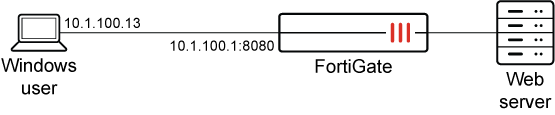
Prerequisite:
An active FortiGuard subscription is required to use the Malicious Certificate Database (MCDB). The MCDB is used by FortiGate’s SSL/TLS inspection and certificate reputation checks to detect and block SSL/TLS sessions that present malicious certificates.
To configure client certificate and blocklist enforcement with explicit proxies:
-
Prepare the certificate:
-
Use a CA to sign the client certificate.
-
Import the root CA certificate that signed the client certificate to FortiGate. In this scenario, the certificate is
root_ca. -
Install the client certificate on an endpoint.
-
-
Configure the explicit web-proxy policy to request the client certificate from the endpoint.
config web-proxy explicit set status enable set secure-web-proxy secure set http-incoming-port 8080 set secure-web-proxy-cert "proxyserver" set client-cert enable set client-certificate-blocklist enable end -
Configure verification of the client certificate with the root CA.
config authentication setting set user-cert-ca "root_ca" end -
Configure explicit proxy policy.
config firewall proxy-policy
    edit 1
        set proxy explicit-web
        set srcaddr "all"
        set dstaddr "all"
        set service "web"
        set action accept
        set schedule "always"
        set logtraffic all
        set utm-status enable
        set ssl-ssh-profile "deep-custom"
    next
end
Verification
On Client PC, initiate a connection with blocklisted client certificate:
# curl -v -k --proxy-insecure --proxy-cert /root/CA/client_blocklist.p12:123456 --proxy-cert-type P12 -x https://10.1.100.1:8080 http://172.16.200.99
TLS handshake fails, connection is denied, and following log is generated on the FortiGate:
1: date=2026-04-02 time=17:33:31 eventtime=1775176410797092890 tz="-0700" logid="0000000013" type="traffic" subtype="forward" level="notice" vd="vdom1" srcip=10.1.100.13 srcport=53684 srcintf="port2" srcintfrole="undefined" dstip=10.1.100.1 dstport=8080 dstintf="unknown-0" dstintfrole="undefined" srccountry="Reserved" dstcountry="Reserved" sessionid=268435461 proto=6 action="deny" policyid=0 policytype="policy" service="tcp/8080" trandisp="noop" appcat="unscanned" duration=0 sentbyte=1965 rcvdbyte=0 sentpkt=0 rcvdpkt=0 crscore=30 craction=131072 crlevel="high" msg="Traffic denied because of client certificate blocklisted"