

Multicast routing and PIM support
Multicasting (also called IP multicasting) consists of using a single multicast source to send data to many receivers. Multicasting can be used to send data to many receivers simultaneously while conserving bandwidth and reducing network traffic. Multicasting can be used for one-way delivery of media streams to multiple receivers and for one-way data transmission for news feeds, financial information, and so on. Many dynamic routing protocols such as RIPv2, OSPF, and EIGRP use multicasting to share hello packets and routing information.
A FortiGate can operate as a Protocol Independent Multicast (PIM) version 2 router. FortiGates support PIM sparse mode (RFC 4601) and PIM dense mode (RFC 3973), and can service multicast servers or receivers on the network segment to which a FortiGate interface is connected. Groups are supported in the PIM join/prune messages. Multicast routing is not supported in transparent mode.
To support PIM communications, the sending and receiving applications, and all connecting PIM routers in between, must be enabled with PIM version 2. PIM can use static routes, RIP, OSPF, or BGP to forward multicast packets to their destinations. To enable source-to-destination packet delivery, sparse mode or dense mode must be enabled on the PIM router interfaces. Sparse mode routers cannot send multicast messages to dense mode routers. If the FortiGate is located between a source and a PIM router, between two PIM routers, or is connected directly to a receiver, you must manually create a multicast policy to pass encapsulated (multicast) packets or decapsulated data (IP traffic) between the source and destination.
PIM domains
A PIM domain is a logical area comprising a number of contiguous networks. The domain contains at least one bootstrap router (BSR), and if sparse mode is enabled, a number of rendezvous points (RPs) and designated routers (DRs). When PIM is enabled, the FortiGate can perform any of these functions at any time as configured.
A PIM domain can be configured in the GUI by going to Network > Multicast, or in the CLI using config router multicast. Note that PIM version 2 must be enabled on all participating routers between the source and receivers. Use config router multicast to set the global operating parameters.
When PIM is enabled, the FortiGate allocates memory to manage mapping information. The FortiGate communicates with neighboring PIM routers to acquire mapping information and, if required, processes the multicast traffic associated with specific multicast groups.
Instead of sending multiple copies of generated IP traffic to more than one specific IP destination address, PIM-enabled routers encapsulate the data and use a Class D multicast group address (224.0.0.0 to 239.255.255.255) to forward multicast packets to multiple destinations. A single stream of data can be sent because one destination address is used. Client applications receive multicast data by requesting that the traffic destined for a certain multicast group address be delivered to them.
PIM support for virtual routing and forwarding (VRF)
PIM supports all VRFs (up to 511) and is aware of IPv4 and IPv6 multicast routing and forwarding over a single overlay, enhancing network scalability and flexibility compared to the previous VRF 0-only support. See Virtual routing and forwarding for more information.
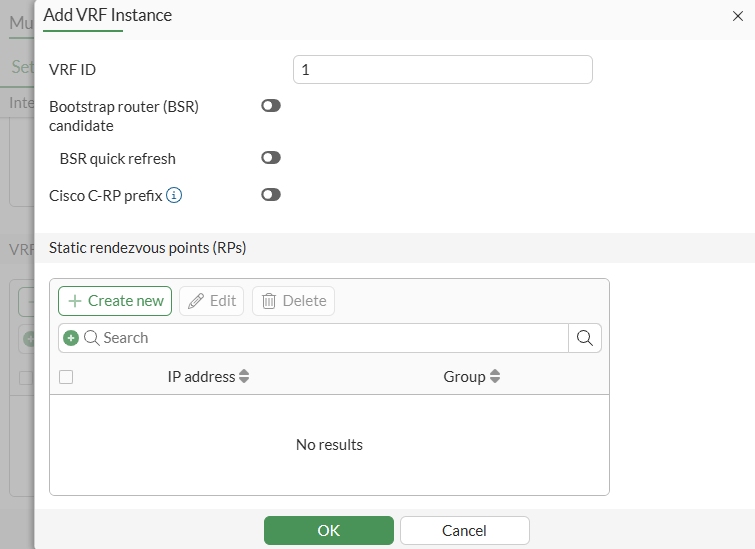
Per-VRF commands are included for multicast routing or it can be configured in Network > Multicast.
To configure VRF settings for multicast routing in the CLI:
config router {multicast | multicast6}
    config pim-sm-global-vrf
        edit <id>
            set bsr-candidate {enable | disable}
            set bsr-interface <string>
            set bsr-priority <integer>
            set bsr-hash <integer>
            set bsr-allow-quick-refresh {enable | disable}
            set cisco-crp-prefix {enable | disable}
            config rp-address
                edit <id>
                    set *ip6-address <IPv6 addr>
                    set group <string>
                next
            end
        next
    end
end
|
Command or option |
Description |
|---|---|
|
config pim-sm-global-vrf |
Per-VRF PIM sparse-mode global settings. |
|
bsr-candidate {enable | disable} |
Enable/disable allowing this router to become a bootstrap router (BSR). |
|
bsr-interface <string> |
Interface to advertise as candidate BSR. |
|
bsr-priority <integer> |
BSR priority (0 - 255, default = 0). |
|
bsr-hash <integer> |
BSR hash length (0 - 32, default = 10). |
|
bsr-allow-quick-refresh {enable | disable} |
Enable/disable accept BSR quick refresh packets from neighbors. |
|
cisco-crp-prefix {enable | disable} |
Enable/disable making candidate RP compatible with old Cisco IOS:
|
|
config rp-address |
Statically configure RP addresses. |
|
*ip6-address <IPv6 addr> |
RP router IPv6 address. |
|
group <string> |
Groups to use this RP. |
VRF support is also included in the following diagnose, get, and execute commands:
diagnose ip multicast mfc-add
diagnose ip multicast mfc-del
diagnose vpn {mr | mr6} add
diagnose vpn {mr | mr6} del
get router info multicast igmp groups
get router info multicast igmp groups-detail
get router info multicast pim sparse-mode bsr-info
get router info multicast pim sparse-mode next-hop
get router info multicast pim sparse-mode rp-mapping
get router info multicast pim sparse-mode table
get router info multicast table
get router info multicast table-count
get router info6 multicast mld groups
get router info6 multicast mld groups-detail
get router info6 multicast pim sparse-mode bsr-router
get router info6 multicast pim sparse-mode mroute
get router info6 multicast pim sparse-mode nexthop
get router info6 multicast pim sparse-mode rp mapping
get router info6 multicast pim sparse-mode rp-hash
execute mrouter clear multicast-routes
execute mrouter clear sparse-mode-bsr
execute mrouter clear sparse-routes
execute mrouter clear statistics
execute mrouter6 clear mld group
execute mrouter6 clear sparse-routes
NPU offloading of VRF multicast traffic on a dynamic IPsec tunnel is not supported.
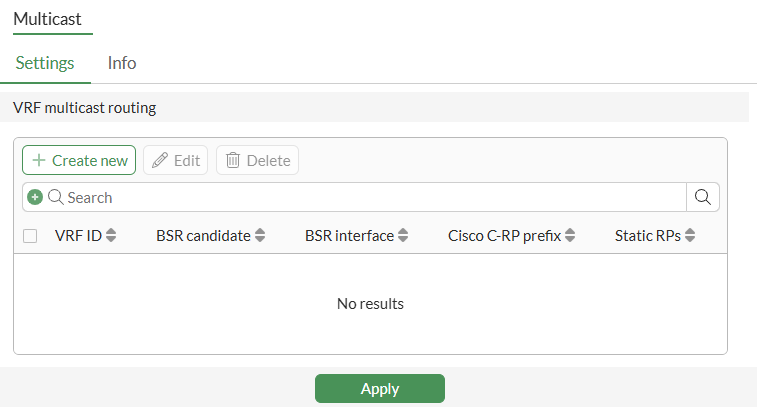
To configure VRF settings for multicast routing in the GUI:
-
Go to Network > Multicast.
-
Enable Multicast routing if you are configuring multicast for the first time in the GUI.
-
Under VRF multicast routing, click Create new.
-
Configure the settings as needed.
-
Click OK.
-
Click Apply.
IPv4 example
This example uses the following topology:

In this example, the multicast server:
-
Sends out multicast traffic 225.1.1.1 from 22.1.1.22 in VRF1.
-
Sends out multicast traffic 225.1.1.2 from 22.1.1.55 in VRF2.
To verify VRF in IPv4 multicast routing:
-
Review the sniffer information:
-
The VRF1 client can receive 225.1.1.1 and cannot receive 225.1.1.2:
24.872130 vd33-vlan33 in 22.1.1.22 -> 225.1.1.1: icmp: echo request
25.872117 vd3-vlan33 out 22.1.1.22 -> 225.1.1.1: icmp: echo request
25.872123 vd33-vlan33 in 22.1.1.22 -> 225.1.1.1: icmp: echo request
26.872131 vd3-vlan33 out 22.1.1.22 -> 225.1.1.1: icmp: echo request
26.872137 vd33-vlan33 in 22.1.1.22 -> 225.1.1.1: icmp: echo request
-
The VRF2 client can receive 225.1.1.2 and cannot receive 225.1.1.1:
4.320988 vd3-vlan331 out 22.1.1.55 -> 225.1.1.2: icmp: echo request
4.320996 vd4-vlan331 in 22.1.1.55 -> 225.1.1.2: icmp: echo request
5.320703 vd3-vlan331 out 22.1.1.55 -> 225.1.1.2: icmp: echo request
5.320717 vd4-vlan331 in 22.1.1.55 -> 225.1.1.2: icmp: echo request
6.320671 vd3-vlan331 out 22.1.1.55 -> 225.1.1.2: icmp: echo request
6.320678 vd4-vlan331 in 22.1.1.55 -> 225.1.1.2: icmp: echo request
-
-
Review the group information:
# get router info multicast igmp groups
IGMP Connected Group Membership
VRF Group Address    Interface            Uptime   Expires          Last Reporter
1   225.1.1.1        vd3-vlan33           00:15:16 stopped(static)  0.0.0.0
2   225.1.1.2        vd3-vlan331          00:14:49 stopped(static)  0.0.0.0
IPv6 example New
This example uses the following topology:
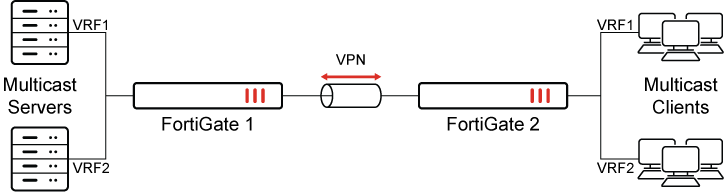
In this example, the multicast server:
-
Sends out multicast traffic ff0e::10 from 2000:172:16:205::11 in VRF1.
-
Sends out multicast traffic ff0e::20 from 2000:172:16:205::22 in VRF2.
To configure IPv6 multicast-flow:
config router multicast6-flow
    edit "flow6a"
        config flows
            edit 1
                set group-addr ff0e::10
            next
        end
    next
    edit "flow6b"
        config flows
            edit 1
                set group-addr ff0e::20
            next
        end
    next
end
To configure PIM-SM global settings for each VRF:
config router multicast6
    set multicast-routing enable
    config interface
        edit "vd3-1"
        next
        edit "vd3-vlan33"
        next
        edit "vd3-vlan331"
        next
    end
    config pim-sm-global-vrf
        edit 2
            config rp-address
                edit 1
                    set ip6-address 2011::12
                next
            end
        next
        edit 1
            config rp-address
                edit 1
                    set ip6-address 2011::11
                next
            end
        next
    end
end
For brevity, only the commands relevant to this feature are included.
To verify VRF in IPv6 multicast routing:
-
Review the sniffer information:
-
The VRF1 client can receive ff0e::10 and cannot receive ff0e::20:
0.800190 npu0_vlink0 out 2000:172:16:205::11.33372 -> ff0e::10.5001: udp 46 [flowlabel 0xa620f]
0.800197 vd33-vlan33 in 2000:172:16:205::11.33372 -> ff0e::10.5001: udp 46 [flowlabel 0xa620f]
-
The VRF2 client can receive ff0e::20 and cannot receive ff0e::10:
0.666623 vd3-vlan331 out 2000:172:16:205::22.33372 -> ff0e::20.5001: udp 46 [flowlabel 0xa620f
0.666630 vd3-vlan331 out 2000:172:16:205::22.33372 -> ff0e::20.5001: udp 46 [flowlabel 0xa620f
-
-
Review the group information:
# get router info6 multicast mld groups
MLD Connected Group Membership
VRF Group Address                           Interface            Uptime   Expires  Last Reporter
1   ff0e::10                                vd3-vlan33           00:21:05 now(static) ::
2   ff0e::20                                vd3-vlan331          00:21:05 now(static) ::