
Fortinet white logo
Fortinet white logo

Administration Guide

EAP user authentication

EAP user authentication

EAP is a native authentication mechanism of IKEv2 that occurs during the IKE_AUTH exchange. The IKE SA is only completed when EAP authentication completes successfully. EAP allows the VPN gateway to authenticate the initiator using a variety of methods, including EAP-MSCHAPv2, EAP-TLS, and EAP-TTLS.

However, the EAP method must be supported by the client endpoint as well as the external authentication servers. FortiClient IKEv2 only supports initiating EAP-MSCHAPv2 and EAP-TTLS authentication.

EAP-MSCHAPv2 or EAP-TTLS with External RADIUS server

If an external RADIUS server is configured for the VPN, EAP-MSCHAPv2 or EAP-TTLS can be used for end to end communication.

FortiOS does not terminate the EAP-TTLS tunnel on its internal eap_proxy RADIUS server. Instead, it passes the EAP-TTLS connection attempt through to the external RADIUS server. EAP-TTLS with PAP as an inner method must be supported and properly configured on the external RADIUS server, or the authentication attempt will fail.

The EAP method attempted is configured on the client, and the default is EAP-MSCHAPv2. If EAP-TTLS/PAP is in use, the EAP server certificate is configured on the remote RADIUS server. Unlike EAP-TLS, EAP-TTLS does not require the use of client certificates.

Multiple RADIUS servers associated with the same dial-up gateway are not supported.

EAP-TTLS with LDAP server
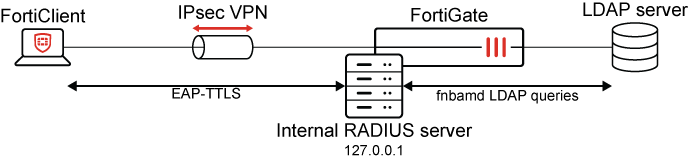
If EAP-TTLS is used and no external RADIUS server is configured for the VPN (like when LDAP is used), the EAP-TTLS tunnel terminates on the FortiGate's own internal RADIUS server.

Because the firewall can view the user’s original plaintext credentials in this case, FortiOS attempts to authenticate them against the set of local users and remote LDAP servers configured for the tunnel.

To support EAP-TTLS on the client side, FortiClient 7.4.3 and later should be used.

FortiGate cannot authenticate Active Directory users against an LDAP server directly using EAP-MSCHAPv2. See IKEv2 dial up VPN with LDAP authentication.

The TLS certificate that FortiOS uses for EAP-TTLS is Fortinet_Wifi by default and is signed by a public CA. The certificate is configured in global settings with the wifi-certificate command. If the certificate is not trusted by the client, VPN connections will fail with certificate errors showing in debug messages. See EAP-TTLS connection failing with FortiClient and IPsec IKEv2 connection due to certificate error.

Two-factor authentication with FortiToken and FortiAuthenticator

When the user's FortiToken is hosted on a FortiAuthenticator, EAP-MSCHAPv2 must be used for the user to see a token prompt or get a push notification. This can be used to trigger token prompts for on-premises Active Directory users when the FortiAuthenticator is joined to the Active Directory domain. See Authenticating users using MSCHAP2 PEAP.

When authenticating against a remote RADIUS server that performs 2FA, extending the RADIUS timeout is usually required.

config user radius
    edit <server name>
        set timeout 60
    next
end

When EAP-TTLS must be used, FortiAuthenticator does not support sending the prompt, but the user may append the token code to their password as a workaround. See Multi-Factor Authentication support for Windows FortiClient with LDAP (EAP-TTLS).

The default IPsec negotiation timeout is 30 seconds. If OTP entry takes longer, the IPsec connection may expire, preventing access even after successful authentication. Consider increasing the IPsec negotiation timeout to allow enough time for users to enter their one-time password (OTP) or accept the token prompt.

config vpn ipsec phase1-interface
    edit <tunnel name>
        set negotiate-timeout 60 
    next
end

If using FortiTokens provisioned on FortiGate, EAP-TTLS authentication requires FortiOS 7.4.9 or later and FortiClient Windows 7.4.4. See Multi-Factor Authentication support for Windows FortiClient with LDAP (EAP-TTLS) and FortiOS 7.4.9 Resolved issue 1031789.

SAML authentication

SAML authentication is not an EAP method. When SAML authentication is in use, FortiClient initiates an HTTPS connection to the FortiGate as the SAML Service Provider (SP) first. After SAML redirect and authentication with the SAML IDP, FortiClient presents the SAML cookie to the FortiGate, which caches a user authentication entry internally.

FortiClient attempts to connect to the IKEv2 dial-up gateway. FortiClient authenticates FortiGate using pre-shared key or signature authentication, then proves ownership of the cached user authentication by authenticating itself against the FortiGate eap_proxy using EAP-MSCHAPv2 or EAP-TTLS.

For this reason, it is still required to enable EAP in the FortiGate phase1-interface configuration, even though SAML is not an EAP method.

When configuring a single-sign-on tunnel on FortiClient, it is recommended leave eap_method in its default value. FortiClient 7.2.4 and later support using SAML authentication with IKEv2. See IPsec VPN SAML-based authentication.

EAP user authentication

EAP user authentication

EAP is a native authentication mechanism of IKEv2 that occurs during the IKE_AUTH exchange. The IKE SA is only completed when EAP authentication completes successfully. EAP allows the VPN gateway to authenticate the initiator using a variety of methods, including EAP-MSCHAPv2, EAP-TLS, and EAP-TTLS.

However, the EAP method must be supported by the client endpoint as well as the external authentication servers. FortiClient IKEv2 only supports initiating EAP-MSCHAPv2 and EAP-TTLS authentication.

EAP-MSCHAPv2 or EAP-TTLS with External RADIUS server

If an external RADIUS server is configured for the VPN, EAP-MSCHAPv2 or EAP-TTLS can be used for end to end communication.

FortiOS does not terminate the EAP-TTLS tunnel on its internal eap_proxy RADIUS server. Instead, it passes the EAP-TTLS connection attempt through to the external RADIUS server. EAP-TTLS with PAP as an inner method must be supported and properly configured on the external RADIUS server, or the authentication attempt will fail.

The EAP method attempted is configured on the client, and the default is EAP-MSCHAPv2. If EAP-TTLS/PAP is in use, the EAP server certificate is configured on the remote RADIUS server. Unlike EAP-TLS, EAP-TTLS does not require the use of client certificates.

Multiple RADIUS servers associated with the same dial-up gateway are not supported.

EAP-TTLS with LDAP server

If EAP-TTLS is used and no external RADIUS server is configured for the VPN (like when LDAP is used), the EAP-TTLS tunnel terminates on the FortiGate's own internal RADIUS server.

Because the firewall can view the user’s original plaintext credentials in this case, FortiOS attempts to authenticate them against the set of local users and remote LDAP servers configured for the tunnel.

To support EAP-TTLS on the client side, FortiClient 7.4.3 and later should be used.

FortiGate cannot authenticate Active Directory users against an LDAP server directly using EAP-MSCHAPv2. See IKEv2 dial up VPN with LDAP authentication.

The TLS certificate that FortiOS uses for EAP-TTLS is Fortinet_Wifi by default and is signed by a public CA. The certificate is configured in global settings with the wifi-certificate command. If the certificate is not trusted by the client, VPN connections will fail with certificate errors showing in debug messages. See EAP-TTLS connection failing with FortiClient and IPsec IKEv2 connection due to certificate error.

Two-factor authentication with FortiToken and FortiAuthenticator

When the user's FortiToken is hosted on a FortiAuthenticator, EAP-MSCHAPv2 must be used for the user to see a token prompt or get a push notification. This can be used to trigger token prompts for on-premises Active Directory users when the FortiAuthenticator is joined to the Active Directory domain. See Authenticating users using MSCHAP2 PEAP.

When authenticating against a remote RADIUS server that performs 2FA, extending the RADIUS timeout is usually required.

config user radius
    edit <server name>
        set timeout 60
    next
end

When EAP-TTLS must be used, FortiAuthenticator does not support sending the prompt, but the user may append the token code to their password as a workaround. See Multi-Factor Authentication support for Windows FortiClient with LDAP (EAP-TTLS).

The default IPsec negotiation timeout is 30 seconds. If OTP entry takes longer, the IPsec connection may expire, preventing access even after successful authentication. Consider increasing the IPsec negotiation timeout to allow enough time for users to enter their one-time password (OTP) or accept the token prompt.

config vpn ipsec phase1-interface
    edit <tunnel name>
        set negotiate-timeout 60 
    next
end

If using FortiTokens provisioned on FortiGate, EAP-TTLS authentication requires FortiOS 7.4.9 or later and FortiClient Windows 7.4.4. See Multi-Factor Authentication support for Windows FortiClient with LDAP (EAP-TTLS) and FortiOS 7.4.9 Resolved issue 1031789.

SAML authentication

SAML authentication is not an EAP method. When SAML authentication is in use, FortiClient initiates an HTTPS connection to the FortiGate as the SAML Service Provider (SP) first. After SAML redirect and authentication with the SAML IDP, FortiClient presents the SAML cookie to the FortiGate, which caches a user authentication entry internally.

FortiClient attempts to connect to the IKEv2 dial-up gateway. FortiClient authenticates FortiGate using pre-shared key or signature authentication, then proves ownership of the cached user authentication by authenticating itself against the FortiGate eap_proxy using EAP-MSCHAPv2 or EAP-TTLS.

For this reason, it is still required to enable EAP in the FortiGate phase1-interface configuration, even though SAML is not an EAP method.

When configuring a single-sign-on tunnel on FortiClient, it is recommended leave eap_method in its default value. FortiClient 7.2.4 and later support using SAML authentication with IKEv2. See IPsec VPN SAML-based authentication.