
Fortinet white logo
Fortinet white logo

New Features

SSO integration with FortiIdentity Cloud

SSO integration with FortiIdentity Cloud

FortiIdentity Cloud can act as the local Identity Provider (IdP) for SAML and OIDC applications, or it can operate as an IdP proxy to broker authentication requests to other upstream IdPs. In this architecture, the FortiGate acts as the Service Provider (SP) for services such as VPN or ZTNA access and completes authentication via SAML against FortiIdentity Cloud.

In this enhancement, SSO is more tightly integrated between FortiGate and FortiIdentity Cloud. In the FortiGate’s Single Sign-On configuration page, a new type, FortiIdentity Cloud, is added. When selected, the FortiGate can retrieve existing realms, user sources and certificates configured on FortiIdentity Cloud, as well as retrieve the IdP URLs automatically. Once the fields are configured and saved, FortiIdentity Cloud automatically configures an SSO application corresponding to the FortiGate configuration and synchronizes the SP URLs.

In FortiOS, go to User & Authentication > Single Sign-On to configure an SSO server with type FortiIdentity Cloud:
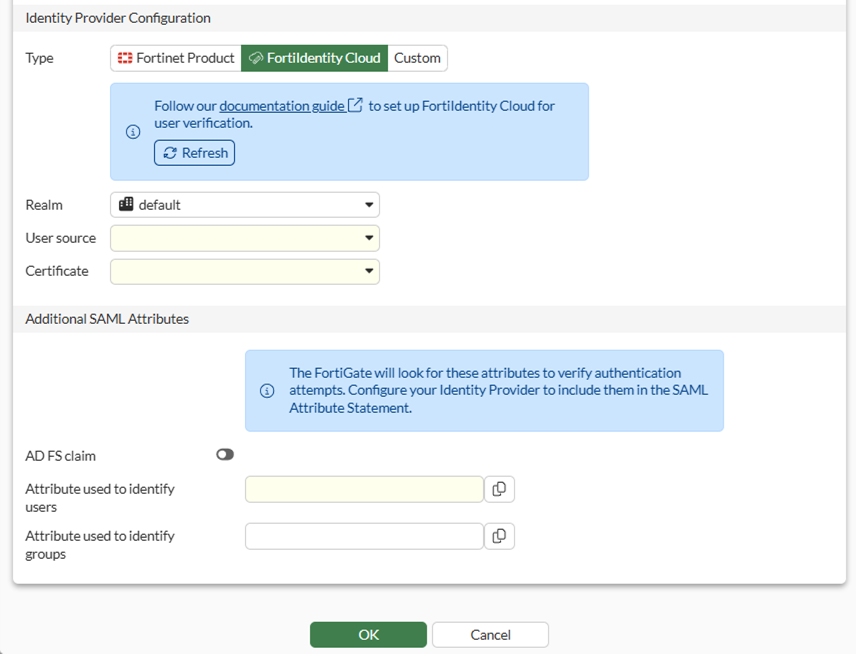
When FortiIdentity Cloud is selected, the following fields are pre-populated based on your FortiIdentity Cloud configuration:

Field

Description

Realm

A realm is a container that has a set of users that can be controlled by the same realm settings, including MFA method and adaptive auth profile.

User source

The source of user identities. This could be provided by upstream Identity providers, active directory or sometimes the identity store can be local users.

Certificate

Certificate to identify the IdP.

FortiGates with FortiCare Premium or FortiCare Elite have 3 free seats to FortiIdentity Cloud. See FortiCloud Subscriptions for details.

To configure FortiIdentity Cloud, see Getting Started – FGT-FIC users.

Example

This example demonstrates the simple SSO configuration on the FortiGate and the subsequent synchronization of configurations between the FortiGate and the FortiIdentity Cloud. Once configured, the SSO server can be used for remote access VPNs, ZTNA, and other services that require authentication.

To configure and check the SSO configuration in the GUI:
  1. On the FortiGate, go to User & Authentication > Single Sign-On and click Create New.

  2. Set the Name of the SSO, fic-sso in this example.

  3. Set Address to the address that the IdP will send SAML authentication requests to.

  4. Under Identity Provider Configuration, set Type to FortiIdentity Cloud and configure the following:

    Field

    Value

    Realm

    default

    User source

    cote-azure

    Certificate

    FIC_Default_Cert

  5. Set Attribute used to identify users to username.

  6. Set Attribute used to identify groups to group.
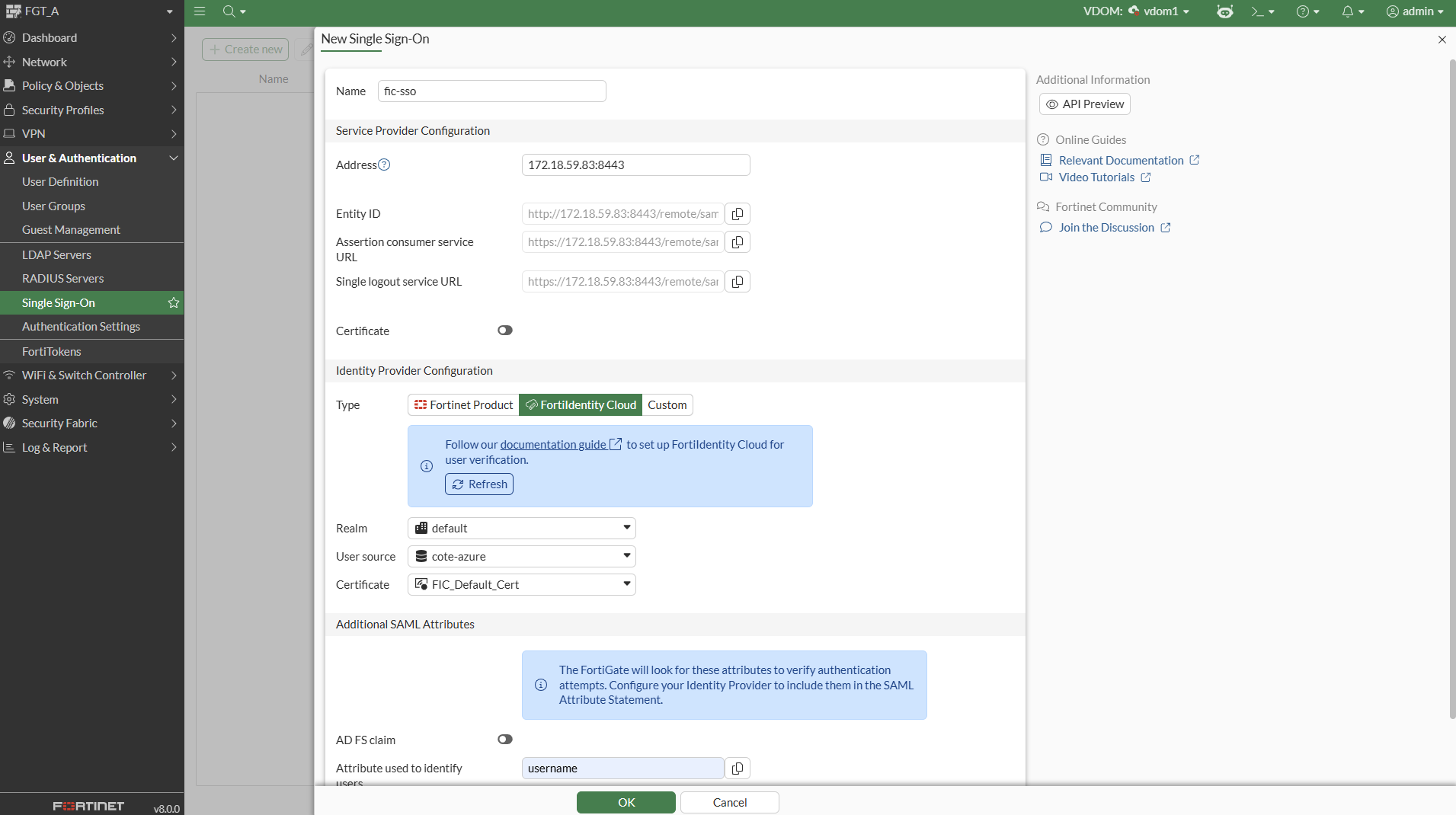
  7. Click OK.

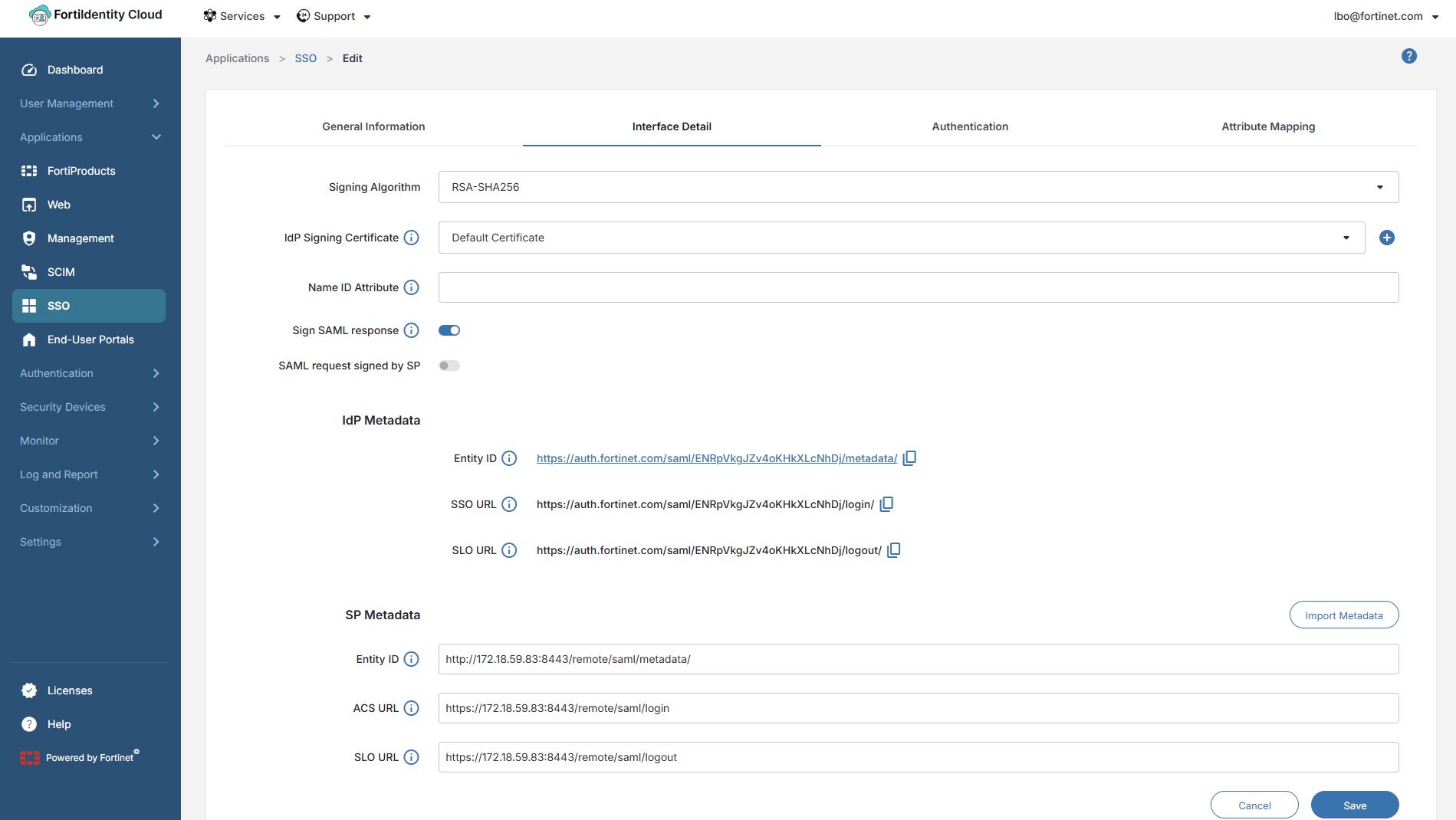
    A new SSO application with the same name is automatically created in FortiIdentity Cloud:
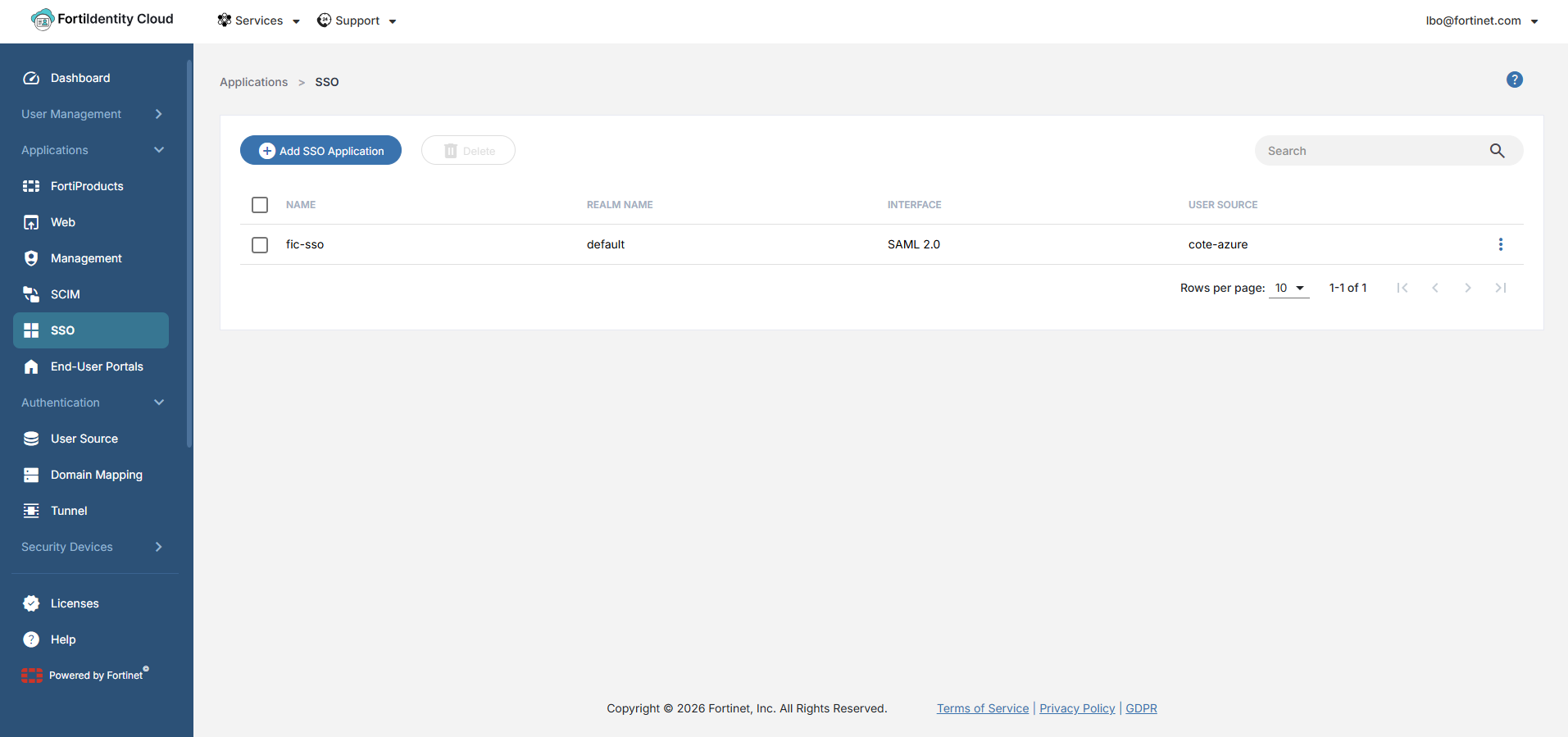
    The metadata between FortiGate (SP) and FortiIdentity Cloud (IdP) is exchanged in the background:
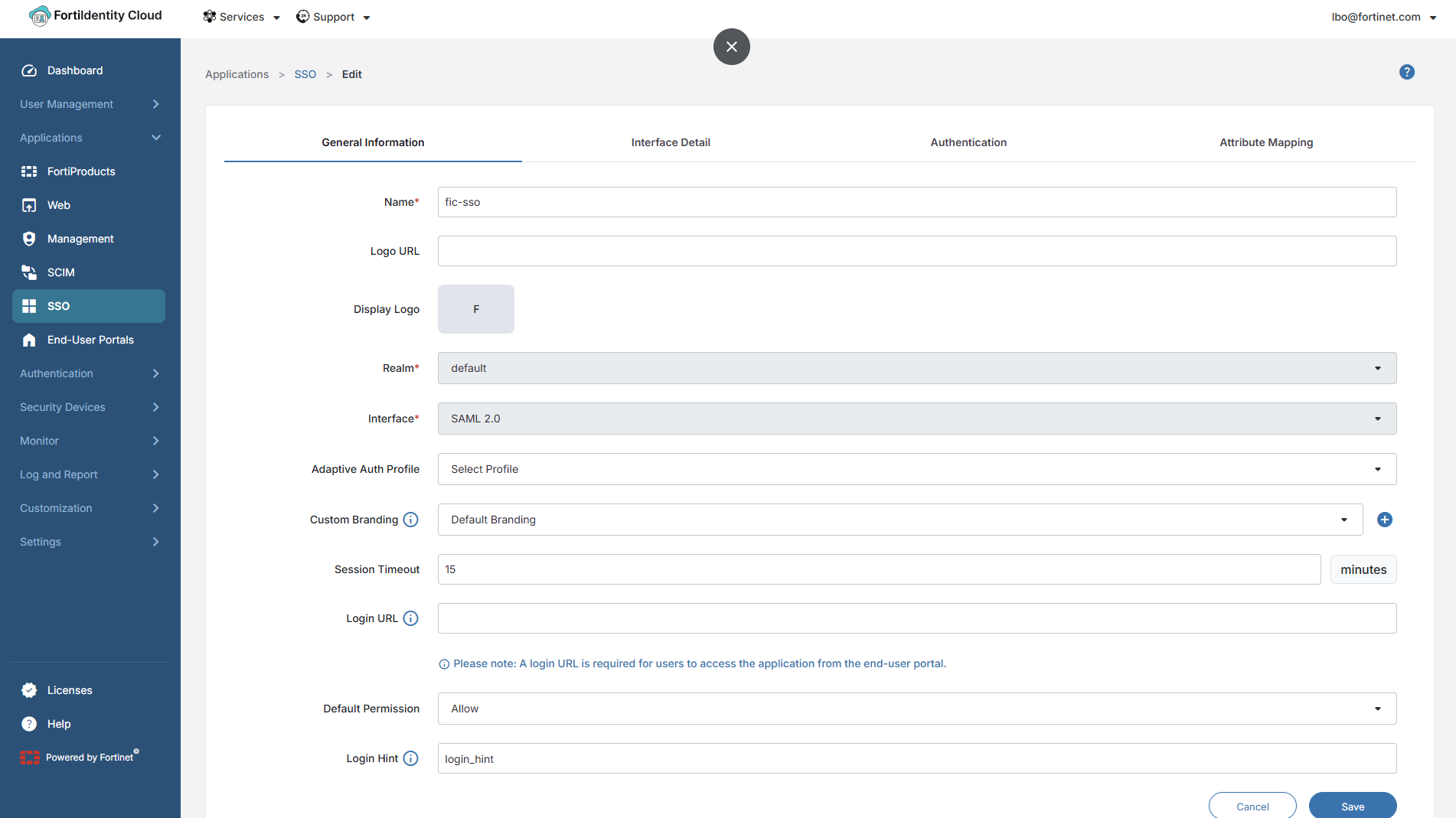
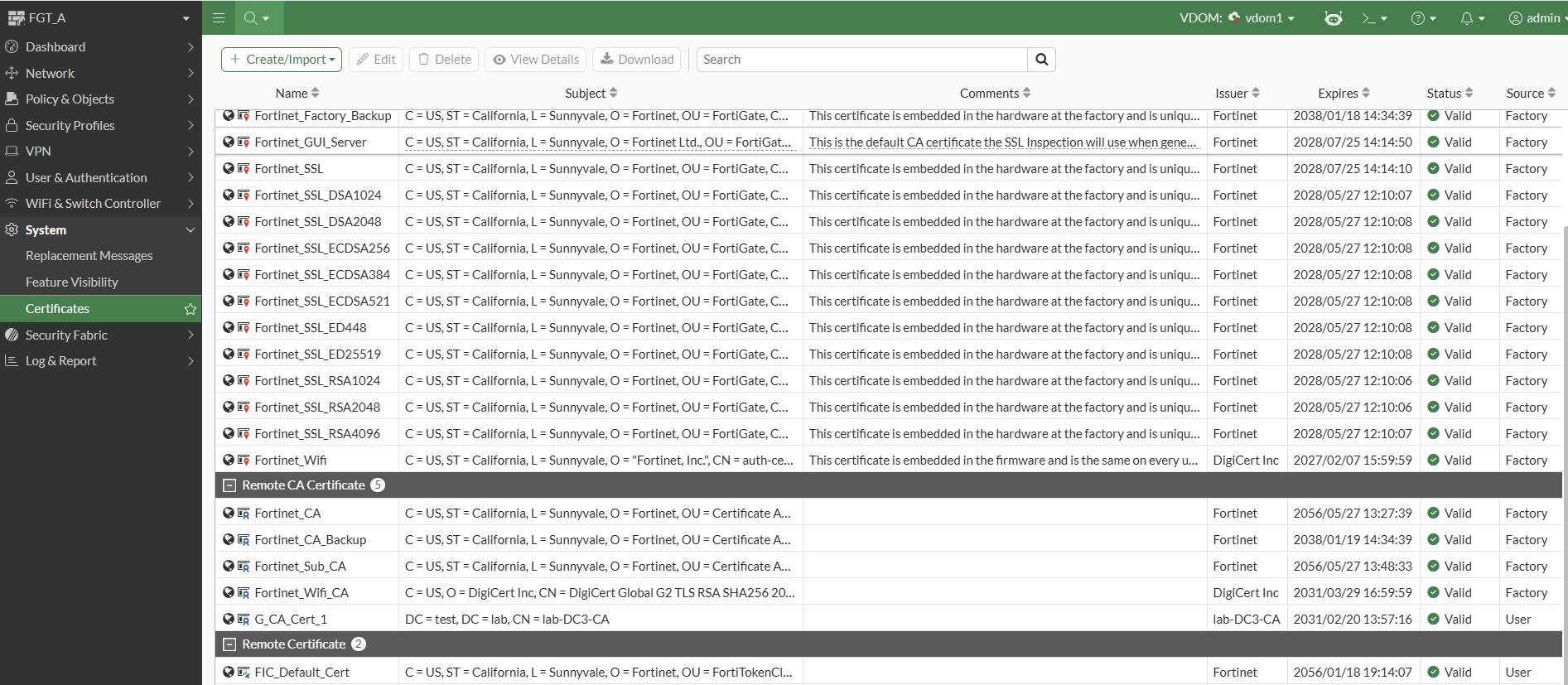
    The certificate from FortiIdentity Cloud is automatically imported into FortiGate as a remote certificate, completing the SSO configuration:

To configure the SSO in the CLI:
  1. Configure an SSO with type FortiIdentity Cloud:

    config user saml
        edit "fic-sso"
            set type fortiidentity-cloud
            set idp-cert "FIC_Default_Cert"
            set user-name "username"
            set group-name "group"
            set service-provider-address "172.18.59.83:8443"
            set user-source "cote-azure"
         next
    end
  2. Check that the SSO configuration is done:

    # show user saml
    config user saml
        edit "fic-sso"
            set uuid 52c8b5ee-3f68-51f1-8b53-b3a4fb3493d0
            set type fortiidentity-cloud
            set idp-cert "FIC_Default_Cert"
            set user-name "username"
            set group-name "group"
            set digest-method sha256
            set service-provider-address "172.18.59.83:8443"
            set entity-id "http://172.18.59.83:8443/remote/saml/metadata/"
            set single-sign-on-url "https://172.18.59.83:8443/remote/saml/login"
            set single-logout-url "https://172.18.59.83:8443/remote/saml/logout"
            set idp-entity-id "https://auth.fortinet.com/saml/ENRpVkgJZv4oKHkXLcNhDj/metadata/"
            set idp-single-sign-on-url "https://auth.fortinet.com/saml/ENRpVkgJZv4oKHkXLcNhDj/login/"
            set idp-single-logout-url "https://auth.fortinet.com/saml/ENRpVkgJZv4oKHkXLcNhDj/logout/"
            set user-source "cote-azure"
        next
    end

SSO integration with FortiIdentity Cloud

SSO integration with FortiIdentity Cloud

FortiIdentity Cloud can act as the local Identity Provider (IdP) for SAML and OIDC applications, or it can operate as an IdP proxy to broker authentication requests to other upstream IdPs. In this architecture, the FortiGate acts as the Service Provider (SP) for services such as VPN or ZTNA access and completes authentication via SAML against FortiIdentity Cloud.

In this enhancement, SSO is more tightly integrated between FortiGate and FortiIdentity Cloud. In the FortiGate’s Single Sign-On configuration page, a new type, FortiIdentity Cloud, is added. When selected, the FortiGate can retrieve existing realms, user sources and certificates configured on FortiIdentity Cloud, as well as retrieve the IdP URLs automatically. Once the fields are configured and saved, FortiIdentity Cloud automatically configures an SSO application corresponding to the FortiGate configuration and synchronizes the SP URLs.

In FortiOS, go to User & Authentication > Single Sign-On to configure an SSO server with type FortiIdentity Cloud:

When FortiIdentity Cloud is selected, the following fields are pre-populated based on your FortiIdentity Cloud configuration:

Field

Description

Realm

A realm is a container that has a set of users that can be controlled by the same realm settings, including MFA method and adaptive auth profile.

User source

The source of user identities. This could be provided by upstream Identity providers, active directory or sometimes the identity store can be local users.

Certificate

Certificate to identify the IdP.

FortiGates with FortiCare Premium or FortiCare Elite have 3 free seats to FortiIdentity Cloud. See FortiCloud Subscriptions for details.

To configure FortiIdentity Cloud, see Getting Started – FGT-FIC users.

Example

This example demonstrates the simple SSO configuration on the FortiGate and the subsequent synchronization of configurations between the FortiGate and the FortiIdentity Cloud. Once configured, the SSO server can be used for remote access VPNs, ZTNA, and other services that require authentication.

To configure and check the SSO configuration in the GUI:
  1. On the FortiGate, go to User & Authentication > Single Sign-On and click Create New.

  2. Set the Name of the SSO, fic-sso in this example.

  3. Set Address to the address that the IdP will send SAML authentication requests to.

  4. Under Identity Provider Configuration, set Type to FortiIdentity Cloud and configure the following:

    Field

    Value

    Realm

    default

    User source

    cote-azure

    Certificate

    FIC_Default_Cert

  5. Set Attribute used to identify users to username.

  6. Set Attribute used to identify groups to group.

  7. Click OK.

    A new SSO application with the same name is automatically created in FortiIdentity Cloud:

    The metadata between FortiGate (SP) and FortiIdentity Cloud (IdP) is exchanged in the background:
    The certificate from FortiIdentity Cloud is automatically imported into FortiGate as a remote certificate, completing the SSO configuration:
To configure the SSO in the CLI:
  1. Configure an SSO with type FortiIdentity Cloud:

    config user saml
        edit "fic-sso"
            set type fortiidentity-cloud
            set idp-cert "FIC_Default_Cert"
            set user-name "username"
            set group-name "group"
            set service-provider-address "172.18.59.83:8443"
            set user-source "cote-azure"
         next
    end
  2. Check that the SSO configuration is done:

    # show user saml
    config user saml
        edit "fic-sso"
            set uuid 52c8b5ee-3f68-51f1-8b53-b3a4fb3493d0
            set type fortiidentity-cloud
            set idp-cert "FIC_Default_Cert"
            set user-name "username"
            set group-name "group"
            set digest-method sha256
            set service-provider-address "172.18.59.83:8443"
            set entity-id "http://172.18.59.83:8443/remote/saml/metadata/"
            set single-sign-on-url "https://172.18.59.83:8443/remote/saml/login"
            set single-logout-url "https://172.18.59.83:8443/remote/saml/logout"
            set idp-entity-id "https://auth.fortinet.com/saml/ENRpVkgJZv4oKHkXLcNhDj/metadata/"
            set idp-single-sign-on-url "https://auth.fortinet.com/saml/ENRpVkgJZv4oKHkXLcNhDj/login/"
            set idp-single-logout-url "https://auth.fortinet.com/saml/ENRpVkgJZv4oKHkXLcNhDj/logout/"
            set user-source "cote-azure"
        next
    end