Fortinet white logo
Fortinet white logo

Examples

Configuring the reverse service on FortiPAM (control plane)

Configuring the reverse service on FortiPAM (control plane)

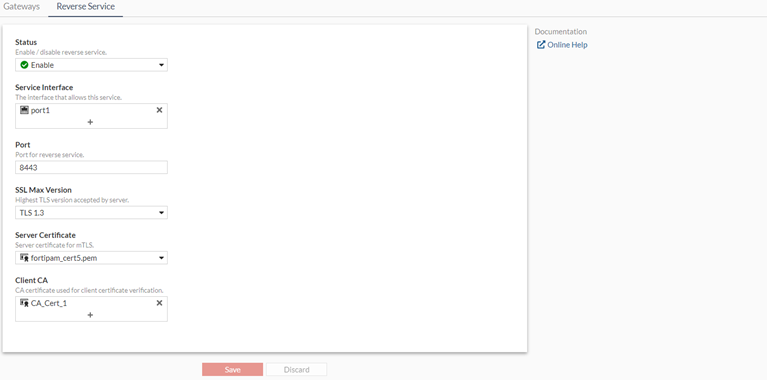
We configure the reverse service on FortiPAM for the reverse connection (control plane).

To configure the reverse service:
  1. Go to Network > Secret Gateway.
  2. Select the Reverse Service tab.

    The Reverse Service tab opens.

  3. From the Status dropdown, select Enable.
  4. From the Service Interface, select +, from Select Entries, select port1, and click Close.

    This is the IP address on the selected interface and the port the FortiPAM server listens on to receive the reverse connection from a gateway for the control plane connection. In this example, it is 34.95.41.159:8443.

  5. Ensure that the Port is 8443 and the SSL Max Version is TLS 1.3.
  6. In the Server Certificate dropdown, select fortipam_cert5.pem.

    This is the currect FortiPAM server certificate for control plane mTLS connection.

  7. In the Client CA dropdown, select CA_Cert_1.

    This is the gateway certificate CA.

  8. Click Save.

Configuring the reverse service on FortiPAM (control plane)

Configuring the reverse service on FortiPAM (control plane)

We configure the reverse service on FortiPAM for the reverse connection (control plane).

To configure the reverse service:
  1. Go to Network > Secret Gateway.
  2. Select the Reverse Service tab.

    The Reverse Service tab opens.

  3. From the Status dropdown, select Enable.
  4. From the Service Interface, select +, from Select Entries, select port1, and click Close.

    This is the IP address on the selected interface and the port the FortiPAM server listens on to receive the reverse connection from a gateway for the control plane connection. In this example, it is 34.95.41.159:8443.

  5. Ensure that the Port is 8443 and the SSL Max Version is TLS 1.3.
  6. In the Server Certificate dropdown, select fortipam_cert5.pem.

    This is the currect FortiPAM server certificate for control plane mTLS connection.

  7. In the Client CA dropdown, select CA_Cert_1.

    This is the gateway certificate CA.

  8. Click Save.