Fortinet white logo
Fortinet white logo

Administration Guide

OIDC NEW

OIDC NEW

OpenID Connect (OIDC) is a widely adopted JSON-based identity layer built on top of the OAuth 2.0 protocol. If you have an Identity Provider (IdP) like Azure AD, Google Identity, or any other service that supports OIDC, you can use it to authenticate users seamlessly across your FortiProxy instance and other integrated systems.

Like SAML, OIDC facilitates secure transfer of user authentication and authorization data between an Identity Provider (IdP) and a Relying Party (RP)—in this case, the FortiProxy unit. In OIDC-based authentication, the FortiProxy unit redirects unauthenticated users to the IdP (such as Azure Active Directory, Okta, Google, or other OIDC-compliant providers) for authentication. After the user is verified by the IdP, the user is redirected back to the FortiProxy with an ID token and possibly additional tokens in a JSON-based format. These tokens carry essential information about the user’s identity, group memberships, and authorization claims.

FortiProxy uses these claims to perform both authentication and authorization steps. Depending on your IdP’s configuration, group information can be included as claims in the ID token or fetched from an external directory service. This streamlined approach reduces infrastructure overhead, accelerates user login, and leverages existing IdP services without requiring additional on-premises components.

OIDC has the following advantages over other similar authentication schemes:

  • OIDC builds on OAuth 2.0, which means it uses tokens for both authentication and authorization (access tokens and ID tokens), which is a more flexible and modern approach compared to traditional username/password methods, enhancing security using robust cryptographic methods and proven standards to reduce exposure of credentials.

  • It improves user experience by allowing for single sign-on (SSO) across a wide range of applications and services, both on-premises and in the cloud, which simplifies deployment and scales efficiently across diverse IT ecosystems.

  • OIDC is generally simpler to implement and use than SAML (Security Assertion Markup Language). While SAML is more widely used in enterprise contexts, it involves heavier XML-based messaging, which can be harder to integrate and troubleshoot.

  • OIDC uses JSON Web Tokens (JWT), which are lightweight, easy to parse, and widely supported in modern web applications.

FortiProxy configuration

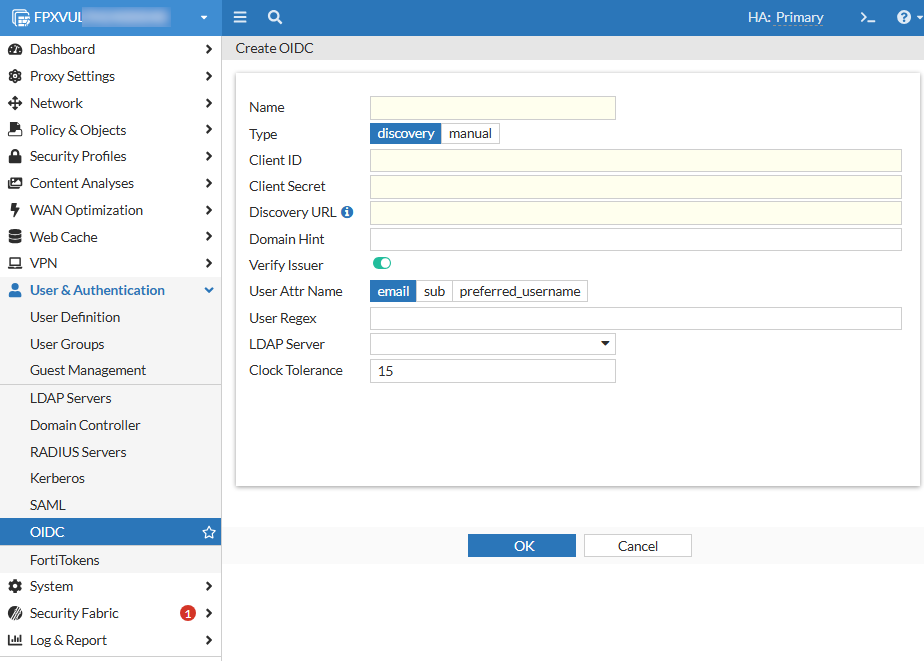
To configure an OIDC server in the FortiProxy GUI:
  1. In the User & Authentication > OIDC tab, click Create New or select an existing OIDC server from the list and click Edit.

  2. Configure the following options:

    Name

    Name that identifies the OIDC server on the FortiProxy unit.

    Type

    Select the type of OpenID Connect configuration.

    Option

    Description

    Required parameters

    Use case

    discovery

    Use an OIDC discovery URL to automatically retrieve endpoint configurations from the IdP.

    discovery-url, client-id, client-secret, verify-issuer (optional)

    Recommended when the IdP supports the discovery mechanism, reducing manual configuration overhead.

    manual

    Use manual configuration, which requires manual input of all OIDC-related endpoints and configurations.

    authorization-url, token-url, jwks-uri, client-id, client-secret

    Useful when the IdP does not support discovery or when a more customized setup is required.

    Client ID

    OpenID Connect server client ID.

    Client Secret

    OpenID Connect server client secret.

    Discovery URL

    OpenID Connect server discovery URL.

    This option is available only if you selected discovery in Type.

    Authorization URL

    OpenID Connect server authorization URL.

    This option is available only if you selected manual in Type.

    Token URL

    OpenID Connect server token URL.

    This option is available only if you selected manual in Type.

    JWKS URI

    URL of the OP's JWK Set document.

    This option is available only if you selected manual in Type.

    Domain Hint Domain Hint.

    Verify Issuer

    Specifies whether to verify OpenID Connect server issuer.

    This option is available only if you selected discovery in Type.

    Issuer

    OpenID Connect server issuer.

    This option is available only if you selected manual in Type.

    User Attr Name

    Field in ID token to use as username.

    Option

    Description

    email

    Use email in ID token as username.

    sub

    Use sub in ID token as username.

    preferred_username

    Use preferred_username in ID token as username.

    User Regex Regular expressions that the username must match. This field is case insensitive.
    LDAP Server Select the LDAP server(s).
    Clock Tolerance Clock skew tolerance in seconds. The default is 15 seconds.
  3. Click OK.

To configure an OIDC server in the FortiProxy CLI:

Use the config user oidc command. See an example below:

config user oidc

edit "oidc-discovery"

set client-id "********-****-****-****-************"

set client-secret "****************************"

set discovery-url "https://login.microsoftonline.com/common/v2.0/.well-known/openid-configuration"

set verify-issuer disable

next

edit "oidc-1"

set type manual

set client-id "********-****-****-****-************"

set client-secret "****************************"

set authorization-url "https://login.microsoftonline.com/common/oauth2/v2.0/authorize"

set token-url "https://login.microsoftonline.com/common/oauth2/v2.0/token"

set ldap-server "AD1"

next

edit "oidc-google"

set type manual

set client-id "****************-************************.apps.googleusercontent.com"

set client-secret "GOCSPX-************************"

set authorization-url "https://accounts.google.com/o/oauth2/v2/auth"

set token-url "https://oauth2.googleapis.com/token"

set jwks-uri "https://www.googleapis.com/oauth2/v3/certs"

next

end

Callback URL configuration in IdP

To fully integrate FortiProxy with an OIDC provider, you must configure the following callback URL (redirect URI) in your IdP ( (Azure AD, Google, Okta) and communicate the callback URL configuration to your IdP administrator:

https://<FortiProxy_FQDN_or_IP>:7831/XX/YY/ZZ/oidc/callback

where <FortiProxy_FQDN_or_IP> is the value of authentication.settings.captive-portal for transparent or explicit proxy deployments, or ztna.web-portal.auth-virtual-host for ZTNA web portal deployments.

OIDC NEW

OIDC NEW

OpenID Connect (OIDC) is a widely adopted JSON-based identity layer built on top of the OAuth 2.0 protocol. If you have an Identity Provider (IdP) like Azure AD, Google Identity, or any other service that supports OIDC, you can use it to authenticate users seamlessly across your FortiProxy instance and other integrated systems.

Like SAML, OIDC facilitates secure transfer of user authentication and authorization data between an Identity Provider (IdP) and a Relying Party (RP)—in this case, the FortiProxy unit. In OIDC-based authentication, the FortiProxy unit redirects unauthenticated users to the IdP (such as Azure Active Directory, Okta, Google, or other OIDC-compliant providers) for authentication. After the user is verified by the IdP, the user is redirected back to the FortiProxy with an ID token and possibly additional tokens in a JSON-based format. These tokens carry essential information about the user’s identity, group memberships, and authorization claims.

FortiProxy uses these claims to perform both authentication and authorization steps. Depending on your IdP’s configuration, group information can be included as claims in the ID token or fetched from an external directory service. This streamlined approach reduces infrastructure overhead, accelerates user login, and leverages existing IdP services without requiring additional on-premises components.

OIDC has the following advantages over other similar authentication schemes:

  • OIDC builds on OAuth 2.0, which means it uses tokens for both authentication and authorization (access tokens and ID tokens), which is a more flexible and modern approach compared to traditional username/password methods, enhancing security using robust cryptographic methods and proven standards to reduce exposure of credentials.

  • It improves user experience by allowing for single sign-on (SSO) across a wide range of applications and services, both on-premises and in the cloud, which simplifies deployment and scales efficiently across diverse IT ecosystems.

  • OIDC is generally simpler to implement and use than SAML (Security Assertion Markup Language). While SAML is more widely used in enterprise contexts, it involves heavier XML-based messaging, which can be harder to integrate and troubleshoot.

  • OIDC uses JSON Web Tokens (JWT), which are lightweight, easy to parse, and widely supported in modern web applications.

FortiProxy configuration

To configure an OIDC server in the FortiProxy GUI:
  1. In the User & Authentication > OIDC tab, click Create New or select an existing OIDC server from the list and click Edit.

  2. Configure the following options:

    Name

    Name that identifies the OIDC server on the FortiProxy unit.

    Type

    Select the type of OpenID Connect configuration.

    Option

    Description

    Required parameters

    Use case

    discovery

    Use an OIDC discovery URL to automatically retrieve endpoint configurations from the IdP.

    discovery-url, client-id, client-secret, verify-issuer (optional)

    Recommended when the IdP supports the discovery mechanism, reducing manual configuration overhead.

    manual

    Use manual configuration, which requires manual input of all OIDC-related endpoints and configurations.

    authorization-url, token-url, jwks-uri, client-id, client-secret

    Useful when the IdP does not support discovery or when a more customized setup is required.

    Client ID

    OpenID Connect server client ID.

    Client Secret

    OpenID Connect server client secret.

    Discovery URL

    OpenID Connect server discovery URL.

    This option is available only if you selected discovery in Type.

    Authorization URL

    OpenID Connect server authorization URL.

    This option is available only if you selected manual in Type.

    Token URL

    OpenID Connect server token URL.

    This option is available only if you selected manual in Type.

    JWKS URI

    URL of the OP's JWK Set document.

    This option is available only if you selected manual in Type.

    Domain Hint Domain Hint.

    Verify Issuer

    Specifies whether to verify OpenID Connect server issuer.

    This option is available only if you selected discovery in Type.

    Issuer

    OpenID Connect server issuer.

    This option is available only if you selected manual in Type.

    User Attr Name

    Field in ID token to use as username.

    Option

    Description

    email

    Use email in ID token as username.

    sub

    Use sub in ID token as username.

    preferred_username

    Use preferred_username in ID token as username.

    User Regex Regular expressions that the username must match. This field is case insensitive.
    LDAP Server Select the LDAP server(s).
    Clock Tolerance Clock skew tolerance in seconds. The default is 15 seconds.
  3. Click OK.

To configure an OIDC server in the FortiProxy CLI:

Use the config user oidc command. See an example below:

config user oidc

edit "oidc-discovery"

set client-id "********-****-****-****-************"

set client-secret "****************************"

set discovery-url "https://login.microsoftonline.com/common/v2.0/.well-known/openid-configuration"

set verify-issuer disable

next

edit "oidc-1"

set type manual

set client-id "********-****-****-****-************"

set client-secret "****************************"

set authorization-url "https://login.microsoftonline.com/common/oauth2/v2.0/authorize"

set token-url "https://login.microsoftonline.com/common/oauth2/v2.0/token"

set ldap-server "AD1"

next

edit "oidc-google"

set type manual

set client-id "****************-************************.apps.googleusercontent.com"

set client-secret "GOCSPX-************************"

set authorization-url "https://accounts.google.com/o/oauth2/v2/auth"

set token-url "https://oauth2.googleapis.com/token"

set jwks-uri "https://www.googleapis.com/oauth2/v3/certs"

next

end

Callback URL configuration in IdP

To fully integrate FortiProxy with an OIDC provider, you must configure the following callback URL (redirect URI) in your IdP ( (Azure AD, Google, Okta) and communicate the callback URL configuration to your IdP administrator:

https://<FortiProxy_FQDN_or_IP>:7831/XX/YY/ZZ/oidc/callback

where <FortiProxy_FQDN_or_IP> is the value of authentication.settings.captive-portal for transparent or explicit proxy deployments, or ztna.web-portal.auth-virtual-host for ZTNA web portal deployments.