ZTNA traffic forwarding proxy example
In this example, a traffic forwarding proxy (TFP) is configured to demonstrate an HTTPS reverse proxy that forwards TCP traffic to the designated resource. The access proxy tunnels TCP traffic between the client and the FortiGate over HTTPS, and forwards the TCP traffic to the protected resource. It verifies user identity, device identity, and trust context, before granting access to the protected source.
The TFP supports communication between the client and the access proxy without SSL/TLS encryption. The connection still begins with a TLS handshake. The client uses the HTTP 101 response to switch protocols and remove the HTTPS stack. Further end to end communication between the client and server are encapsulated in the specified TCP port, but not encrypted by the access proxy. This improves performance by reducing the overhead of encrypting an already secured underlying protocol, such as RDP, SSH, or FTPS. Users should still enable the encryption option for end to end protocols that are insecure.
In this example, RDP (Remote Desktop Protocol) and SMB (Server Message Block) protocol access are configured to one server, and SSH access to the other server. Encryption is disabled for RDP and SSH, and enabled for SMB.
FortiClient (Windows) must be running 7.0.3 or later to detect SMB.
You cannot use ZTNA connection rules and TCP forwarding on a Windows 7 endpoint.
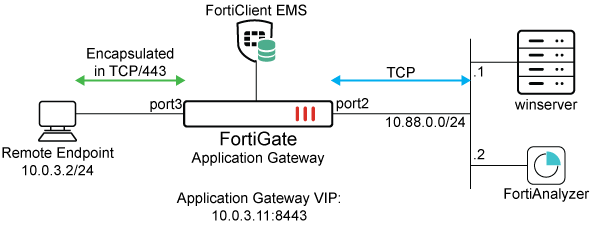
This example assumes that the FortiGate EMS fabric connector is already successfully connected.
To configure the ZTNA server for TFP in the GUI:
-
Go to Policy & Objects > ZTNA > Traffic Forwarding > Traffic Forwarding Server.
-
Click Create new.
-
Set Name to ZTNA-tcp-server.
-
Set Host to 10.0.3.11.
-
Set ZTNA port to Create new and configure the port:
Option
Value
Interface
port3
IP address
10.0.3.11
Port
8443
Default certificate
This example uses a wildcard certificate with a Common Name (CN): *.ztnademo.com.
This certificate is trusted by the endpoints which will access the ZTNA port.
Name
TCPserver:8443
Verify that the IP address and port do not conflict with management access to the interface. Otherwise, change the IP address to another address on that subnet.
-
Click OK to save the traffic forwarding server.
-
Select the Destination view to define a destination.
-
Click Create new.
-
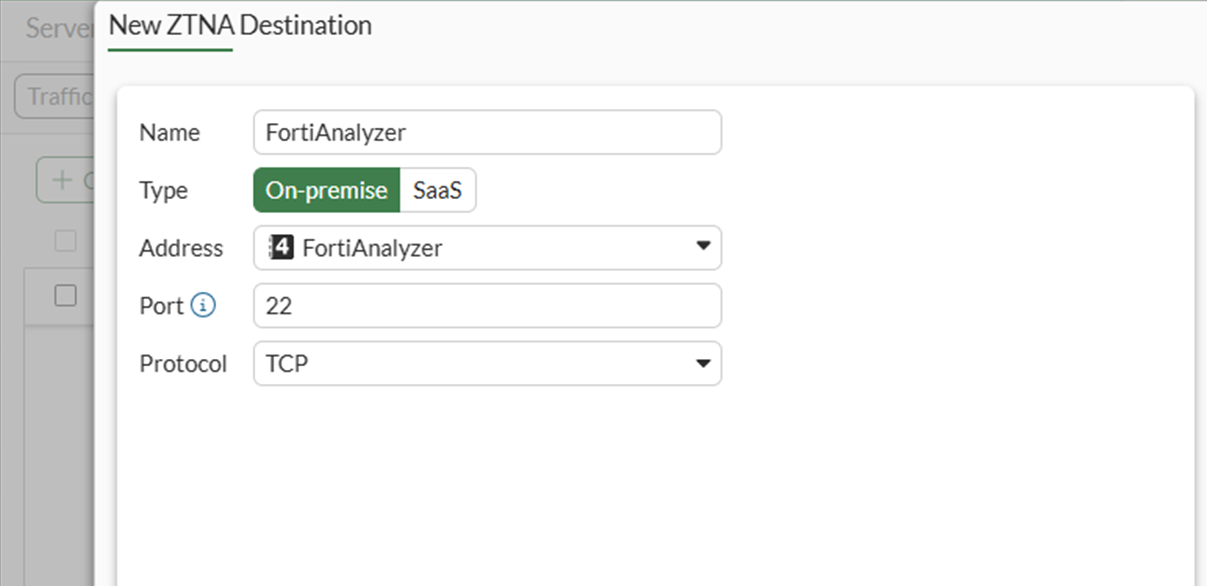
Configure the ZTNA destination:
Option
Value
Name
FortiAnalyzer
Type
On-premise
Address
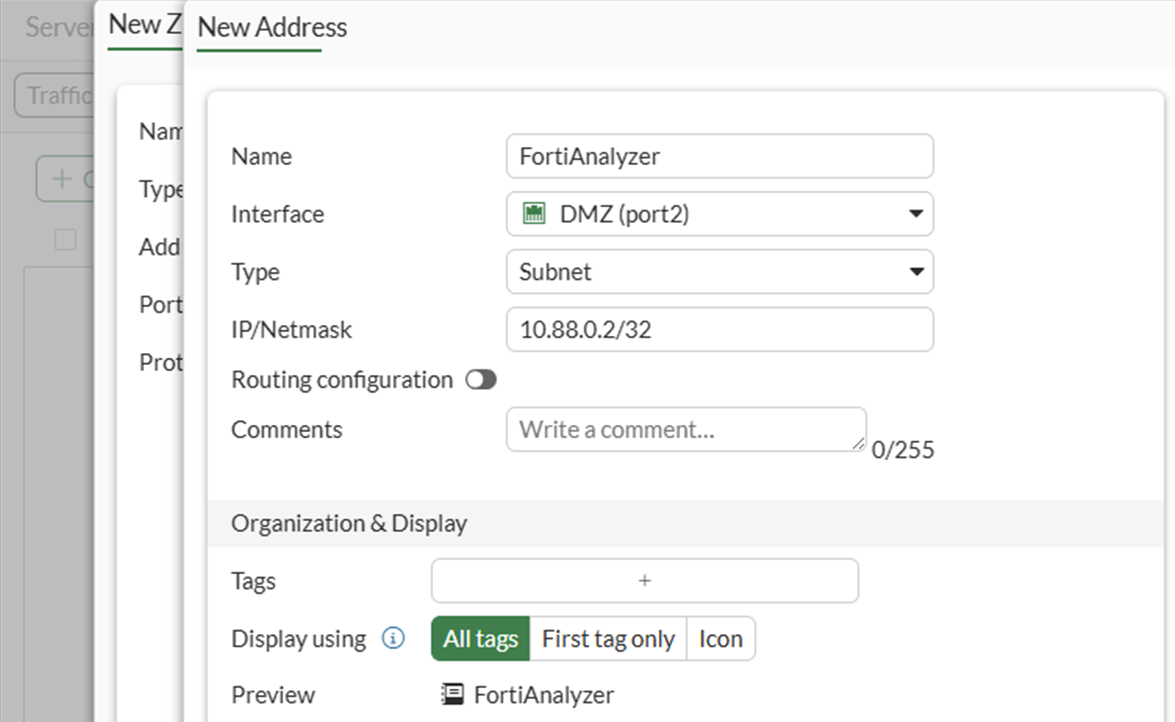
Use the dropdown and then the + button to define a new address object with: 10.88.0.2/32.
Port
22
Protocol
TCP
-
Click OK to save the ZTNA destination.
-
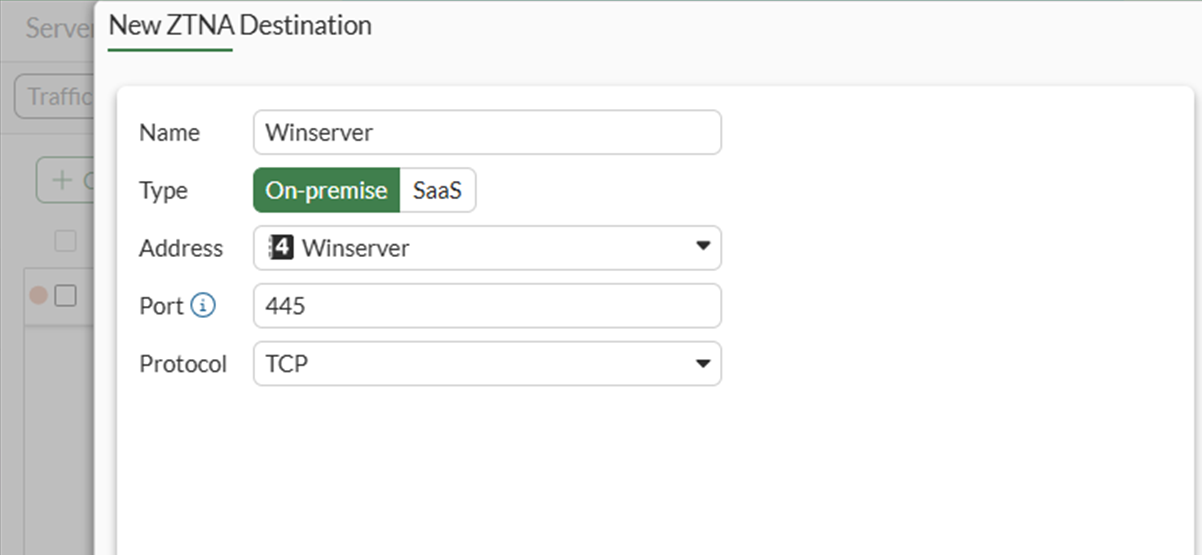
Click Create New again to define a second destination for the winserver server at 10.88.0.1 with ports 445 and 3389 to correspond to SMB and RDP:
Option
Value
Name
Winserver
Type
On-premise
Address
Use the dropdown and then the + button to define a new address object with: 10.88.0.1/32.
Port
445
It is not possible to specify two non-consecutive ports for a destination in the GUI. The second port, 3389, must be appended using the CLI.
Protocol
TCP
-
Click OK to save the ZTNA destination.
-
Use the CLI to add the second port:
config ztna destination
     edit "Winserver"
        set mappedport 445 3389
     next
 end
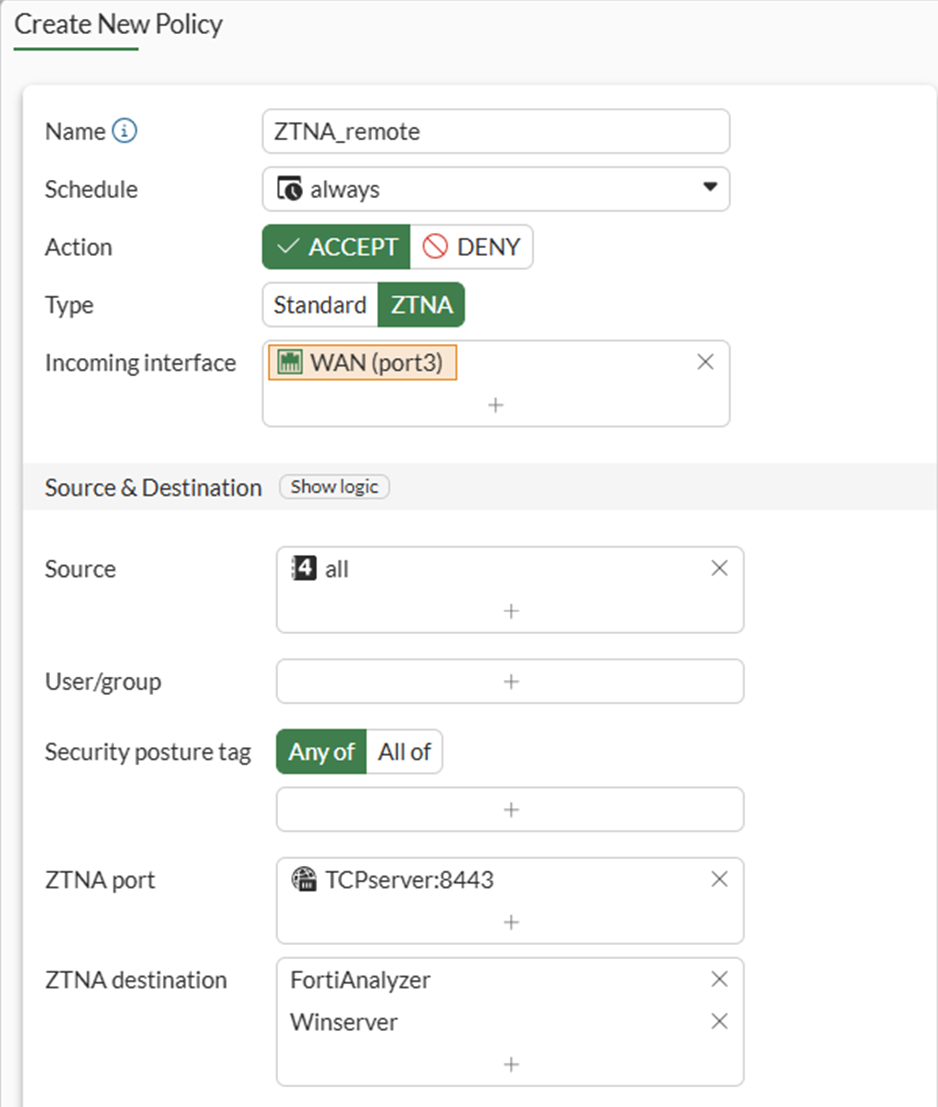
To configure a simple ZTNA policy to allow traffic to the TCP access proxy in the GUI:
-
Go to Policy & Objects > Firewall Policy, and click Create New.
-
Set Name to ZTNA_remote.
-
Set Type to ZTNA.
-
Set Incoming Interface to port3.
-
Set Source to all.
-
Set ZTNA port to TCPserver:8443.
-
Set ZTNA destination to FortiAnalyzer and Winserver.
-
Set Log allowed traffic to All sessions.
-
Configure the remaining options as needed.
-
Click OK.
To configure a ZTNA traffic forwarding proxy in the CLI:
-
Configure the access proxy VIP:
config firewall vip edit "TCPserver:8443" set type access-proxy set server-type https set extip 10.0.3.11 set extintf "port3" set extport 8443 set ssl-certificate "ztna-wildcard" next end -
Configure the destinations:
config ztna destination edit "Winserver" set address "Winserver" set mappedport 445 3389 set protocol TCP next edit "FortiAnalyzer" set address "FortiAnalyzer" set mappedport 22 set protocol TCP next end -
Configure the virtual host:
config firewall access-proxy-virtual-host
     edit "10.0.3.11_host"
         set ssl-certificate “ztna-wildcard”
         set host “10.0.3.11”
     next
 end
The virtual host is configured automatically when specifying the Host field during the Traffic Forwarding Server creation.
-
Configure the traffic forward proxy:
config ztna traffic-forward-proxy edit "ZTNA-tcp-server" set vip "TCPserver:8443" set host "10.0.3.11_host" next end -
Configure Firewall Address Objects and ZTNA policy:
config firewall address
     edit "FortiAnalyzer"
         set subnet 10.88.0.2 255.255.255.255
     next
     edit "Winserver"
         set subnet 10.88.0.1 255.255.255.255
     next
end
config firewall policy edit 1 set name "ZTNA_remote" set srcintf "port3" set dstintf "any" set action accept set srcaddr "all" set dstaddr "TCPserver:8443" set ztna-destination "FortiAnalyzer" "Winserver" set schedule "always" set logtraffic all set nat enable next end
Test the connection to the access proxy
Before connecting, users must have a ZTNA connection rule in FortiClient. This will be configured using EMS.
To create a ZTNA Destination in EMS:
-
Go to Endpoint Profiles > ZTNA Destinations.
-
Select the required profile, or create a new one.
-
Set Name to the desired name.
-
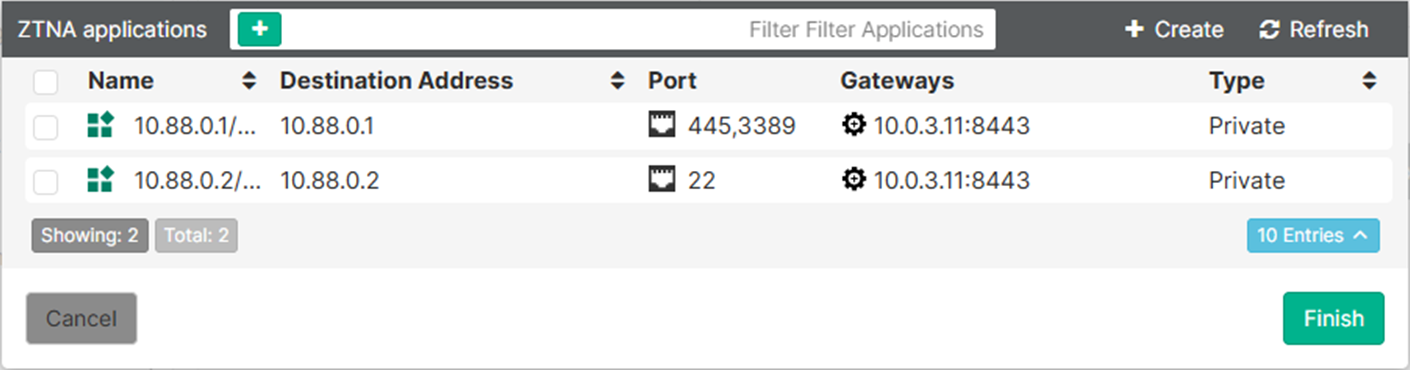
In the Rules section click Add.
Two ZTNA applications should populate that were learned from the FortiGate.
-
Select both applications then click Finish.
The two destinations now appear as rule entries.
-
Click Save to save the ZTNA Destinations profile.
-
Ensure that this profile is applied to the endpoint policy assigned to the remote endpoint.
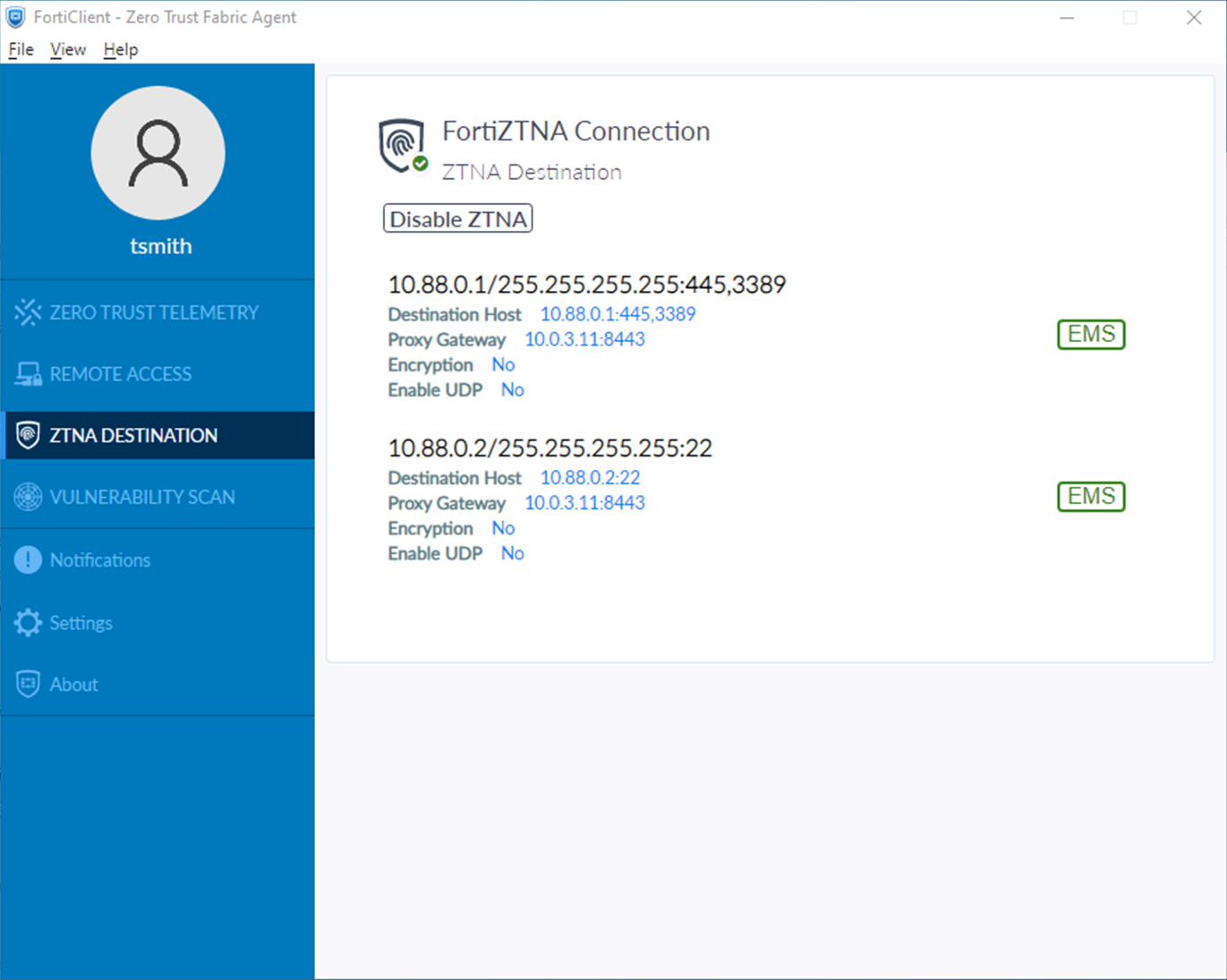
After some time, the FortiClient will receive the profile update and the configuration will appear under the ZTNA DESTINATION tab on FortiClient.
To test the access proxy:
-
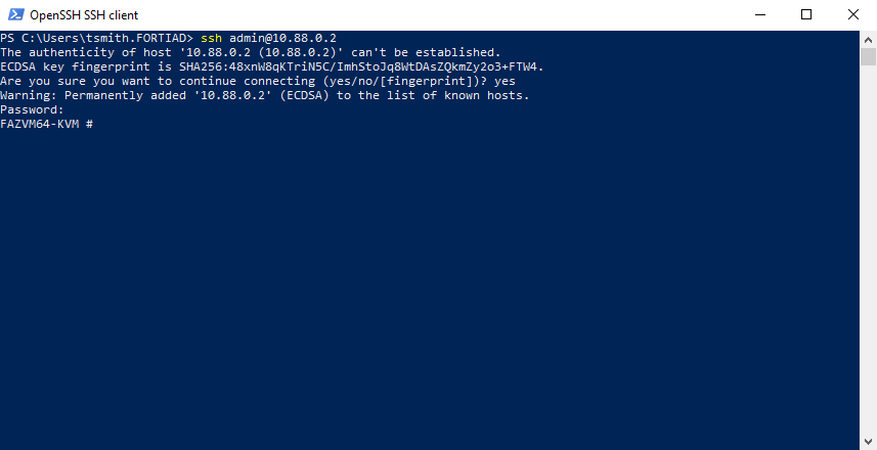
Test SSH connectivity to the FortiAnalyzer by opening a SSH client, such as PowerShell:
ssh admin@10.88.0.2
-
If it is the first time that you are connecting, accept the ECDSA key fingerprint of the FortiAnalyzer.
-
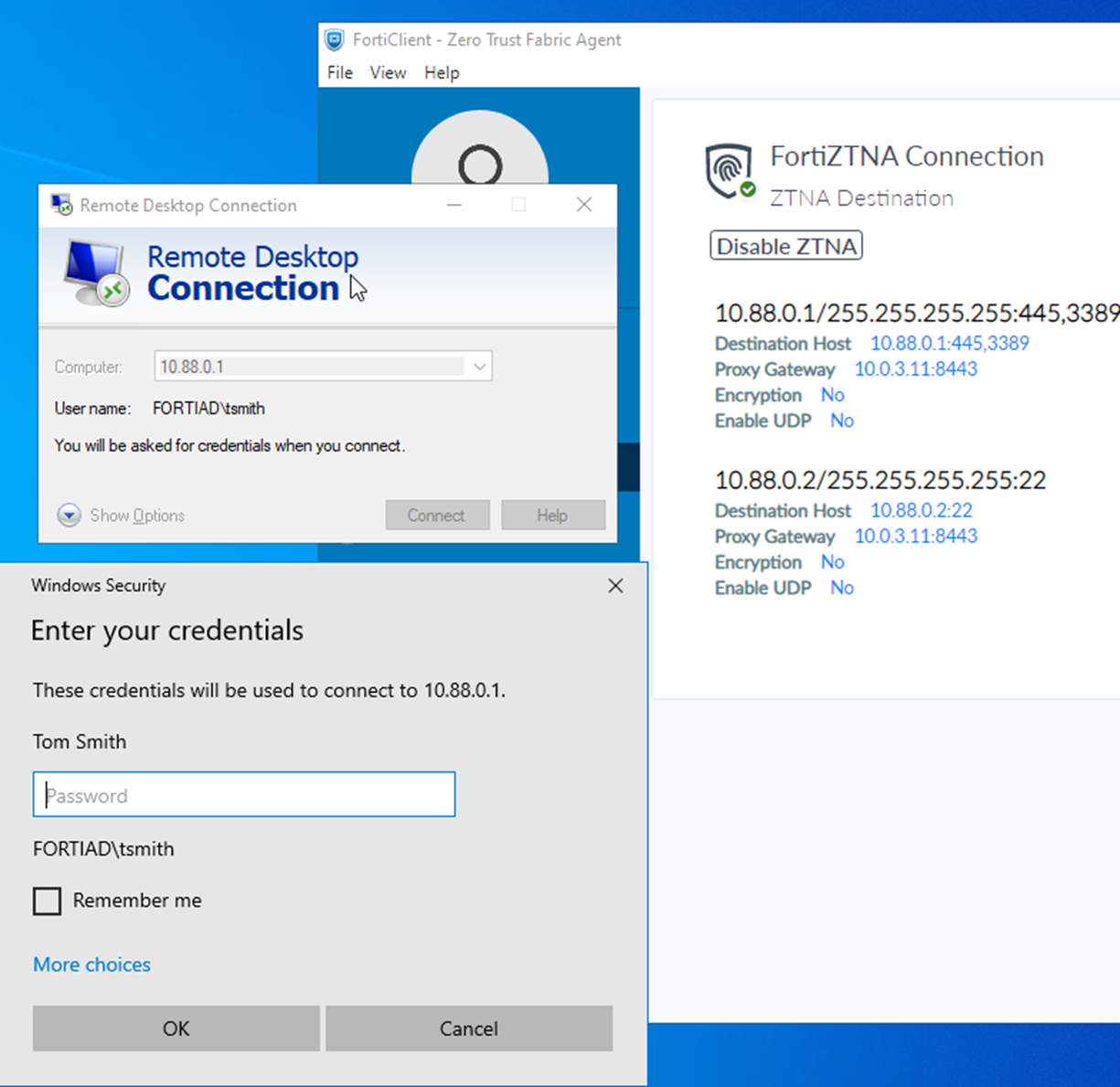
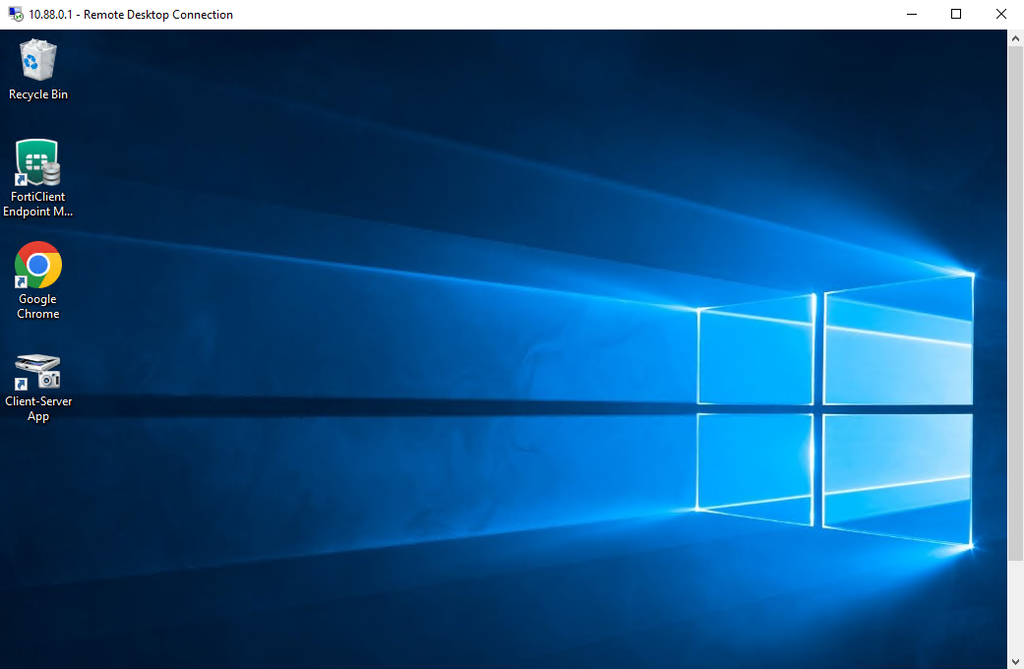
Test RDP by opening the Remote Desktop Connection application and providing the address to RDP to (10.88.0.1) and the username and password:
-
Test SMB access by opening File Explorer and entering
\\10.88.0.1\Home: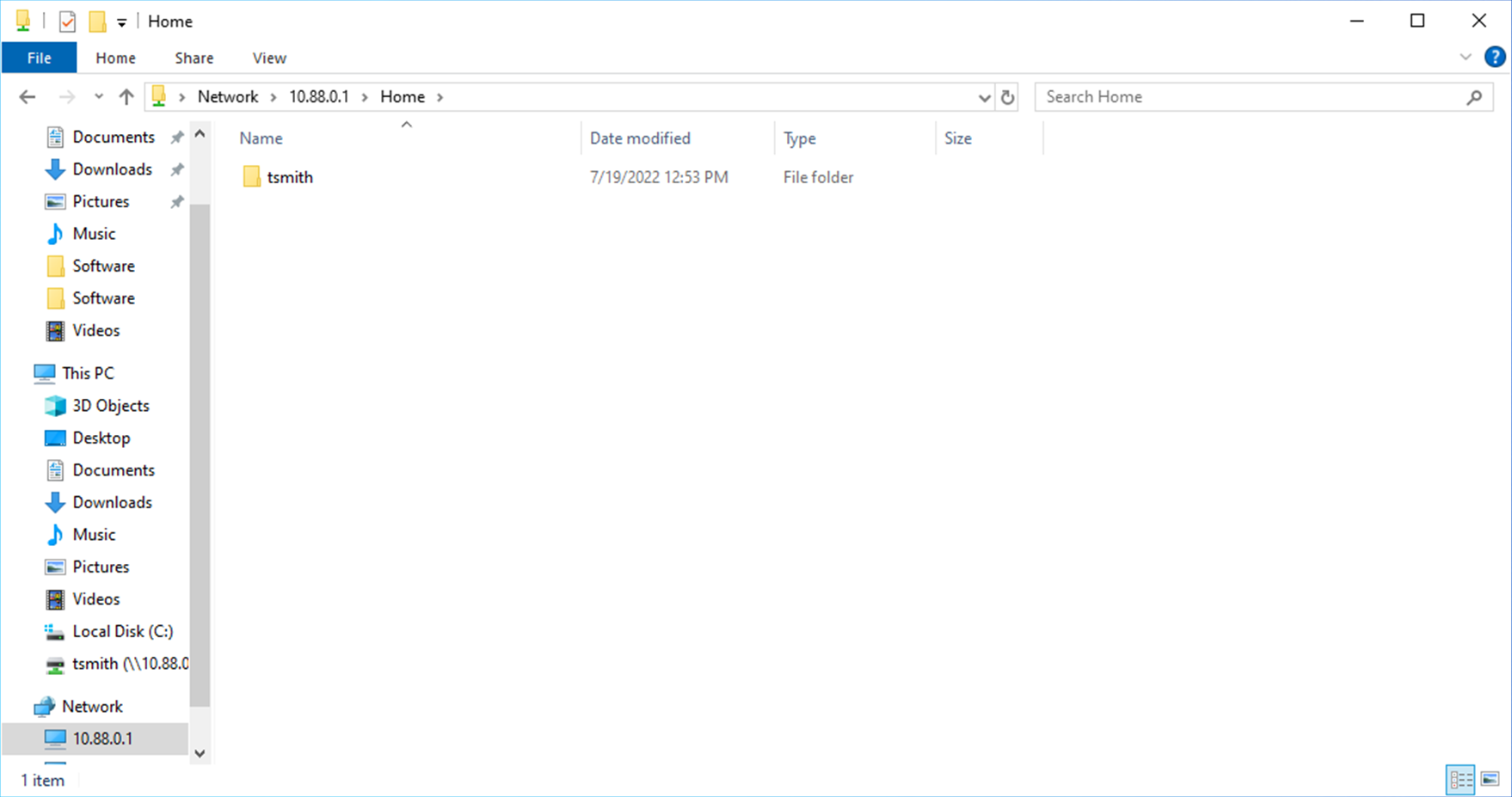
Logs
# execute log filter category 0
# execute log filter field subtype ztna
# execute log display
SSH:
1: date=2026-03-05 time=10:05:32 eventtime=1772733931608530952 tz="-0800" logid="0005000024" type="traffic" subtype="ztna" level="notice" vd="root" srcip=10.0.3.2 srcport=3638 srcintf="port3" srcintfrole="wan" dstcountry="Reserved" srccountry="Reserved" dstip=10.88.0.2 dstport=22 dstintf="port2" dstintfrole="dmz" sessionid=40549 srcuuid="b458a65a-f759-51ea-d7df-ef2e750026d1" dstuuid="488b7d46-17ea-51f1-0341-09c9959801a7" service="SSH" proxyapptype="ztna-proxy" proto=6 action="accept" policyid=1 policytype="policy" poluuid="33483cfe-18bb-51f1-bede-ba49af71cc72" policyname="ZTNA_remote" appcat="unscanned" duration=50 vip="TCPserver:8443" vipincomingip=10.0.3.11 accessproxy="ZTNA-tcp-server" ztnadestination="FortiAnalyzer" clientdevicemanageable="manageable" clientcert="yes" wanin=2917 rcvdbyte=2917 wanout=2301 lanin=4270 sentbyte=4270 lanout=6046
Logs will not generate until the session is complete. Exit the SSH session by pressing Ctrl+C.
RDP:
11: date=2026-03-05 time=10:10:54 eventtime=1772734254005541566 tz="-0800" logid="0005000024" type="traffic" subtype="ztna" level="notice" vd="root" srcip=10.0.3.2 srcport=3649 srcintf="port3" srcintfrole="wan" dstcountry="Reserved" srccountry="Reserved" dstip=10.88.0.1 dstport=3389 dstintf="port2" dstintfrole="dmz" sessionid=40642 srcuuid="b458a65a-f759-51ea-d7df-ef2e750026d1" dstuuid="488b7d46-17ea-51f1-0341-09c9959801a7" service="RDP" proxyapptype="ztna-proxy" proto=6 action="accept" policyid=1 policytype="policy" poluuid="33483cfe-18bb-51f1-bede-ba49af71cc72" policyname="ZTNA_remote" appcat="unscanned" duration=39 vip="TCPserver:8443" vipincomingip=10.0.3.11 accessproxy="ZTNA-tcp-server" ztnadestination="Winserver" clientdevicemanageable="manageable" clientcert="yes" wanin=320490 rcvdbyte=320490 wanout=73972 lanin=75943 sentbyte=75943 lanout=323619
SMB:
2: date=2026-03-05 time=10:41:51 eventtime=1772736111610076560 tz="-0800" logid="0005000024" type="traffic" subtype="ztna" level="notice" vd="root" srcip=10.0.3.2 srcport=3728 srcintf="port3" srcintfrole="wan" dstcountry="Reserved" srccountry="Reserved" dstip=10.88.0.1 dstport=445 dstintf="port2" dstintfrole="dmz" sessionid=41351 srcuuid="b458a65a-f759-51ea-d7df-ef2e750026d1" dstuuid="488b7d46-17ea-51f1-0341-09c9959801a7" service="SMB" proxyapptype="ztna-proxy" proto=6 action="accept" policyid=1 policytype="policy" poluuid="33483cfe-18bb-51f1-bede-ba49af71cc72" policyname="ZTNA_remote" appcat="unscanned" duration=0 vip="TCPserver:8443" vipincomingip=10.0.3.11 accessproxy="ZTNA-tcp-server" ztnadestination="Winserver" clientdevicemanageable="manageable" clientcert="yes" wanin=0 rcvdbyte=0 wanout=0 lanin=1970 sentbyte=1970 lanout=3129