
Fortinet white logo
Fortinet white logo

Administration Guide

ZTNA IPv6 examples

ZTNA IPv6 examples

IPv6 can be configured in ZTNA in several scenarios:

  • IPv6 Client — IPv6 Access Proxy — IPv6 Server

  • IPv6 Client — IPv6 Access Proxy — IPv4 Server

  • IPv4 Client — IPv4 Access Proxy — IPv6 Server

  • IPv6 EMS tags in dual stack firewall policies

These examples show the basic configuration for each scenario. It is assumed that the EMS fabric connector is already successfully connected.
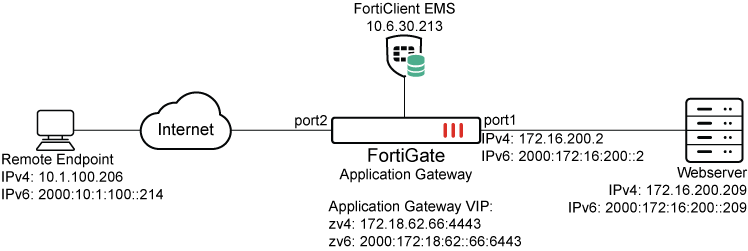
Example 1: IPv6 Client — IPv6 Access Proxy — IPv6 Server

To configure the FortiGate:
  1. Configure the IPv6 access proxy VIP:

    config firewall vip6
        edit "zv6"
            set type access-proxy
            set extip 2000:172:18:62::66
            set server-type https
            set extport 6443
            set ssl-certificate "cert"
        next
    end
  2. Configure a virtual host:

    config firewall access-proxy-virtual-host
        edit "vhost_ipv6"
            set ssl-certificate "cert"
            set host "webserver.test.com"
        next
    end

    The client uses this address to connect to the access proxy.

  3. Configure an IPv6 web proxy and IPv6 api-gateway, apply the VIP6 and virtual host to it, and assign an IPv6 address to the realserver:

    config ztna web-proxy
        edit "zs6"
            set vip "zv6"
            set host "vhost_ipv6"
            config api-gateway6
                edit 1
                    config realservers
                        edit 1
                            set ip 2000:172:16:200::209
                        next
                    end
                next
            end
        next
    end
  4. Configure a ZTNA policy:

    config firewall policy
        edit 1
            set name "ztna_rule"
            set srcintf "port2"
            set dstintf "any"
            set action accept
            set srcaddr6 "all" 
            set dstaddr6 "zs6"
            set schedule "always"
            set logtraffic all
        next
    end
To test the configuration:
  1. On an IPv6 client, ensure that the address webserver.test.com resolves to the IPv6 VIP address of 2000:172:18:62::66.

  2. In a browser, connect to https://webserver.test.com:6443.

  3. After device certificate verification, the browser will open up the webpage on the IPv6 real server.

  4. In the Forward Traffic Log, the following log is available:

    1: date=2026-03-03 time=14:46:14 eventtime=1772577974130406404 tz="-0800" logid="0005000024" type="traffic" subtype="ztna" level="notice" vd="root" srcip=2000:10:1:100::214 srcport=55957 srcintf="port2" srcintfrole="undefined" dstcountry="Reserved" srccountry="Reserved" dstip=2000:172:16:200::209 dstport=443 dstintf="port1" dstintfrole="undefined" sessionid=9174 srcuuid="b458a65a-f759-51ea-d7df-ef2e750026d1" dstuuid="01b612e6-174a-51f1-1a3d-b3293e8efa12" service="HTTPS" proxyapptype="ztna-proxy" proto=6 action="accept" policyid=1 policytype="policy" poluuid="693c3e3e-174c-51f1-3e13-715130a1a107" policyname="ztna_rule" appcat="unscanned" duration=129 gatewayid=1 realserverid=1 vip="zv6" vipincomingip=2000:172:18:62::66 accessproxy="zs6" clientdeviceid="9A016B5A6E914B42AD4168C066EB04CA" clientdevicemanageable="manageable" clientdeviceems="FCTEMS8825007166" clientdevicetags="CLASS_Low/ all_registered_clients" clientcert="yes" emsconnection="online" wanin=303009 rcvdbyte=303009 wanout=4424 lanin=4220 sentbyte=4220 lanout=305716 fctuid="9A016B5A6E914B42AD4168C066EB04CA"

Example 2: IPv6 Client — IPv6 Access Proxy — IPv4 Server

To configure the FortiGate:
  1. Configure the IPv6 access proxy VIP:

    config firewall vip6
        edit "zv6"
            set type access-proxy
            set extip 2000:172:18:62::66
            set server-type https
            set extport 6443
            set ssl-certificate "cert"
        next
    end
  2. Configure a virtual host:

    config firewall access-proxy-virtual-host
        edit "vhost_ipv6"
            set ssl-certificate "cert"
            set host "webserver.test.com"
        next
    end

    The client uses this address to connect to the access proxy.

  3. Configure an IPv6 web proxy and api-gateway, apply the VIP6 and virtual host to it, and assign an IPv4 address to the realserver:

    config ztna web-proxy
        edit "zs6"
            set vip "zv6"
            set host "vhost_ipv6"
            config api-gateway
                edit 1
                    config realservers
                        edit 1
                            set ip 172.16.200.209
                        next
                    end
                next
            end
        next
    end
  4. Configure a ZTNA policy:

    config firewall policy
        edit 1
            set name "ztna_rule"
            set srcintf "port2"
            set dstintf "any"
            set action accept
            set srcaddr6 "all" 
            set dstaddr6 "zs6"
            set schedule "always"
            set logtraffic all
        next
    end
To test the configuration:
  1. On an IPv6 client, ensure that the address webserver.test.com resolves to the IPv6 VIP address of 2000:172:18:62::66.

  2. In a browser, connect to https://webserver.test.com:6443.

  3. After device certificate verification, the browser will open up the webpage on the IPv4 real server.

  4. In the Forward Traffic Log, the following log is available:

    1: date=2026-03-03 time=14:46:14 eventtime=1772577974130406404 tz="-0800" logid="0005000024" type="traffic" subtype="ztna" level="notice" vd="root" srcip=2000:10:1:100::214 srcport=55957 srcintf="port2" srcintfrole="undefined" dstcountry="Reserved" srccountry="Reserved" dstip=172.16.200.209 dstport=443 dstintf="port1" dstintfrole="undefined" sessionid=9174 srcuuid="b458a65a-f759-51ea-d7df-ef2e750026d1" dstuuid="01b612e6-174a-51f1-1a3d-b3293e8efa12" service="HTTPS" proxyapptype="ztna-proxy" proto=6 action="accept" policyid=1 policytype="policy" poluuid="693c3e3e-174c-51f1-3e13-715130a1a107" policyname="ztna_rule" appcat="unscanned" duration=129 gatewayid=1 realserverid=1 vip="zv6" vipincomingip=2000:172:18:62::66 accessproxy="zs6" clientdeviceid="9A016B5A6E914B42AD4168C066EB04CA" clientdevicemanageable="manageable" clientdeviceems="FCTEMS8825007166" clientdevicetags="CLASS_Low/ all_registered_clients" clientcert="yes" emsconnection="online" wanin=303009 rcvdbyte=303009 wanout=4424 lanin=4220 sentbyte=4220 lanout=305716 fctuid="9A016B5A6E914B42AD4168C066EB04CA"

Example 3: IPv4 Client — IPv4 Access Proxy — IPv6 Server

To configure the FortiGate:
  1. Configure the IPv4 access proxy VIP:

    config firewall vip
        edit "zv4"
            set type access-proxy
            set extip 172.18.62.66
            set extintf "port2"
            set server-type https
            set extport 4443
            set ssl-certificate "cert"
        next
    end
  2. Configure a virtual host:

    config firewall access-proxy-virtual-host
        edit "vhost_ipv4"
            set ssl-certificate "cert"
            set host "qa.test.com"
        next
    end

    The client uses this address to connect to the access proxy.

  3. Configure an IPv4 web proxy and IPv6 api-gateway, apply the VIP and virtual host to it, and assign an IPv6 address to the realserver:

    config ztna web-proxy
        edit "zs4"
            set vip "zv4"
            set host "vhost_ipv4"
            config api-gateway6
                edit 1
                    config realservers
                        edit 1
                            set ip 2000:172:16:200::209
                        next
                    end
                next
            end
        next
    end
    
  4. Configure a ZTNA policy:

    config firewall policy
        edit 1
            set name "ztna_rule"
            set srcintf "port2"
            set dstintf "any"
            set action accept
            set srcaddr "all" 
            set dstaddr "zs4"
            set schedule "always"
            set logtraffic all
        next
    end
To test the configuration:
  1. On an IPv4 client, ensure that the address webserver.test.com resolves to the IPv4 VIP address of 172.18.62.66.

  2. In a browser, connect to https://webserver.test.com:6443.

  3. After device certificate verification, the browser will open up the webpage on the IPv6 real server.

  4. In the Forward Traffic Log, the following log is available:

    1: date=2026-03-03 time=14:46:14 eventtime=1772577974130406404 tz="-0800" logid="0005000024" type="traffic" subtype="ztna" level="notice" vd="root" srcip=10.1.100.206 srcport=55957 srcintf="port2" srcintfrole="undefined" dstcountry="Reserved" srccountry="Reserved" dstip=2000:172:16:200::209 dstport=443 dstintf="port1" dstintfrole="undefined" sessionid=9174 srcuuid="b458a65a-f759-51ea-d7df-ef2e750026d1" dstuuid="01b612e6-174a-51f1-1a3d-b3293e8efa12" service="HTTPS" proxyapptype="ztna-proxy" proto=6 action="accept" policyid=1 policytype="policy" poluuid="693c3e3e-174c-51f1-3e13-715130a1a107" policyname="ztna_rule" appcat="unscanned" duration=129 gatewayid=1 realserverid=1 vip="zv4" vipincomingip=172.18.62.66 accessproxy="zs4" clientdeviceid="9A016B5A6E914B42AD4168C066EB04CA" clientdevicemanageable="manageable" clientdeviceems="FCTEMS8825007166" clientdevicetags="CLASS_Low/ all_registered_clients" clientcert="yes" emsconnection="online" wanin=303009 rcvdbyte=303009 wanout=4424 lanin=4220 sentbyte=4220 lanout=305716 fctuid="9A016B5A6E914B42AD4168C066EB04CA"

Example 4: IPv6 EMS tags in dual stack firewall policies

To configure the FortiGate:
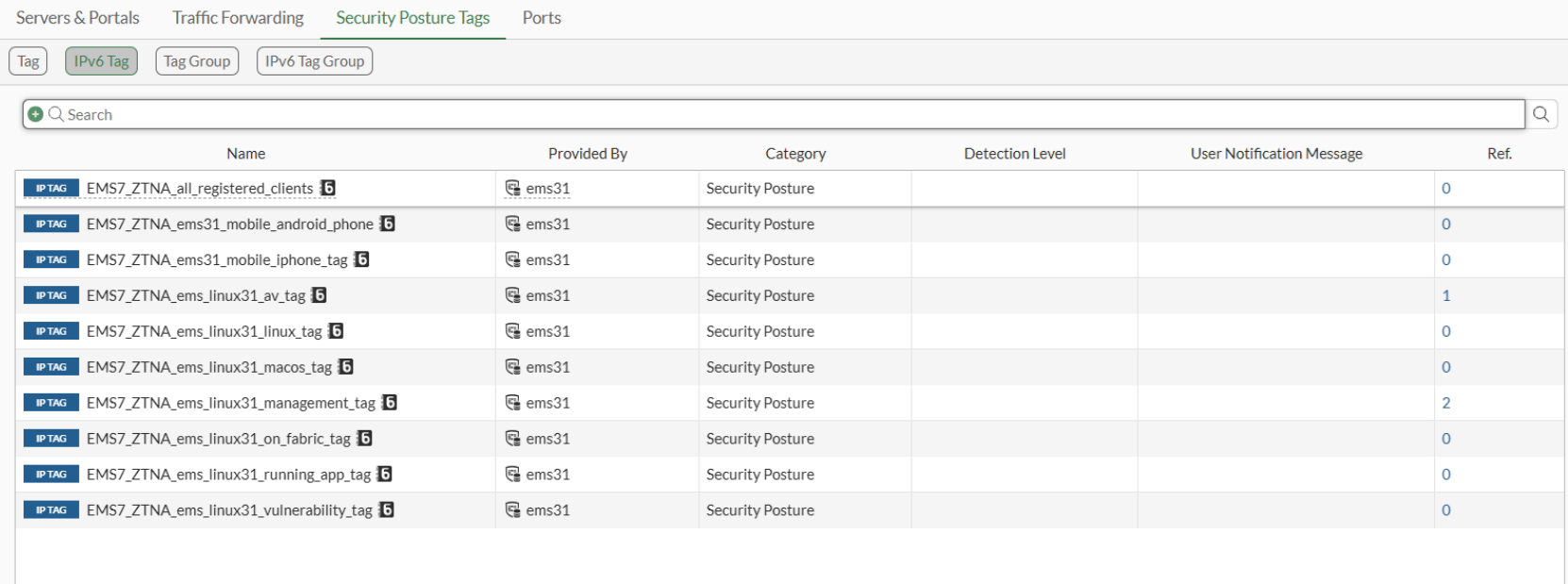
  1. Go to Policy & Objects > ZTNA > Security Posture Tags > IPv6 Tag to verify that FortiGate has IPv6 tags from FortiClient EMS:
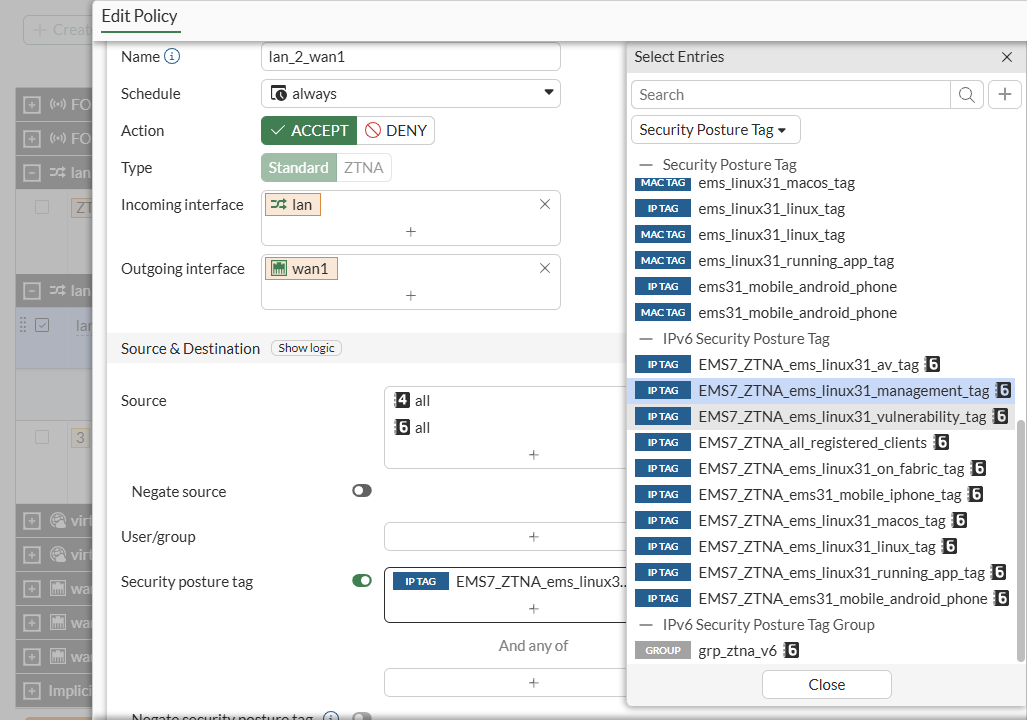
  2. Go to Policy & Objects > Firewall Policy, create or edit a firewall policy with IPv4 and IPv6 source addresses, and add IPv6 EMS security posture tag:
To configure the FortiGate in the CLI:
  1. Verify the EMS tag in the CLI:

    # show firewall address6
    config firewall address6
        ...
        edit "EMS7_ZTNA_ems_linux31_management_tag"
            set uuid 880ef31c-fcba-51f0-e348-1f01acd82c22
            set type dynamic
            set sub-type ems-tag
            set dirty clean
            set obj-tag "ems_linux31_management_tag"
            set tag-type "zero_trust"
        next
        ...
    end
  2. Apply the tag in a firewall policy:

    config firewall policy
        edit 1
            set name "lan_2_wan1"
            set srcintf "lan"
            set dstintf "wan1"
            set action accept
            set ztna-status enable
            set srcaddr "all"
            set dstaddr "all"
            set srcaddr6 "all"
            set dstaddr6 "all"
            set ztna-ems-tag6 "EMS7_ZTNA_ems_linux31_management_tag" 
            set schedule "always"
            set service "ALL"
            set logtraffic all
            set nat enable
        next
    end
    

ZTNA IPv6 examples

ZTNA IPv6 examples

IPv6 can be configured in ZTNA in several scenarios:

  • IPv6 Client — IPv6 Access Proxy — IPv6 Server

  • IPv6 Client — IPv6 Access Proxy — IPv4 Server

  • IPv4 Client — IPv4 Access Proxy — IPv6 Server

  • IPv6 EMS tags in dual stack firewall policies

These examples show the basic configuration for each scenario. It is assumed that the EMS fabric connector is already successfully connected.

Example 1: IPv6 Client — IPv6 Access Proxy — IPv6 Server

To configure the FortiGate:
  1. Configure the IPv6 access proxy VIP:

    config firewall vip6
        edit "zv6"
            set type access-proxy
            set extip 2000:172:18:62::66
            set server-type https
            set extport 6443
            set ssl-certificate "cert"
        next
    end
  2. Configure a virtual host:

    config firewall access-proxy-virtual-host
        edit "vhost_ipv6"
            set ssl-certificate "cert"
            set host "webserver.test.com"
        next
    end

    The client uses this address to connect to the access proxy.

  3. Configure an IPv6 web proxy and IPv6 api-gateway, apply the VIP6 and virtual host to it, and assign an IPv6 address to the realserver:

    config ztna web-proxy
        edit "zs6"
            set vip "zv6"
            set host "vhost_ipv6"
            config api-gateway6
                edit 1
                    config realservers
                        edit 1
                            set ip 2000:172:16:200::209
                        next
                    end
                next
            end
        next
    end
  4. Configure a ZTNA policy:

    config firewall policy
        edit 1
            set name "ztna_rule"
            set srcintf "port2"
            set dstintf "any"
            set action accept
            set srcaddr6 "all" 
            set dstaddr6 "zs6"
            set schedule "always"
            set logtraffic all
        next
    end
To test the configuration:
  1. On an IPv6 client, ensure that the address webserver.test.com resolves to the IPv6 VIP address of 2000:172:18:62::66.

  2. In a browser, connect to https://webserver.test.com:6443.

  3. After device certificate verification, the browser will open up the webpage on the IPv6 real server.

  4. In the Forward Traffic Log, the following log is available:

    1: date=2026-03-03 time=14:46:14 eventtime=1772577974130406404 tz="-0800" logid="0005000024" type="traffic" subtype="ztna" level="notice" vd="root" srcip=2000:10:1:100::214 srcport=55957 srcintf="port2" srcintfrole="undefined" dstcountry="Reserved" srccountry="Reserved" dstip=2000:172:16:200::209 dstport=443 dstintf="port1" dstintfrole="undefined" sessionid=9174 srcuuid="b458a65a-f759-51ea-d7df-ef2e750026d1" dstuuid="01b612e6-174a-51f1-1a3d-b3293e8efa12" service="HTTPS" proxyapptype="ztna-proxy" proto=6 action="accept" policyid=1 policytype="policy" poluuid="693c3e3e-174c-51f1-3e13-715130a1a107" policyname="ztna_rule" appcat="unscanned" duration=129 gatewayid=1 realserverid=1 vip="zv6" vipincomingip=2000:172:18:62::66 accessproxy="zs6" clientdeviceid="9A016B5A6E914B42AD4168C066EB04CA" clientdevicemanageable="manageable" clientdeviceems="FCTEMS8825007166" clientdevicetags="CLASS_Low/ all_registered_clients" clientcert="yes" emsconnection="online" wanin=303009 rcvdbyte=303009 wanout=4424 lanin=4220 sentbyte=4220 lanout=305716 fctuid="9A016B5A6E914B42AD4168C066EB04CA"

Example 2: IPv6 Client — IPv6 Access Proxy — IPv4 Server

To configure the FortiGate:
  1. Configure the IPv6 access proxy VIP:

    config firewall vip6
        edit "zv6"
            set type access-proxy
            set extip 2000:172:18:62::66
            set server-type https
            set extport 6443
            set ssl-certificate "cert"
        next
    end
  2. Configure a virtual host:

    config firewall access-proxy-virtual-host
        edit "vhost_ipv6"
            set ssl-certificate "cert"
            set host "webserver.test.com"
        next
    end

    The client uses this address to connect to the access proxy.

  3. Configure an IPv6 web proxy and api-gateway, apply the VIP6 and virtual host to it, and assign an IPv4 address to the realserver:

    config ztna web-proxy
        edit "zs6"
            set vip "zv6"
            set host "vhost_ipv6"
            config api-gateway
                edit 1
                    config realservers
                        edit 1
                            set ip 172.16.200.209
                        next
                    end
                next
            end
        next
    end
  4. Configure a ZTNA policy:

    config firewall policy
        edit 1
            set name "ztna_rule"
            set srcintf "port2"
            set dstintf "any"
            set action accept
            set srcaddr6 "all" 
            set dstaddr6 "zs6"
            set schedule "always"
            set logtraffic all
        next
    end
To test the configuration:
  1. On an IPv6 client, ensure that the address webserver.test.com resolves to the IPv6 VIP address of 2000:172:18:62::66.

  2. In a browser, connect to https://webserver.test.com:6443.

  3. After device certificate verification, the browser will open up the webpage on the IPv4 real server.

  4. In the Forward Traffic Log, the following log is available:

    1: date=2026-03-03 time=14:46:14 eventtime=1772577974130406404 tz="-0800" logid="0005000024" type="traffic" subtype="ztna" level="notice" vd="root" srcip=2000:10:1:100::214 srcport=55957 srcintf="port2" srcintfrole="undefined" dstcountry="Reserved" srccountry="Reserved" dstip=172.16.200.209 dstport=443 dstintf="port1" dstintfrole="undefined" sessionid=9174 srcuuid="b458a65a-f759-51ea-d7df-ef2e750026d1" dstuuid="01b612e6-174a-51f1-1a3d-b3293e8efa12" service="HTTPS" proxyapptype="ztna-proxy" proto=6 action="accept" policyid=1 policytype="policy" poluuid="693c3e3e-174c-51f1-3e13-715130a1a107" policyname="ztna_rule" appcat="unscanned" duration=129 gatewayid=1 realserverid=1 vip="zv6" vipincomingip=2000:172:18:62::66 accessproxy="zs6" clientdeviceid="9A016B5A6E914B42AD4168C066EB04CA" clientdevicemanageable="manageable" clientdeviceems="FCTEMS8825007166" clientdevicetags="CLASS_Low/ all_registered_clients" clientcert="yes" emsconnection="online" wanin=303009 rcvdbyte=303009 wanout=4424 lanin=4220 sentbyte=4220 lanout=305716 fctuid="9A016B5A6E914B42AD4168C066EB04CA"

Example 3: IPv4 Client — IPv4 Access Proxy — IPv6 Server

To configure the FortiGate:
  1. Configure the IPv4 access proxy VIP:

    config firewall vip
        edit "zv4"
            set type access-proxy
            set extip 172.18.62.66
            set extintf "port2"
            set server-type https
            set extport 4443
            set ssl-certificate "cert"
        next
    end
  2. Configure a virtual host:

    config firewall access-proxy-virtual-host
        edit "vhost_ipv4"
            set ssl-certificate "cert"
            set host "qa.test.com"
        next
    end

    The client uses this address to connect to the access proxy.

  3. Configure an IPv4 web proxy and IPv6 api-gateway, apply the VIP and virtual host to it, and assign an IPv6 address to the realserver:

    config ztna web-proxy
        edit "zs4"
            set vip "zv4"
            set host "vhost_ipv4"
            config api-gateway6
                edit 1
                    config realservers
                        edit 1
                            set ip 2000:172:16:200::209
                        next
                    end
                next
            end
        next
    end
    
  4. Configure a ZTNA policy:

    config firewall policy
        edit 1
            set name "ztna_rule"
            set srcintf "port2"
            set dstintf "any"
            set action accept
            set srcaddr "all" 
            set dstaddr "zs4"
            set schedule "always"
            set logtraffic all
        next
    end
To test the configuration:
  1. On an IPv4 client, ensure that the address webserver.test.com resolves to the IPv4 VIP address of 172.18.62.66.

  2. In a browser, connect to https://webserver.test.com:6443.

  3. After device certificate verification, the browser will open up the webpage on the IPv6 real server.

  4. In the Forward Traffic Log, the following log is available:

    1: date=2026-03-03 time=14:46:14 eventtime=1772577974130406404 tz="-0800" logid="0005000024" type="traffic" subtype="ztna" level="notice" vd="root" srcip=10.1.100.206 srcport=55957 srcintf="port2" srcintfrole="undefined" dstcountry="Reserved" srccountry="Reserved" dstip=2000:172:16:200::209 dstport=443 dstintf="port1" dstintfrole="undefined" sessionid=9174 srcuuid="b458a65a-f759-51ea-d7df-ef2e750026d1" dstuuid="01b612e6-174a-51f1-1a3d-b3293e8efa12" service="HTTPS" proxyapptype="ztna-proxy" proto=6 action="accept" policyid=1 policytype="policy" poluuid="693c3e3e-174c-51f1-3e13-715130a1a107" policyname="ztna_rule" appcat="unscanned" duration=129 gatewayid=1 realserverid=1 vip="zv4" vipincomingip=172.18.62.66 accessproxy="zs4" clientdeviceid="9A016B5A6E914B42AD4168C066EB04CA" clientdevicemanageable="manageable" clientdeviceems="FCTEMS8825007166" clientdevicetags="CLASS_Low/ all_registered_clients" clientcert="yes" emsconnection="online" wanin=303009 rcvdbyte=303009 wanout=4424 lanin=4220 sentbyte=4220 lanout=305716 fctuid="9A016B5A6E914B42AD4168C066EB04CA"

Example 4: IPv6 EMS tags in dual stack firewall policies

To configure the FortiGate:
  1. Go to Policy & Objects > ZTNA > Security Posture Tags > IPv6 Tag to verify that FortiGate has IPv6 tags from FortiClient EMS:

  2. Go to Policy & Objects > Firewall Policy, create or edit a firewall policy with IPv4 and IPv6 source addresses, and add IPv6 EMS security posture tag:

To configure the FortiGate in the CLI:
  1. Verify the EMS tag in the CLI:

    # show firewall address6
    config firewall address6
        ...
        edit "EMS7_ZTNA_ems_linux31_management_tag"
            set uuid 880ef31c-fcba-51f0-e348-1f01acd82c22
            set type dynamic
            set sub-type ems-tag
            set dirty clean
            set obj-tag "ems_linux31_management_tag"
            set tag-type "zero_trust"
        next
        ...
    end
  2. Apply the tag in a firewall policy:

    config firewall policy
        edit 1
            set name "lan_2_wan1"
            set srcintf "lan"
            set dstintf "wan1"
            set action accept
            set ztna-status enable
            set srcaddr "all"
            set dstaddr "all"
            set srcaddr6 "all"
            set dstaddr6 "all"
            set ztna-ems-tag6 "EMS7_ZTNA_ems_linux31_management_tag" 
            set schedule "always"
            set service "ALL"
            set logtraffic all
            set nat enable
        next
    end