

Monitor routing prefix for FGSP session failover
FGSP now supports another method for determining an FGSP peer as unhealthy, by monitoring the health of a routing prefix from RIP, OSPF or BGP. Using this method, FortiGate can prevent network isolation and blackholing by recognizing a critical data path is down. For instance, when peer 1’s path to a certain network no longer exists in the routing table, it will share a not-ready status over FGSP heartbeats so other peers will know not to bounce traffic back to it.
Multiple prefixes can be monitored. However, a bad health status on a prefix will trigger the entire peer as not-ready, not only the specific path. Furthermore, if traffic is failed over to the peer that is not the original owner of the session, then UTM inspection will not apply.
Route monitoring to FGSP peers can be configured in the CLI:
config system standalone-cluster
    config monitor-prefix
        edit <ID>
            set vdom <VDOM name>
            set vrf <VRF ID>
            set prefix <ip address and netmask>
        next
    end
end
Example
In the following configurations, two peers are configured in FGSP. Two routing prefixes are monitored. In the diagram below, traffic travels asymmetrically, but is eventually bounced back to the peer (FGT_1) where the traffic was initiated. This allows the traffic to continue its UTM inspection through the peer.
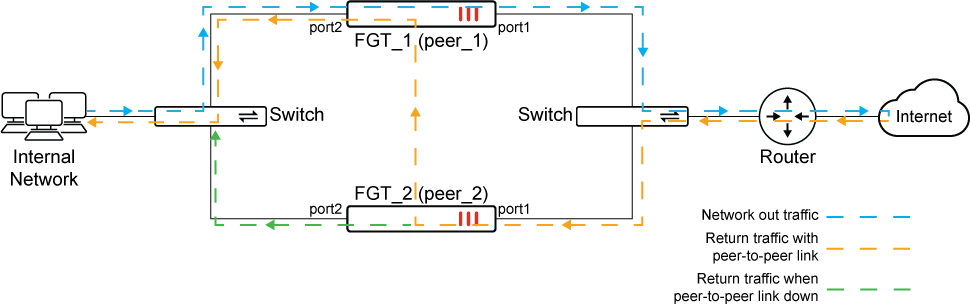
In the scenario that one of the peers (FGT_1) no longer sees a route to a prefix, disrupting the flow of traffic, instead of causing network isolation and blackholing by bouncing the traffic back to the peer (FGT_1), traffic instead continues through the healthy peer (FGT_2).
Note that in this case, traffic does not get scanned by UTM on the healthy peer (FGT_2).
To configure routing prefix monitoring to FGSP:
-
Configure two peers in FGSP:
config system standalone-cluster set standalone-group-id 1 config cluster-peer edit 1 set peerip 10.2.2.2 next end config monitor-prefix edit 1 set vdom "root" set prefix 192.168.2.0 255.255.255.0 next edit 2 set vdom "root" set prefix 20.1.1.0 255.255.255.0 next end end -
Verification:
-
FGT_1 and FGT_2 both learn the network prefix of 20.1.1.0/24 over RIP from the upstream router.
FGT_1 # get router info routing-table all Codes: K - kernel, C - connected, S - static, R - RIP, B - BGP O - OSPF, IA - OSPF inter area N1 - OSPF NSSA external type 1, N2 - OSPF NSSA external type 2 E1 - OSPF external type 1, E2 - OSPF external type 2 i - IS-IS, L1 - IS-IS level-1, L2 - IS-IS level-2, ia - IS-IS inter area V - BGP VPNv4 * - candidate default Routing table for VRF=0 S* 0.0.0.0/0 [10/0] via 172.16.200.254, wan1, [1/0] C 10.1.100.0/24 is directly connected, port1 C 10.2.2.0/24 is directly connected, ha1 R 20.1.1.0/24 [120/2] via 172.16.200.3, wan1, 00:01:46, [1/0] C 172.16.200.0/24 is directly connected, wan1 C 192.168.2.0/24 is directly connected, mgmt -
As such, the health status on peer_1 for both prefixes display healthy=1:
FGT_1 # diagnose test application sessionsync 1 HA is not enabled sync context: sync-enabled=0, sync-tcp=1, sync-nat=0 sync-other=1, sync-exp=1, standalone-sync=1, mtu=0 ipsec-tun-sync=1, encrypt-enabled=0 fgsp-peers-num=1, kernel-filters-num=1 fgsp-peers: vdom=0, ip/port=10.2.2.2:708 fgsp_route_health=1 mon_prefix: vdom=root vrf=0, prefix=192.168.2.0(255.255.255.0) healthy=1 mon_prefix: vdom=root vrf=0, prefix=20.1.1.0(255.255.255.0) healthy=1 -
On peer_2, it sees the health status of peer_1 as ready:
FGT_2 # diagnose sys ha standalone-peers Group=1, ID=2 Detected-peers=1 Peer ready bitmap=0000000100000000 Kernel standalone-peers: num=1. peer0: vfid=0, peerip:port = 10.2.2.1:708, standalone_id=0, ready=1 session-type: send=0, recv=0 packet-type: send=0, recv=0 … -
Traffic originally passes through UTM inspection over peer_1. The return traffic is routed to peer_2, where it will bounce to peer_1, the original FGSP peer for inspection.
-
In the event that the network prefix 20.1.1.0/24 becomes unavailable from peer_1:
FGT_1 # get router info routing-table all Codes: K - kernel, C - connected, S - static, R - RIP, B - BGP O - OSPF, IA - OSPF inter area N1 - OSPF NSSA external type 1, N2 - OSPF NSSA external type 2 E1 - OSPF external type 1, E2 - OSPF external type 2 i - IS-IS, L1 - IS-IS level-1, L2 - IS-IS level-2, ia - IS-IS inter area V - BGP VPNv4 * - candidate default Routing table for VRF=0 S* 0.0.0.0/0 [10/0] via 172.16.200.254, wan1, [1/0] C 10.1.100.0/24 is directly connected, port1 C 10.2.2.0/24 is directly connected, ha1 C 172.16.200.0/24 is directly connected, wan1 C 192.168.2.0/24 is directly connected, mgmt -
Its health status immediately changes to unhealthy (
healthy=0).# diagnose test application sessionsync 1 HA is not enabled sync context: sync-enabled=0, sync-tcp=1, sync-nat=0 sync-other=1, sync-exp=1, standalone-sync=1, mtu=0 ipsec-tun-sync=1, encrypt-enabled=0 fgsp-peers-num=1, kernel-filters-num=1 fgsp-peers: vdom=0, ip/port=10.2.2.2:708 fgsp_route_health=0 mon_prefix: vdom=root vrf=0, prefix=192.168.2.0(255.255.255.0) healthy=1 mon_prefix: vdom=root vrf=0, prefix=20.1.1.0(255.255.255.0) healthy=0 -
peer_2 also detects the not-ready status over the heartbeat packets (
ready=0):FGT_2 # diagnose sys ha standalone-peers Group=1, ID=2 Detected-peers=1 Peer ready bitmap=0000000000000000 Kernel standalone-peers: num=1. peer0: vfid=0, peerip:port = 10.2.2.1:708, standalone_id=0, ready=0 session-type: send=0, recv=0 packet-type: send=0, recv=0 -
Upon peer_1 becoming unavailable or unhealthy, traffic no longer bounces back to peer_1. Instead, it is failed over to peer_2 for processing.
-