
Fortinet white logo
Fortinet white logo

New features and enhancements

New features and enhancements

FortiNDR v7.1 is released to support new generation of HW (gen3) of FortiNDR-3500F which has additional 4 x 10G SFP+ ports, along with bug fixes.

Netflow

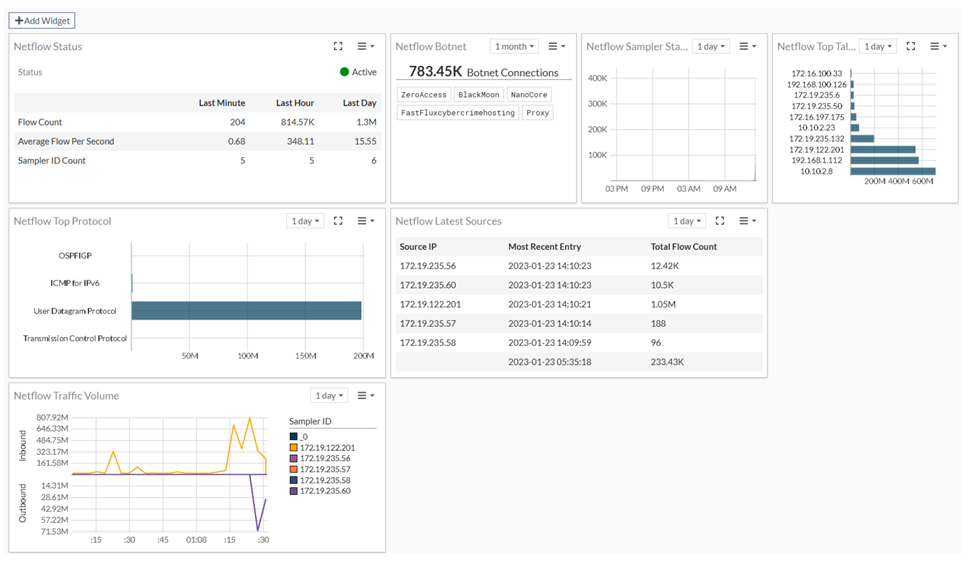
Netflow is a generic network protocol for collecting information about network traffic. It provides data about the source, destination, and volume of network traffic and is used for network monitoring, analysis and security purposes. The information collected by Netflow can be used to monitor network usage, detect anomalies, and identify security threats. FortiNDR v7.2.0 supports the following protocols and versions: NetFlow v5, v9 or IPFIX flow records, SFlow.

Netflow has a dedicated dashboard that can be customized to your needs, as well as Netflow Log monitor where you can create filters to sort and analyze Netflow traffic. A new CLI was created to turn Netflow on and off (the default is on).
Device Enrichment

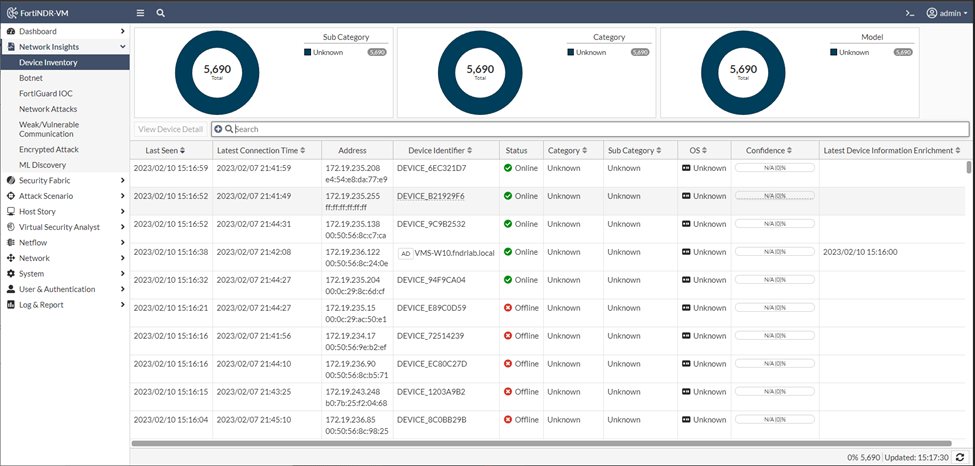
You can improve the Device Identifier by connecting FortiNDR to get the Hostname information from Windows Active Directory and DNS server of the target network. You can configure a Device Information Enrichment profile and FortiNDR will either manually or periodically fetch the latest hostname from AD. After the device information is enriched, you will see AD tag under Device Inventory.
Custom dashboard

FortiNDR 7.2.0 allows you to combine widgets to create custom dashboards. Custom dashboards are useful for SOC when you are looking for specific attacks such as botnet.

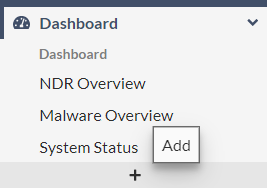
You can add a new dashboard in the navigation menu.
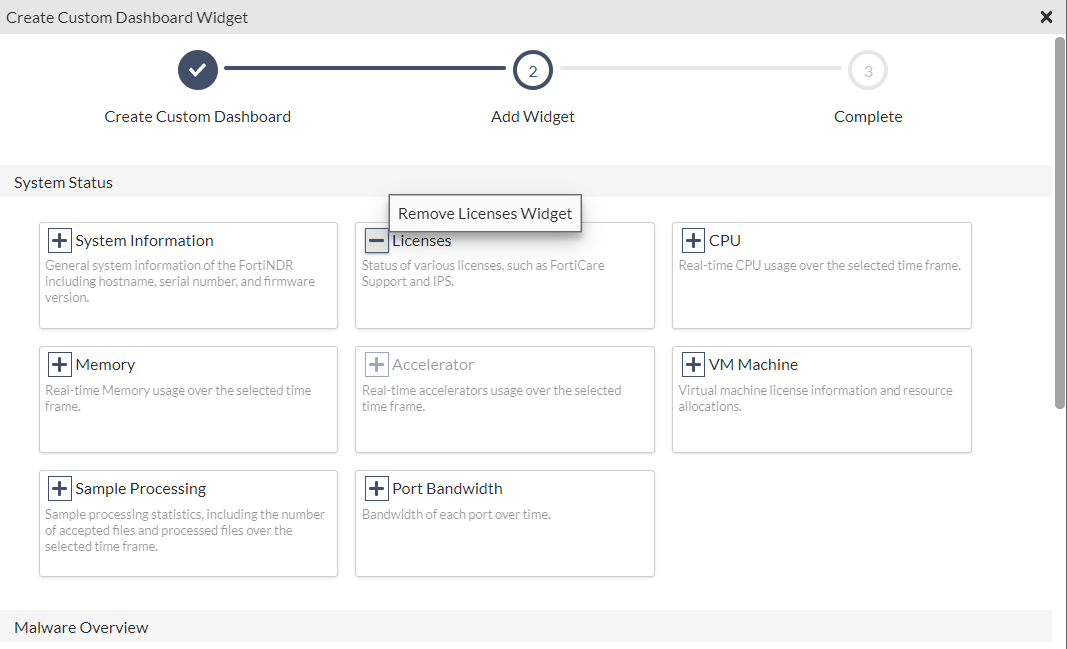
You can add or remove widgets from the widget library.
IPv6 Support

FortiNDR v7.2 supports IPv6 for the following:

  • IPv6 display will share existing source and destination address column. IPv6 is not supported for OFTP, ICAP and API, fabric configuration.
  • Sniffer port file/malware detections show source and destination addresses.
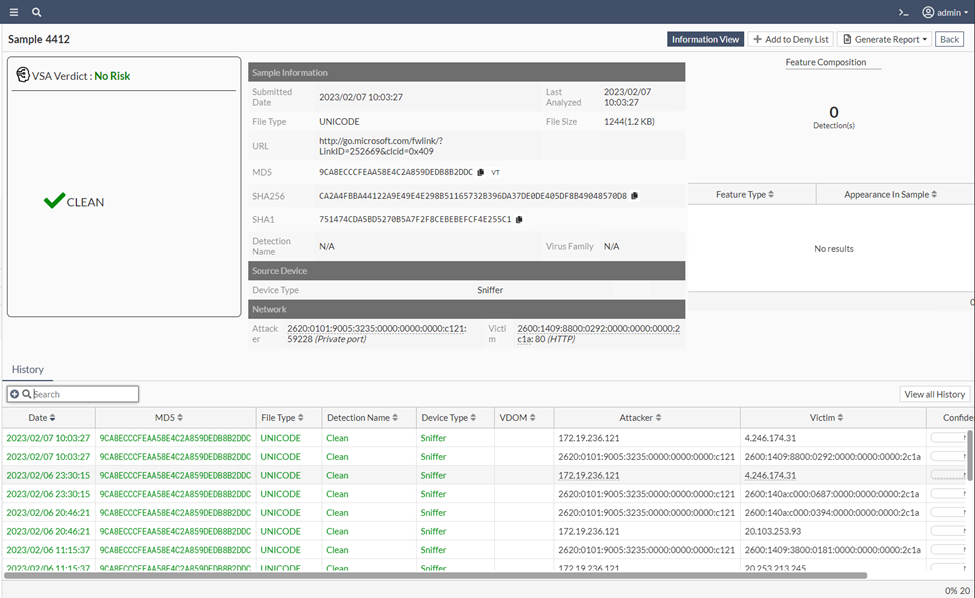
  • IPv6 logging support.

  • IPv6 addresses are shown in session details page.
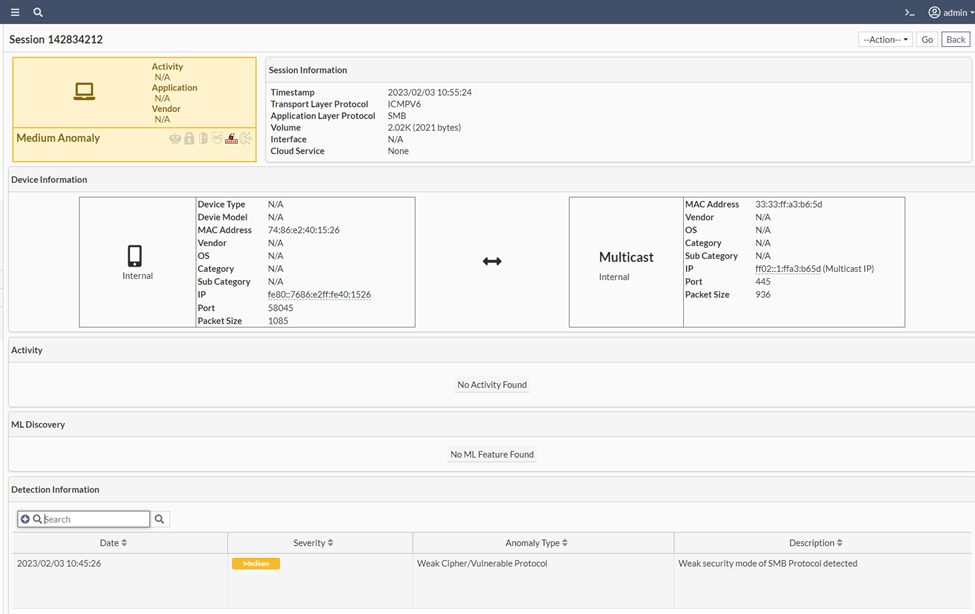
  • IPv6 is supported for ML anomaly detections.
  • Flow IPv6 including Netflow, SFlow and IPFIX.
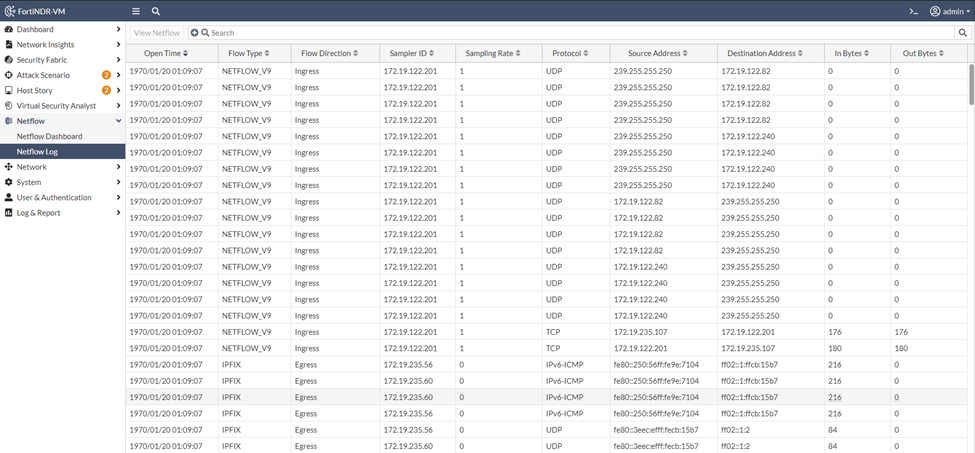
  • IPv6 support in CLI only for interface and routing IPv6 config, webGUI and SSH support.
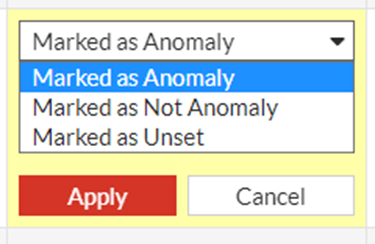
  • Marked as Anomaly can be used to correct a clean decision.
Enhanced API support

  • API for file submission (scan) and verdict returns filename and archive name. new fields are as below:

    Sample upload API update:

    {"results": {"file_id":5,"virus_name":"N/A","md5":"fee6db3a3aa7b72356a40284261776fe","sha256":"4d7c236c1a1c1236fe3edaed2e59fc5166712fd75b79af86d9179b7a5e08465f","sha1":"af66fe8b0747ecf287cf65051f1b0421bb29e724","file_size":270968,"source":"Manual Upload","file_name":"level2-1.png","severity":"No Risk","category":"Clean","family":"N/A","create_date":"2023-01-14","confidence":"N/A","file_type":"PNG","attacker_ip":0,"victim_ip":0,"attacker_port":0,"victim_port":0,"engine_version":1.057,"kdb_version":0,"tmfc":0,"pbit":3,"tfc":0,"parent_fname":"level2.zip","feature_composition":[{"feature_type":"Dropper","appearance_in_sample":1}]}}

    file_name and parent_fname are added into the results.

  • Introduced a new API to start Network Scan. See, Start Network Share scan in the FortiNDR Administration Guide.

DB performance enhancement

FortiNDR 7.2.0 supports new database designs, which result in faster write speed and throughput for NDR and malware scanning.

NFS scan logic improvement

FortiNDR 7.2.0 has improved the logic of NFS scan. If a scan is longer than the scheduled scan time (for example, the scan takes two hours and scheduled scan is to start in an hour and a half), the next scheduled scan will be skipped and event log entry will be created. This new logic avoids queuing added to scan.

Files scanning conserve mode

FortiNDR v 7.2 supports Conserve Mode to prevent the system from locking when the files-per-hour scanned is higher than peak sustainable throughput. The system will enter and exit conserve mode and an event log entry will be created automatically. Backlogs and time are used to consider whether system enters conserve mode.

Additional public cloud support

GCP, Azure and Alibaba images are available for FortiNDR. Please contact your account representative for details and availability in the Market Place.

ML anomaly logic detection

New CLI: Execute cleanup ml, this command will clean up all ML Discovery logs. It also retrains baseline, but keeps user feedback.

  • execute cleanup: Removes all logs including all counts in Dashboard, Malware Log, NDR log, ML Discovery log, but will keep ML baseline and feedback.
  • execute cleanup ndr: Removes logs including NDR related widgets in the Dashboard, NDR log, ML Discovery log. ML baseline and feedback are preserved.

Support for 802.1q trunk-encapsulated traffic

FortiNDR 7.2.0 sniffer supports 802.1q traffic spanning across to sniffer ports. This version does not display the vland id.

New features and enhancements

New features and enhancements

FortiNDR v7.1 is released to support new generation of HW (gen3) of FortiNDR-3500F which has additional 4 x 10G SFP+ ports, along with bug fixes.

Netflow

Netflow is a generic network protocol for collecting information about network traffic. It provides data about the source, destination, and volume of network traffic and is used for network monitoring, analysis and security purposes. The information collected by Netflow can be used to monitor network usage, detect anomalies, and identify security threats. FortiNDR v7.2.0 supports the following protocols and versions: NetFlow v5, v9 or IPFIX flow records, SFlow.

Netflow has a dedicated dashboard that can be customized to your needs, as well as Netflow Log monitor where you can create filters to sort and analyze Netflow traffic. A new CLI was created to turn Netflow on and off (the default is on).

Device Enrichment

You can improve the Device Identifier by connecting FortiNDR to get the Hostname information from Windows Active Directory and DNS server of the target network. You can configure a Device Information Enrichment profile and FortiNDR will either manually or periodically fetch the latest hostname from AD. After the device information is enriched, you will see AD tag under Device Inventory.

Custom dashboard

FortiNDR 7.2.0 allows you to combine widgets to create custom dashboards. Custom dashboards are useful for SOC when you are looking for specific attacks such as botnet.

You can add a new dashboard in the navigation menu.

You can add or remove widgets from the widget library.

IPv6 Support

FortiNDR v7.2 supports IPv6 for the following:

  • IPv6 display will share existing source and destination address column. IPv6 is not supported for OFTP, ICAP and API, fabric configuration.
  • Sniffer port file/malware detections show source and destination addresses.

  • IPv6 logging support.

  • IPv6 addresses are shown in session details page.

  • IPv6 is supported for ML anomaly detections.
  • Flow IPv6 including Netflow, SFlow and IPFIX.

  • IPv6 support in CLI only for interface and routing IPv6 config, webGUI and SSH support.
  • Marked as Anomaly can be used to correct a clean decision.

Enhanced API support

  • API for file submission (scan) and verdict returns filename and archive name. new fields are as below:

    Sample upload API update:

    {"results": {"file_id":5,"virus_name":"N/A","md5":"fee6db3a3aa7b72356a40284261776fe","sha256":"4d7c236c1a1c1236fe3edaed2e59fc5166712fd75b79af86d9179b7a5e08465f","sha1":"af66fe8b0747ecf287cf65051f1b0421bb29e724","file_size":270968,"source":"Manual Upload","file_name":"level2-1.png","severity":"No Risk","category":"Clean","family":"N/A","create_date":"2023-01-14","confidence":"N/A","file_type":"PNG","attacker_ip":0,"victim_ip":0,"attacker_port":0,"victim_port":0,"engine_version":1.057,"kdb_version":0,"tmfc":0,"pbit":3,"tfc":0,"parent_fname":"level2.zip","feature_composition":[{"feature_type":"Dropper","appearance_in_sample":1}]}}

    file_name and parent_fname are added into the results.

  • Introduced a new API to start Network Scan. See, Start Network Share scan in the FortiNDR Administration Guide.

DB performance enhancement

FortiNDR 7.2.0 supports new database designs, which result in faster write speed and throughput for NDR and malware scanning.

NFS scan logic improvement

FortiNDR 7.2.0 has improved the logic of NFS scan. If a scan is longer than the scheduled scan time (for example, the scan takes two hours and scheduled scan is to start in an hour and a half), the next scheduled scan will be skipped and event log entry will be created. This new logic avoids queuing added to scan.

Files scanning conserve mode

FortiNDR v 7.2 supports Conserve Mode to prevent the system from locking when the files-per-hour scanned is higher than peak sustainable throughput. The system will enter and exit conserve mode and an event log entry will be created automatically. Backlogs and time are used to consider whether system enters conserve mode.

Additional public cloud support

GCP, Azure and Alibaba images are available for FortiNDR. Please contact your account representative for details and availability in the Market Place.

ML anomaly logic detection

New CLI: Execute cleanup ml, this command will clean up all ML Discovery logs. It also retrains baseline, but keeps user feedback.

  • execute cleanup: Removes all logs including all counts in Dashboard, Malware Log, NDR log, ML Discovery log, but will keep ML baseline and feedback.
  • execute cleanup ndr: Removes logs including NDR related widgets in the Dashboard, NDR log, ML Discovery log. ML baseline and feedback are preserved.

Support for 802.1q trunk-encapsulated traffic

FortiNDR 7.2.0 sniffer supports 802.1q traffic spanning across to sniffer ports. This version does not display the vland id.
