
Fortinet white logo
Fortinet white logo

New features and enhancements

New features and enhancements

The following is a summary of new features and enhancements in version 7.4.3. For details, see the FortiNDR 7.4.3 Administration Guide in the Document Library.

MITRE ATTACK

The MITRE ATT&CK page has been updated with new features.

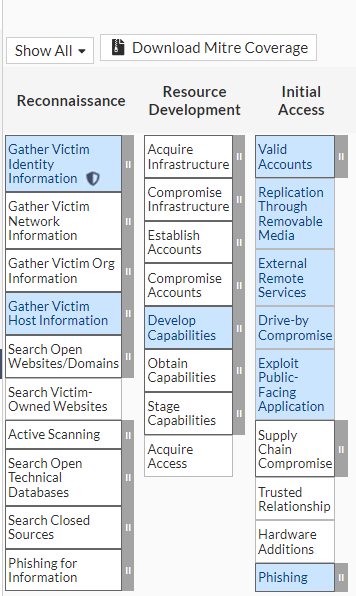
When View All is selected, the MITRE ATT&CK with FNDR coverage blocks are colored light blue. When a MITRE ATT&CK technique detection has been triggered, the technique block will display a shield icon. You can click the blocks to drill down to view the source of the detection in the NDR Anomaly tab.

When Show Coverage is selected, all the technique blocks without FNDR coverage are hidden so that the matrix fits the page. In this view, the colored blocks indicate the MITRE Technique detection has been triggered.

For information, see MITRE ATT&CK.
SNMP

FortiNDR system information and system status can be monitored by utilizing SNMP. When configuring the SNMP manager to connect to FortiNDR’s SNMP agent, you must add the Fortinet proprietary MIBs to have access to Fortinet specific information. For more information, see SNMP.

Additional Public Cloud Support

FortiNDR Center and Sensor are now supported in Azure and GCP. Please refer to Supported Model for details.

Support FortiGuard Override

Users can specify a server for updating FortiGuard updates for FortiNDR . Please see CLI config system fortiguard update for details.

CLI

The following commands were added:

  • diagnose hardware sensorinfo: Use this CLI for monitoring and obtaining information about Power Supply, Temperature, and Fan sensors.
  • config system snmp threshold: Use this command to configure the event types that trigger an SNMP trap.
  • config system snmp community: Use this command to configure simple network management protocol (SNMP) v1/2 settings. These commands apply only if the SNMP agent is enabled.
  • config system snmp user: Use this command to configure SNMP v3 user settings.
  • config system fortiguard update: Five new commands were added.

For more information, see the FortiNDR CLI Reference Guide.

New features and enhancements

New features and enhancements

The following is a summary of new features and enhancements in version 7.4.3. For details, see the FortiNDR 7.4.3 Administration Guide in the Document Library.

MITRE ATTACK

The MITRE ATT&CK page has been updated with new features.

When View All is selected, the MITRE ATT&CK with FNDR coverage blocks are colored light blue. When a MITRE ATT&CK technique detection has been triggered, the technique block will display a shield icon. You can click the blocks to drill down to view the source of the detection in the NDR Anomaly tab.

When Show Coverage is selected, all the technique blocks without FNDR coverage are hidden so that the matrix fits the page. In this view, the colored blocks indicate the MITRE Technique detection has been triggered.

For information, see MITRE ATT&CK.

SNMP

FortiNDR system information and system status can be monitored by utilizing SNMP. When configuring the SNMP manager to connect to FortiNDR’s SNMP agent, you must add the Fortinet proprietary MIBs to have access to Fortinet specific information. For more information, see SNMP.

Additional Public Cloud Support

FortiNDR Center and Sensor are now supported in Azure and GCP. Please refer to Supported Model for details.

Support FortiGuard Override

Users can specify a server for updating FortiGuard updates for FortiNDR . Please see CLI config system fortiguard update for details.

CLI

The following commands were added:

  • diagnose hardware sensorinfo: Use this CLI for monitoring and obtaining information about Power Supply, Temperature, and Fan sensors.
  • config system snmp threshold: Use this command to configure the event types that trigger an SNMP trap.
  • config system snmp community: Use this command to configure simple network management protocol (SNMP) v1/2 settings. These commands apply only if the SNMP agent is enabled.
  • config system snmp user: Use this command to configure SNMP v3 user settings.
  • config system fortiguard update: Five new commands were added.

For more information, see the FortiNDR CLI Reference Guide.