

Upgrade Information
You can upgrade FortiSOAR Cloud using the Cloud portal.
- Log onto the FortiSOAR Cloud Portal and navigate to your FortiSOAR Cloud VM page:
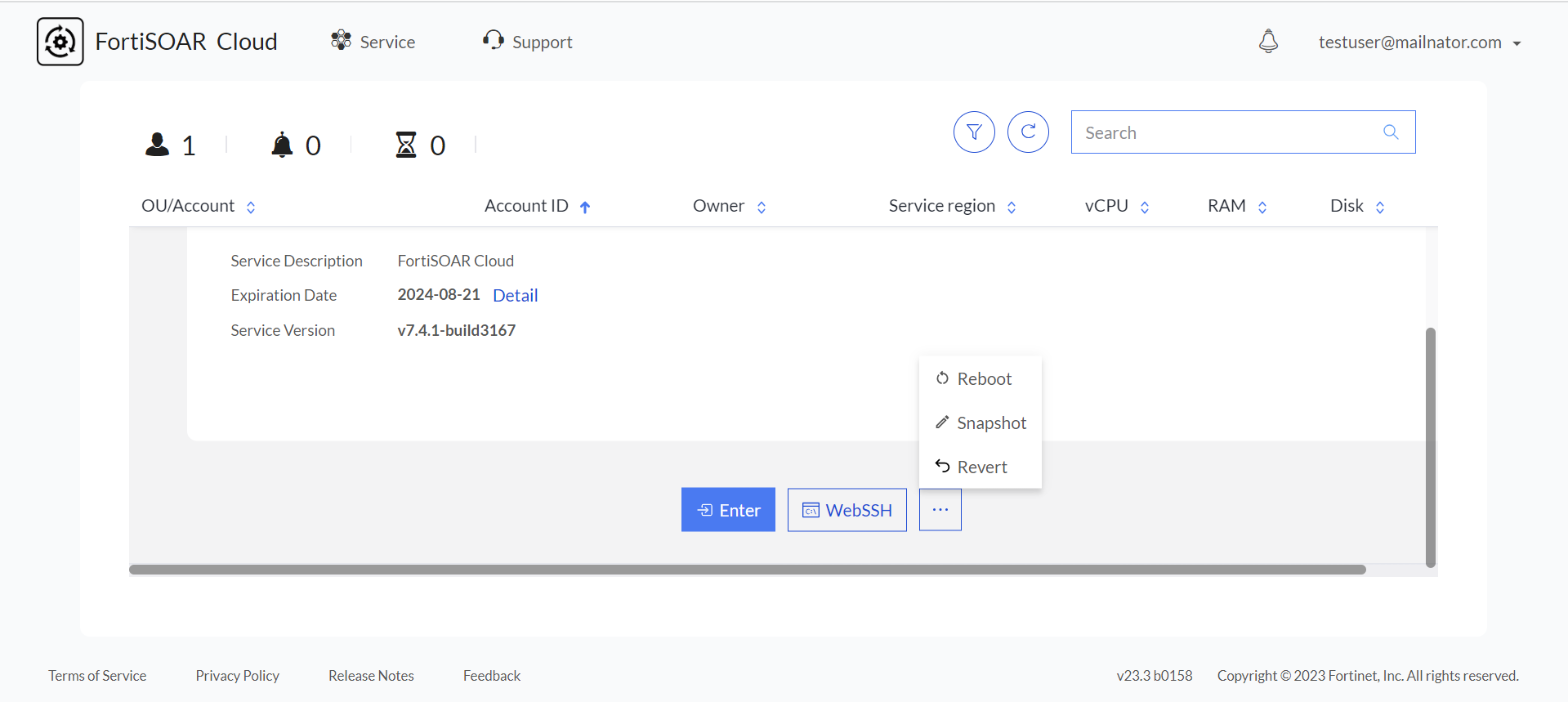
- To take a snapshot, click the Snapshot button.
NOTES:- When a user initiates the snapshot process, you can begin using the system after approximately 5 minutes (even if the snapshot process is in progress) if you have FortiSOAR open in new tab before you begin taking the snapshot.
When a user initiates the snapshot process the FortiSOAR Cloud UI now displays a 'Creating new snapshot' message. The FortiSOAR Cloud UI also indicates the progress of the snapshot creation process, and upon completion, a message saying 'Snapshot Created' is displayed. - The Snapshot, Revert, or Reboot processes should only be initiated by one user at a time. If multiple users attempt to start these processes simultaneously, it may result in unsolvable issues. For example, f there are two users logged in to fortisoar.forticloud.com – one as a SUB user and the other as the Primary user – and the Primary user initiates a snapshot while the SUB user simultaneously attempts to reboot, errors may occur on fortisoar.forticloud.com.
- When a user initiates the snapshot process, you can begin using the system after approximately 5 minutes (even if the snapshot process is in progress) if you have FortiSOAR open in new tab before you begin taking the snapshot.
- Once your FortiSOAR Cloud VM has come up, go to the console of your FortiSOAR Cloud VM by clicking the WebSSH button.
- Check your system to see if
tmuxis installed; if not, use the following command to install itsudo yum install -y tmux
Next, check that you are connected to atmuxsession. Atmuxsession is needed for situations where network connectivity is less than favorable. You can check yourtmuxsession using the following command:# tmux ls
This command returns an output such as the following example:0: 1 windows (created Thu Nov 24 09:37:47 2022) [170x47]
Log back into the SSH console and run the following command to reattach thetmuxsession:tmux attach-session -t 0
If you do not find anytmuxsession, connect to one using the following command:# tmux - To upgrade your FortiSOAR Cloud, use the steps listed in the "Upgrading FortiSOAR" chapter in the FortiSOAR Upgrade Guide.

|
In case the upgrade fails, collect the logs using the FortiSOAR UI. In the FortiSOAR UI, click the FortiSOAR Version Number Build Number link to display the |