

Security Headers
Monitor and review detailed insights for incidents where the security header was modified on payments-related pages.
Unexpected changes to headers can weaken client-side protections. Monitoring header modifications ensures the payment page maintains required security controls and alerts you to risky or non-compliant changes.
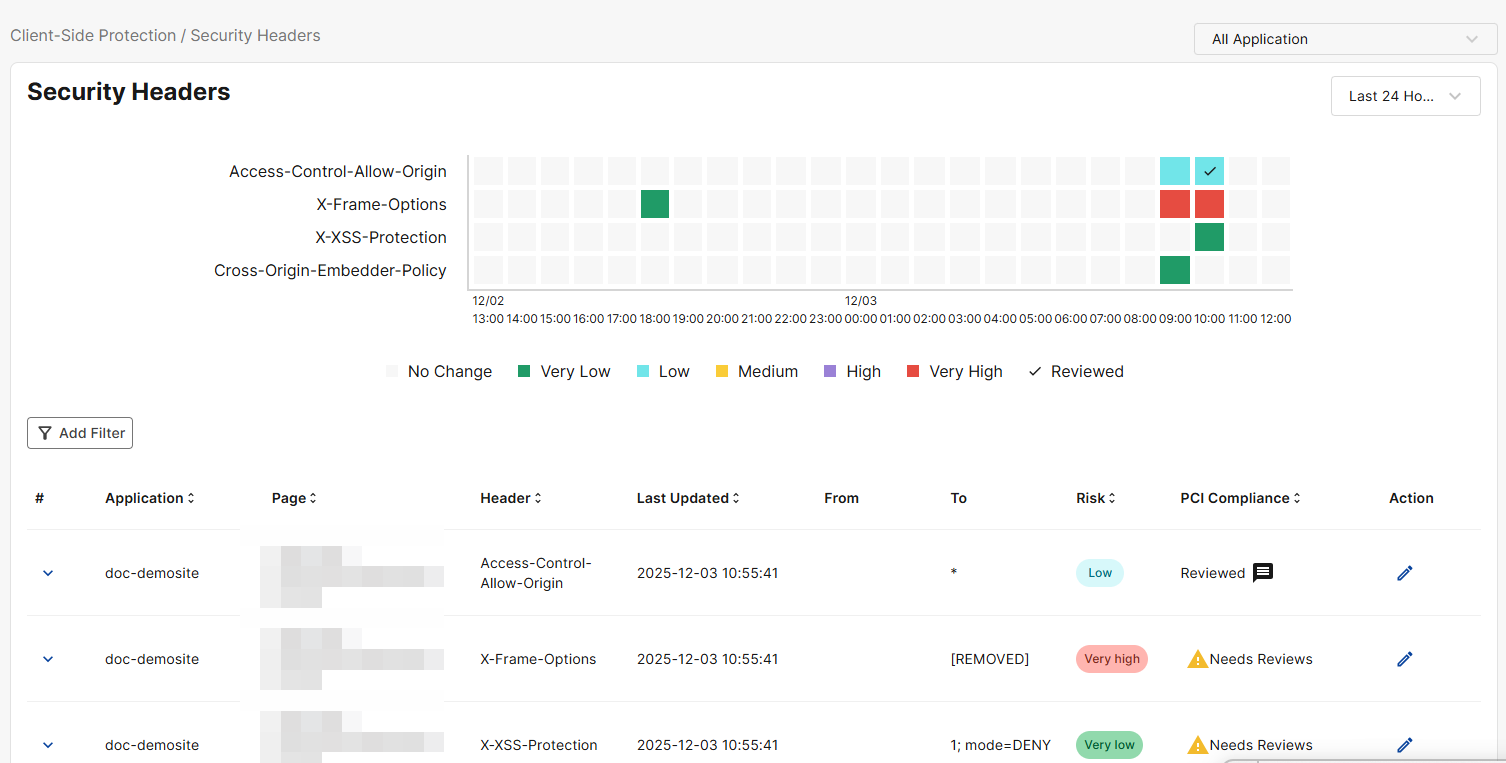
Security Headers graph
Use this graph to track the instances of security header changes over the selected time frame.
The numbers at the bottom of the graph correspond to the date of the detected security header change.
Security header categories
Refer to the table below for descriptions of all security header categories.
|
X-Frame-Options |
Controls whether your site can be displayed inside an iframe to prevent clickjacking attacks. |
|
Access-Control-Allow-Origin |
Specifies which origins are allowed to access your site’s resources via cross-origin requests. |
|
Strict-Transport-Security |
Forces browsers to use HTTPS only, protecting against protocol downgrade and cookie hijacking attacks. |
|
Cross-Origin-Resource-Policy |
Restricts which origins can load your site's resources (e.g., images, scripts) to prevent data leaks. |
|
Cross-Origin-Embedder-Policy |
Requires all embedded resources to explicitly grant permission, enabling secure cross-origin isolation. |
|
Referrer-Policy |
Controls how much referrer information (URL details) the browser sends when navigating away from your site. |
|
Permissions-Policy |
Allows or denies access to powerful browser features (e.g., camera, geolocation, microphone). |
|
X-Content-Type-Options |
Prevents browsers from MIME-type sniffing by enforcing the declared content type (reducing script injection risks). |
|
Content-Security-Policy |
Defines allowed sources for content (scripts, images, styles) to mitigate XSS, data injection, and related attacks. |
|
Cross-Origin-Opener-Policy |
Isolates your browsing context from cross-origin pages to protect against certain cross-origin side-channel attacks (e.g., Spectre-like attacks) and cross-window interference. |
|
X-XSS-Protection |
Legacy header instructing browsers to enable basic cross-site scripting filters (mostly deprecated). |
View cell details
To view the events for a specific cell in the graph, click the cell and the table below will filter to show only the events associated with it.
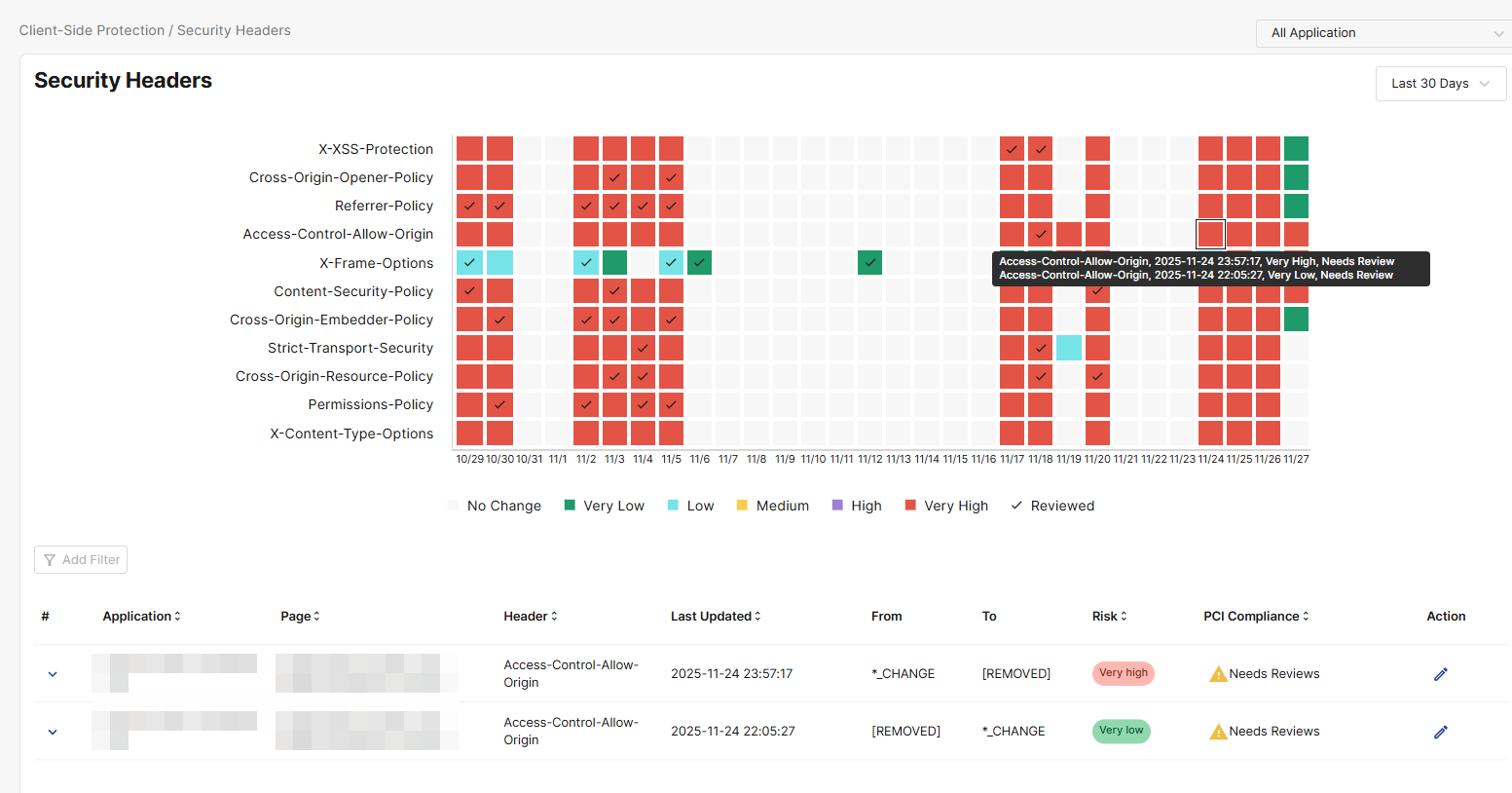
Security Headers table
The table lists all detected security header change events over the selected time period.
To view the events associated with a specific cell in the Security Headers graph, click the cell in the graph and the Security Headers table below will filter to show only those events.
|
Column |
Description |
|---|---|
|
Application |
The application for which the security header change took place. |
|
Page |
The URL of the web page on which the security header change was detected. |
|
Header |
The type of header affected in the change. For descriptions on each security header, please refer to Security header categories. |
|
Last Updated |
The date and time of the most recent activity relating to the tracked incident. |
|
From |
The header value prior to security header change For example, if the header value changed from AAA to BBB, then the From value would be AAA. |
|
To |
The header value prior after the security header change. For example, if the header value changed from AAA to BBB, then the To value would be BBB. If the header was removed in the change, the To value would be [Removed]. |
|
Risk |
The Risk indicates the likelihood that a security header change event poses a security concern.
|
|
PCI Compliance |
Indicates whether the header change incident has been reviewed for PCI DSS 4.0 compliance. Click the edit icon under Action to complete the review. Under PCI DSS 4.0, each JavaScript file and security header configuration on the payment page must include a Justification. The justification demonstrates that the item is intentionally allowed, necessary for business or technical operations, and has been evaluated for risk. This information is used as evidence for internal security teams and QSA auditors. A complete Justification must include:
When writing justifications, include the following elements. These do not need to be long, but the information must be complete:
Sample justification for a CAPTCHA script on a checkout page: Used to provide bot protection and prevent automated card-testing attacks on the payment form. The acquiring bank requires CAPTCHA as part of its fraud prevention controls. |
|
Action |
Click the edit icon to review a script for PCI DSS compliance and enter a Justification. For details on what the Justification must include, please see the description for PCI compliance. Please note, the Block action is not yet supported. |
View Incident details
To view the full, unshortened details of an incident, click it to expand the complete values for From, To, and Last Updated.
