

Dashboard
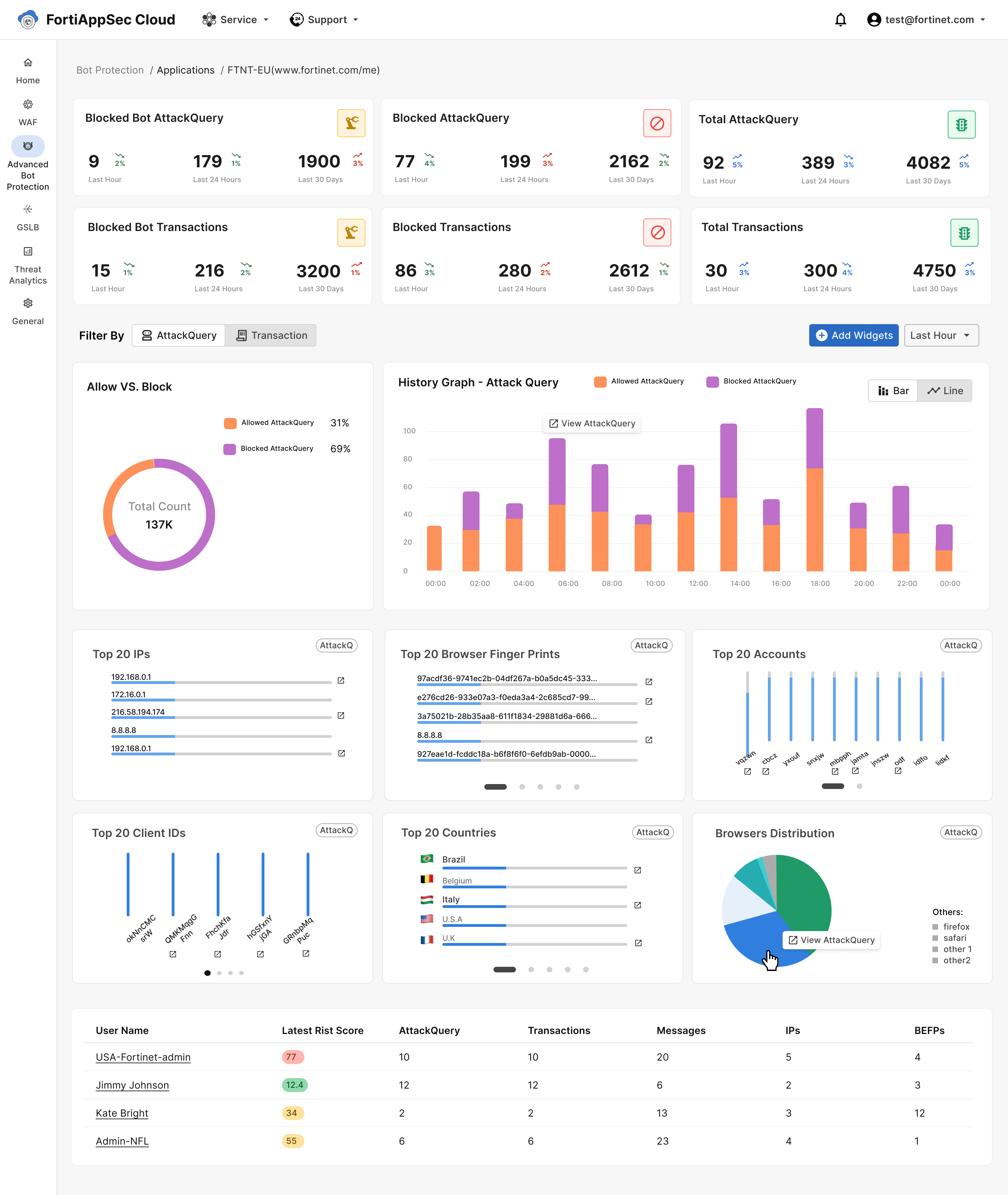
Extract valuable insights using tables and summary graphs that depict your application's traffic data.
Static Components
These components are fixed to your dashboard and cannot be edited or removed.
|
Static Component |
Description |
|---|---|
|
AttackQuery Count |
The count of Blocked Bot AttackQueries, Blocked AttackQueries, and Total AttackQueries over the past hour, 24 hours, and 30 days.
|
| Transactions Count |
The count of Blocked Bot Transactions, Blocked Transactions, and Total Transactions over the past hour, 24 hours, and 30 days.
For more details, see Transactions |
|
Allow VS Block |
Displays the proportion of suggested action = Allow versus suggested action= block, within all AttackQueries or Transaction. Choose whether you want to see this display for attack queries or transactions. Use this pie chart to gain insight on the proportion of malicious bot traffic to benign human or bot traffic. |
| History bar graph |
Click on the Filter By button to choose the data displayed in the graph.
Adjust the time range displayed on the graph by clicking the buttons labeled "last hour," "last 24 hours," and "last 30 days" above the chart. |
| Top Account List Under Threat | List displaying users of your applications ranked from the highest risk score to the lowest. Click on the username to access the account monitoring page for each user. |
Widgets
Customize your dashboard by using widgets to display more information. Widgets present the chosen data in either bar or pie charts and when selected, are positioned between Transactions History Graph and Top Account List Under Threat. Hover your cursor over the charts to view the count associated with each bar or pie slice.

How to add widgets to your dashboard
-
Navigate to TRAFFIC INSIGHTS > Dashboard
-
Click the Widgets button located above the Transactions History Graph. This opens a drop-down menu.
-
Select the widget option(s) you would like displayed on your dashboard.
Widget name
Widget description
Top 20 IPs
20 IPs with the highest transaction counts. Top 20 Browser Fingerprints
20 browser profiles with the highest transaction counts.
Browser fingerprints identify repeat visitors to your website by cross-referencing various browser/device attributes. This includes crawler-specific attributes and browser/OS inconsistencies.
Top 20 Accounts Usernames of 20 accounts with the highest transaction counts. Top 20 Client ID 20 client IDs with the highest transaction counts.
A client ID is a unique identifier for a user's web browser, generated from its configuration, including environment signals and HTTP transport layer information.
Top 20 Countries 20 countries with the highest transaction counts. Browsers Distribution Pie chart displaying the distribution of different browsers accessing your application. Hover over each pie slice to see the represented browser, along with the corresponding count (eg., Chrome: 58). Top 20 UAs 20 user agents with the highest transaction counts. OS Distribution Pie chart illustrating the distribution of operating systems among devices accessing your application. Hover over each pie slice to see the represented operating system, along with the corresponding transaction count (e.g., Windows: 84). Device Distribution Pie chart illustrating the distribution of devices accessing your application. Hover over each pie slice to see the represented device type, along with the corresponding transaction count (e.g., Mac: 32). Top 20 ASN 20 Autonomous System Numbers with the highest transaction counts. Attacks Distribution Pie chart illustrating the distribution of attacks on your application, as detected by FortiAppSec Cloud. Hover over each pie slice to see the represented attack type, along with the corresponding count (eg., Access from bad client: 2). Top 20 Cities 20 cities with the highest transaction counts. Top 20 Emails The top 20 email addresses linked to the highest transaction counts. Top 20 Phone Numbers The top 20 phone numbers linked to the highest transaction counts. Top 20 URLs 20 URLs on your application with the highest transaction counts.