

Onboarding Client-Side Protection
Add Client-Side Protection to an existing WAF application to help meet PCI DSS 4.0 client-side security requirements.
Prerequisites
Before onboarding your CSP Application, ensure you have the following:
-
A corresponding WAF application.
-
A FortiAppSec Cloud Enterprise Plan.
Onboarding Steps
-
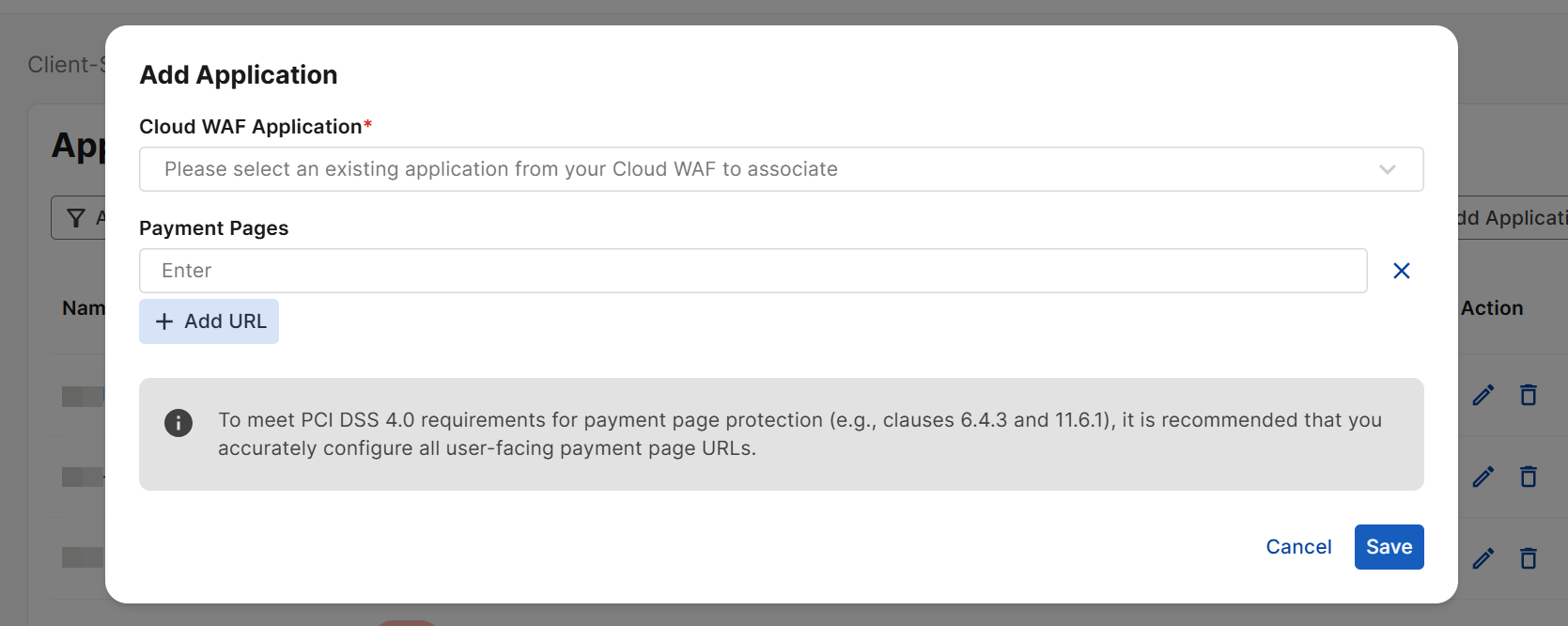
Navigate to Client-Side Protection > Applications, and click Add Application.
-
Enter the following:
Setting
Description
Cloud WAF Application
Select the WAF application to which you want to apply Client-Side Protection. For instructions on onboarding a new WAF application, seeOnboard WAF applications.
Payment Pages
Enter the URL on your Application on which payment transactions occur.
Example input: '
/orders/checkout/'If you have more than one payment URL, click Add URL to enter additional URLs.
For more information on the Applications page, refer to CSP Application.
CSP PCI DSS 4.0 notifications
Enable audit log notifications to track JavaScript and header modifications and help meet PCI DSS 4.0 requirement 11.6.1.
-
Navigate to General > Notifications
-
Scroll to Audit Log Notifications, and click Create.
-
For the Notification Conditions setting, select CSP PCI DSS 4.0.
For more information on the other configurations on this page, refer to Notifications