

Known Attacks
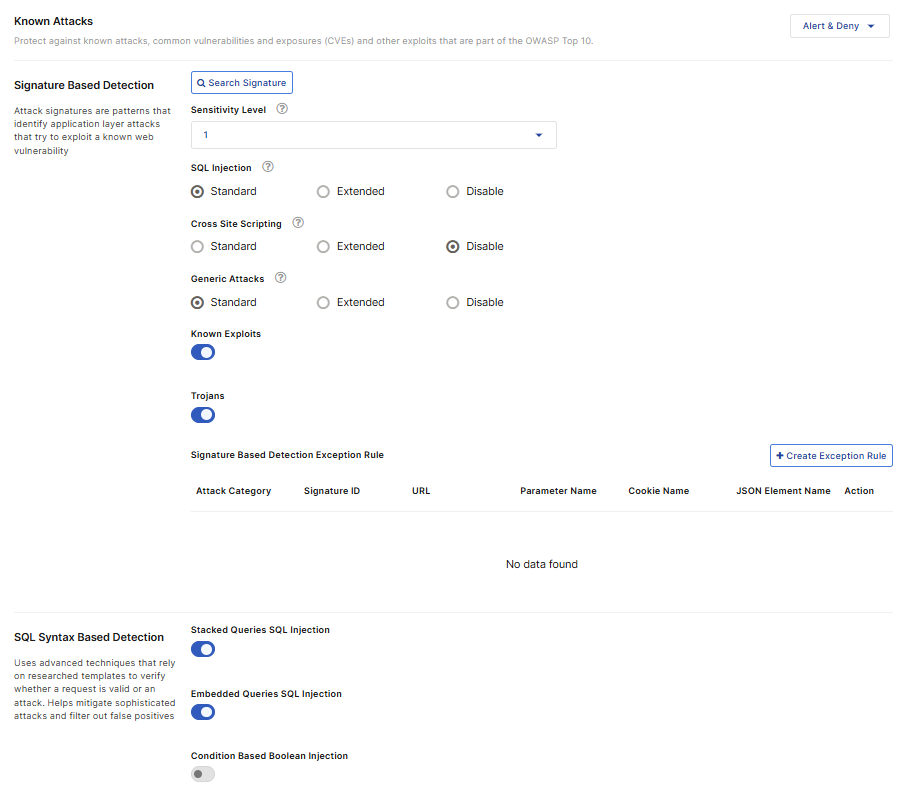
FortiAppSec Cloud leverages continuously updated signatures to defend against OWASP Top 10 threats, including Cross-Site Scripting (XSS), SQL Injection, Generic Attacks, Known Exploits, and Trojans. By parsing packet-level messages, comparing them against the signature database, and applying predefined actions,FortiAppSec Cloud ensures comprehensive protection for your applications.

|
The signature database is updated on the 15th and 31st of each month. You can view the latest updates on the FortiGuard Web Application Security page. New signatures are set to Alert mode by default, and are not editable. Modifications related to known attacks are not applied to these new signatures until the following update cycle. Example: If signature 8888888 is released on March 15th, it will remain in Alert mode from March 15th to March 31st. Any modifications for known attack detection will be applied to this signature after April 1st, during the next update cycle. |
Configure Known Attacks
- Go to WAF > Security Rules > Known Attacks.
You must have already enabled this module in Add Modules. See Add and Remove Modules. - Select the action that FortiAppSec Cloud takes when it detects a violation of the rule from the top right corner.
Alert
Accept the request and generate a log message.
Alert & Deny
Block the request (or reset the connection) and generate a log message.
Deny(no log)
Block the request (or reset the connection) but do not generate log messages.
- If your application is using a template, this page will display the Inherit Template switch next to the action. When enabled, this indicates the module's settings for the current application are inherited from the configured template.

Disabling Inherit Template switches the configuration source for all modules of this application from the template to the application's own settings. This allows for custom adjustments specific to the current application, without affecting other applications sharing the same template.
- For Signature Based Detection, you can use attack signatures to detect application layer attacks that try to exploit a known web vulnerability
Configure these settings.The Sensitivity Level (SL) controls how aggressively FortiAppSec Cloud protects against application signatures across different attack categories. You can choose from four tiers, with SL1 being the least strict and SL4 being the most strict. While higher levels offer more protection by including more signatures, they can also increase the risk of false positives, which may block legitimate traffic.
We recommend selecting an SL based on your application’s security sensitivity, setting it to Monitor mode, and reviewing the Attack Log for signatures triggered during normal access. If too many false positives occur, adjust the SL accordingly.
To see which signatures are included at each sensitivity level:
Navigate to WAF > Application > Security Rules > Known Attacks > Signature Based Detection.
Click Search Signature.
In the Search By dropdown menu, select Sensitivity Level.
Set the desired Sensitivity Level.
Click the magnifying glass icon to perform the search. The included signatures should appear under Signature Information.
Note 1: This setting also affects the Server Information Disclosure and Personally Identifiable Information options under Information Leakage because Sensitivity Level determines how many matching rules are applied to detect response headers and page content. After adjusting Sensitivity Level, review the safeguards described in the Information Leakage section to ensure full protection.
Note 2: A signature's Sensitivity Level is independent of whether it is in standard or extended mode. Mode selection only determines which signatures are active.
SQL Injection
Enable to prevent SQL injection attacks, such as blind SQL injection.
Standard: Detects attacks by comparing application traffic against a set of known malicious signatures.
Extended: Detects attacks by comparing traffic against a larger set of signatures, enhancing detection rates with more granular rules but potentially increasing false positives.
Cross Site Scripting
Enable to prevent a variety of cross-site scripting (XSS) attacks, such as varieties of CSRF (cross-site request forgery).
Standard: Detects attacks by comparing application traffic against a set of known malicious signatures.
Extended: Detects attacks by comparing traffic against a larger set of signatures, enhancing detection rates with more granular rules but potentially increasing false positives.
Generic Attacks
Enable to prevent other common attacks, including a variety of injection threats that do not use SQL, such as local file inclusion (LFI) and remote file inclusion (RFI).
Standard: Detects attacks by comparing application traffic against a set of known malicious signatures.
Extended: Detects attacks by comparing traffic against a larger set of signatures, enhancing detection rates with more granular rules but potentially increasing false positives.
Known Exploits
Enable to prevent known exploits.
Trojans
Enable to prevent malware attacks and prevent accessing Webshell located on server.
If you want to view the details of a specific signature, click Search Signature to find it by CVE Number, Keywords, Attack Category, Signature ID, or Sensitivity Level.
- Click Create Exception Rule to omit attack signature scans when you know that some parameters or URLs cause false positives by matching an attack signature during normal use. Traffic that matches the exception rule(s) bypasses the configured security measures and will not be blocked.
Enable at least one option between Request URL and Parameter Name. Requests matching the specified URL and/or parameter in the exception rule will be exempted from being flagged as attacks.
Request Host Specify the host value (domain name) to match. For example,
www.test.comorapi.test.com.- If String Match is selected, is selected, enter the host name directly. Wildcards are supported (e.g.,
*.test.com). - If Regular Expression Match is selected, you can define a regex pattern to match one or more hostnames. For details, see Frequently used regular expressions.
Request URL
Specify a URL value to match. For example,
/testpage.php, which match requests forhttp://www.test.com/testpage.php.- If String Match is selected, ensure the value starts with a forward slash ( / ) (for example,
/testpage.php). You can enter a precise URL, such as /floder1/index.htm or use wildcards to match multiple URLs, such as /floder1/* ,or /floder1/*/index.htm.String Match may not correctly recognize URLs containing double slashes (//). To avoid matching issues, use Regex Expression Match and allow one or more slashes (e.g.,
setup/+letter_templates_01) to ensure compatibility with normalized URLs.
- If Regular Expression Match is selected, the value does not require a forward slash ( / ). However, ensure that it can match values that contain a forward slash. For details, see Frequently used regular expressions.
Do not include a domain name because it's by default the domain name of this application.
Parameter Name
Specify a parameter name to match. For example,
http://www.test.com/testpage.php?a=1, the parameter name is "a".Enable Check Value to validate both the parameter name and its value. Otherwise, only the parameter name is validated.
Cookie Name
Specify a cookie name to match. Both String Match and Regular Expression Match are supported.
Enable Check Value to validate both the cookie name and its value. Otherwise, only the cookie name is validated.
JSON Elements
Specify the name of the JSON element to match. Both String Match and Regular Expression Match are supported.
Enable Check Value to validate both the JSON element name and its value. Otherwise, only the JSON element name is validated.
HTTP Header Name & Value Specify a HTTP header name to match. Both String Match and Regular Expression Match are supported.
Enable Check Value to validate both the HTTP header name and its value. Otherwise, only the HTTP header name is validated.
Attack Category
Select an attack category in which you want to create an exception for its attacks therein.
Signature ID
The ID for the signature applied to the attack.
Signature Information
Signature description and examples are listed here. You can select any signature ID for the attack and view the signature details.
- If String Match is selected, is selected, enter the host name directly. Wildcards are supported (e.g.,
- SQL Syntax Based Detection, enable the options to detect the corresponding SQL injection types. FortiAppSec Cloud uses an SQL parser to validate whether the pattern is real SQL language. It helps identify true attacks while minimizing false positives.
The syntax-based detection detects an SQL injection attack by analyzing the lexeme and syntax of SQL language rather than using a pattern matching mechanism as the signature-based detection does. -
Stacked Queries SQL Injection
Enable to block attacks that exploit vulnerabilities by appending multiple SQL queries to execute unauthorized commands.
Embedded Queries SQL Injection
Enable to block attacks that insert malicious queries within legitimate ones to manipulate database responses.
Condition-Based Boolean Injection
Enable to block attacks that evaluate true/false conditions in SQL statements to infer sensitive data.
Arithmetic Operation-Based Boolean Injection
Enable to block attacks that leverage arithmetic operations in SQL queries to deduce information based on responses.
Line Comments
Enable to block attacks that use SQL comments to bypass query syntax and inject malicious commands.
SQL Function-Based Boolean Injection
Enable to block attacks that exploit SQL functions to assess query behavior and extract data.
- In XSS Syntax Based Detection, enable theEnable to block attacks that option to detect the corresponding XSS attack types. FortiAppSec Cloud detects an XSS injection attack by analyzing the HTML/JavaScript syntax.
It does HTML document parsing and JavaScript compiling, and checks whether the compiled results include valid HTML and JavaScript codes. -
HTML Tag Based XSS Injection
Enable to block attacks that embed malicious scripts within HTML tags to manipulate webpage behavior.
HTML Attribute Based XSS Injection
Enable to block attacks that inject harmful code into HTML attributes to execute unauthorized actions.
HTML CSS Based XSS Injection
Enable to block attacks that exploit CSS properties in HTML to deliver malicious scripts or alter visual elements.
JavaScript Function Based XSS Injection
Enable to block attacks that insert harmful code into JavaScript functions to execute unauthorized operations.
JavaScript Variable Based XSS Injection
Enable to block attacks that manipulate JavaScript variables to inject and execute malicious scripts.
Syntax Based Detection Exception Rule
Enable to block attacks that excludes specific syntax patterns from triggering security rules, allowing controlled exceptions.
- Click Create Exception Rule to omit Syntax Based attack scans when you know that some parameters or URLs may trigger Syntax Based Detection false positives during normal use. Traffic that matches the exception rule(s) bypasses the configured security measures and will not be blocked.
Request URL
Specify a URL value to match. For example,
/testpage.php, which match requests forhttp://www.test.com/testpage.php.- If String Match is selected, ensure the value starts with a forward slash ( / ) (for example,
/testpage.php). You can enter a precise URL, such as /floder1/index.htm or use wildcards to match multiple URLs, such as /floder1/* ,or /floder1/*/index.htm. - If Regular Expression Match is selected, the value does not require a forward slash ( / ). However, ensure that it can match values that contain a forward slash. For details, see Frequently used regular expressions.
Do not include a domain name because it's by default the domain name of this application.
Parameter Name
Specify a parameter name to match. For example,
http://www.test.com/testpage.php?a=1, the parameter name is "a".Cookie Name
Specify a cookie name to match. Both String Match and Regular Expression Match are supported.
Attack Category
Select an attack category in which you want to create an exception for its attacks therein.
Attack Name
Select the attack name.
Stacked queries SQL injection: The snippet of this attack can be something like "1; delete from users".
Embedded queries: The snippet of this attack can be something like "1 union select username, password from users
1 /*! ; drop table admin */ ".
- If String Match is selected, ensure the value starts with a forward slash ( / ) (for example,
- Click SAVE.