
Fortinet white logo
Fortinet white logo

User Guide

Security Operations Center-as-a-Service (SOCaaS)

Security Operations Center-as-a-Service (SOCaaS)

This page outlines instructions for enabling SOCaaS for Gateways.

For instructions on enabling SOCaaS for WAF applications, please refer to WAF Settings.

Fortinet Security Operations Center-as-a-Service (SOCaaS) offers a cloud-based security monitoring service that analyzes security events generated from your FortiAppSec Cloud, performs alert triage, and escalates confirmed threat notifications. Its key services include:

  • Real-time web application and API security monitoring

  • Clear Call to Action on detected Web Attacks

  • Noise reduction of False Positives and Information alerts

  • Weekly FortiAppSec Cloud executive and threat protection report

To allow the SOCaaS team to perform essential security operations, grant them access to retrieve attack logs from Threat Analytics on FortiCloud.

Enable SOCaaS

  1. Navigate to Threat Analytics > Gateways.

  2. Click Enable SOCaaS for the desired device. This should open the SOCaaS portal.
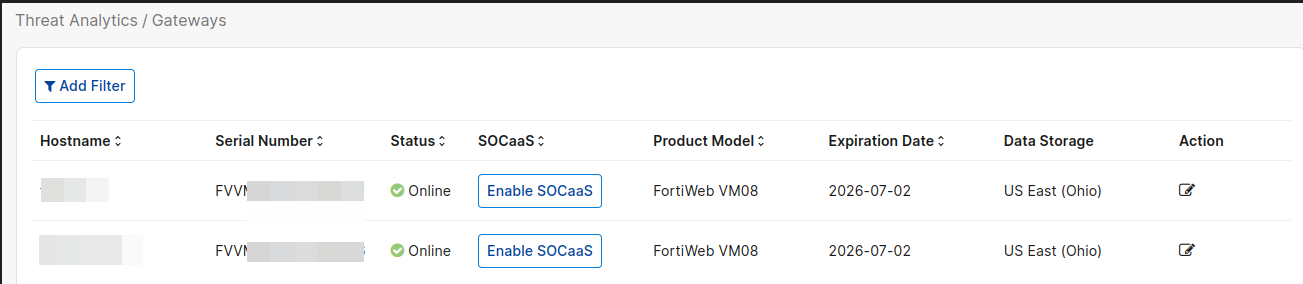
  3. Onboard your device on the SOCaaS portal. For detailed instructions, please refer to the following article: Onboarding FortiWeb or FortiAppSec Cloud.

After onboarding

After you onboard your device through the SOCaaS portal, there is a short waiting period while configuration and service setup complete.

The Gateways page displays the SOCaaS onboarding status.


Once SOCaaS is ready for your device, hover over the SOCaaS status field to view the FortiAnalyzer server settings (address and port) that logs are forwarded to.

Security Operations Center-as-a-Service (SOCaaS)

Security Operations Center-as-a-Service (SOCaaS)

This page outlines instructions for enabling SOCaaS for Gateways.

For instructions on enabling SOCaaS for WAF applications, please refer to WAF Settings.

Fortinet Security Operations Center-as-a-Service (SOCaaS) offers a cloud-based security monitoring service that analyzes security events generated from your FortiAppSec Cloud, performs alert triage, and escalates confirmed threat notifications. Its key services include:

  • Real-time web application and API security monitoring

  • Clear Call to Action on detected Web Attacks

  • Noise reduction of False Positives and Information alerts

  • Weekly FortiAppSec Cloud executive and threat protection report

To allow the SOCaaS team to perform essential security operations, grant them access to retrieve attack logs from Threat Analytics on FortiCloud.

Enable SOCaaS

  1. Navigate to Threat Analytics > Gateways.

  2. Click Enable SOCaaS for the desired device. This should open the SOCaaS portal.

  3. Onboard your device on the SOCaaS portal. For detailed instructions, please refer to the following article: Onboarding FortiWeb or FortiAppSec Cloud.

After onboarding

After you onboard your device through the SOCaaS portal, there is a short waiting period while configuration and service setup complete.

The Gateways page displays the SOCaaS onboarding status.


Once SOCaaS is ready for your device, hover over the SOCaaS status field to view the FortiAnalyzer server settings (address and port) that logs are forwarded to.