
Fortinet white logo
Fortinet white logo

User Guide

Migrating from preceding Fortinet services

Migrating from preceding Fortinet services

FortiAppSec Cloud combines services from the former FortiWeb Cloud, Advanced Bot Protection, and FortiGSLB.

FortiAppSec Cloud key updates

The following features are new to FortiAppSec Cloud and were not available in previous services:

  • New Homepage: A redesigned homepage allowing users to view the status and health of all services in one place.

  • New Domain: The new domain for your web application protection services is now appsec.fortinet.com. Please use this new domain to access your services, as the previous domains will be retired.

WAF and Threat Analytics (previously FortiWeb Cloud)
  • Permissions Management: The user permissions system has been upgraded, providing more flexible configuration options.

GSLB (previously FortiGSLB)
  • Topology Page: A new page that displays the relationships between your configured objects, giving you a clearer view of your configuration flow.

  • Permissions Management: The user permissions system has been upgraded, providing more flexible configuration options.

  • Contract Sharing Mode: Enable Contract Sharing mode to allow all accounts within an organization to utilize the root account's contracts.

ABP (previously FortiGuard ABP)
  • FortiCloud Organization: Integrate your ABP service with FortiCloud Organization, enabling centralized management and control of all Fortinet SaaS solutions.

  • Contract Sharing Mode: Enable Contract Sharing mode to allow all accounts within an organization to utilize the root account's contracts.

Migration Changes

Your applications and logs will be automatically transferred to the new FortiAppSec Cloud backend; however, please make the following adjustments:

FortiWeb Cloud

  • API Change: The API endpoint will change to api.appsec.fortinet.com, and the URL structure will be updated accordingly. If you have not already, please update your applications or API calls to use the new endpoint.

  • Terraform Changes: Please update your Terraform modules to ensure compatibility with the new version.

  • FAZ Requirements: Please verify that the new version meets FortiAnalyzer compatibility requirements.

FortiGSLB

  • API Change: The API endpoint will change to api.appsec.fortinet.com, and the URL structure will be updated accordingly. If you have not already, please update your applications or API calls to use the new endpoint.

  • Complete Organization Migration: Please complete migrating Organizations to FortiCloud before the launch date to ensure a smooth transition into the upgraded service.

FortiGuard ABP

  • Review Permission Profiles: After the launch, please go to the IAM portal and review the newly created permission profiles for FortiAppSec Cloud Application Security to ensure all permissions are correct and aligned with your operational needs.

Contract Migration

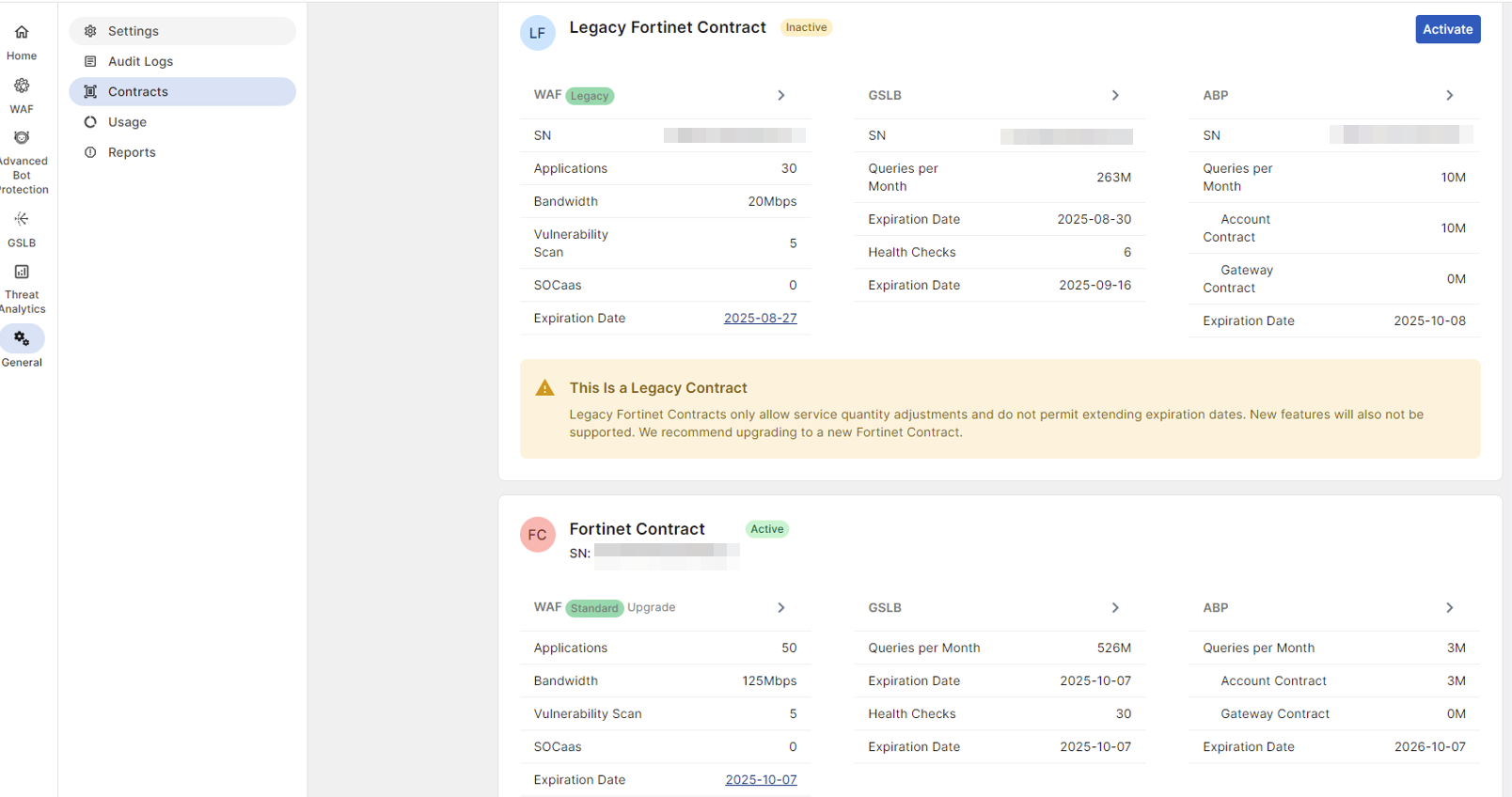
When FortiAppSec Cloud launched on December 1, your existing contract(s) for FortiWeb Cloud, FortiGuard Advanced Bot Protection, and FortiGSLB were transferred to FortiAppSec Cloud in the backend as Legacy Contracts. You can upgrade legacy contracts through co-term to add more applications or bandwidth. However, you

cannot extend their expiration date.
Upgrading to a FortiAppSec Cloud contract

  1. Purchase a FortiAppSec Cloud contract. Depending on your license requirements and billing preferences, you could do this through via FortiFlex, Public Cloud Marketplace, or Fortinet Sales.

    For service continuity and correct licensing, ensure to register the new FortiAppSec Cloud contract under the same Fortinet (FortiCloud/FortiCare) account as your existing legacy service.

  2. After purchasing the new contract, please log into your FortiAppSec Cloud portal and navigate to General > Contracts.

    Only one contract can be active at a time. Before activating your new contract, your legacy contract will remain active.

  3. Click Activate in the new contract to activate it.

Migrating from preceding Fortinet services

Migrating from preceding Fortinet services

FortiAppSec Cloud combines services from the former FortiWeb Cloud, Advanced Bot Protection, and FortiGSLB.

FortiAppSec Cloud key updates

The following features are new to FortiAppSec Cloud and were not available in previous services:

  • New Homepage: A redesigned homepage allowing users to view the status and health of all services in one place.

  • New Domain: The new domain for your web application protection services is now appsec.fortinet.com. Please use this new domain to access your services, as the previous domains will be retired.

WAF and Threat Analytics (previously FortiWeb Cloud)
  • Permissions Management: The user permissions system has been upgraded, providing more flexible configuration options.

GSLB (previously FortiGSLB)
  • Topology Page: A new page that displays the relationships between your configured objects, giving you a clearer view of your configuration flow.

  • Permissions Management: The user permissions system has been upgraded, providing more flexible configuration options.

  • Contract Sharing Mode: Enable Contract Sharing mode to allow all accounts within an organization to utilize the root account's contracts.

ABP (previously FortiGuard ABP)
  • FortiCloud Organization: Integrate your ABP service with FortiCloud Organization, enabling centralized management and control of all Fortinet SaaS solutions.

  • Contract Sharing Mode: Enable Contract Sharing mode to allow all accounts within an organization to utilize the root account's contracts.

Migration Changes

Your applications and logs will be automatically transferred to the new FortiAppSec Cloud backend; however, please make the following adjustments:

FortiWeb Cloud

  • API Change: The API endpoint will change to api.appsec.fortinet.com, and the URL structure will be updated accordingly. If you have not already, please update your applications or API calls to use the new endpoint.

  • Terraform Changes: Please update your Terraform modules to ensure compatibility with the new version.

  • FAZ Requirements: Please verify that the new version meets FortiAnalyzer compatibility requirements.

FortiGSLB

  • API Change: The API endpoint will change to api.appsec.fortinet.com, and the URL structure will be updated accordingly. If you have not already, please update your applications or API calls to use the new endpoint.

  • Complete Organization Migration: Please complete migrating Organizations to FortiCloud before the launch date to ensure a smooth transition into the upgraded service.

FortiGuard ABP

  • Review Permission Profiles: After the launch, please go to the IAM portal and review the newly created permission profiles for FortiAppSec Cloud Application Security to ensure all permissions are correct and aligned with your operational needs.

Contract Migration

When FortiAppSec Cloud launched on December 1, your existing contract(s) for FortiWeb Cloud, FortiGuard Advanced Bot Protection, and FortiGSLB were transferred to FortiAppSec Cloud in the backend as Legacy Contracts. You can upgrade legacy contracts through co-term to add more applications or bandwidth. However, you

cannot extend their expiration date.

Upgrading to a FortiAppSec Cloud contract

  1. Purchase a FortiAppSec Cloud contract. Depending on your license requirements and billing preferences, you could do this through via FortiFlex, Public Cloud Marketplace, or Fortinet Sales.

    For service continuity and correct licensing, ensure to register the new FortiAppSec Cloud contract under the same Fortinet (FortiCloud/FortiCare) account as your existing legacy service.

  2. After purchasing the new contract, please log into your FortiAppSec Cloud portal and navigate to General > Contracts.

    Only one contract can be active at a time. Before activating your new contract, your legacy contract will remain active.

  3. Click Activate in the new contract to activate it.