Fortinet white logo
Fortinet white logo

User Guide

Scripts

Scripts

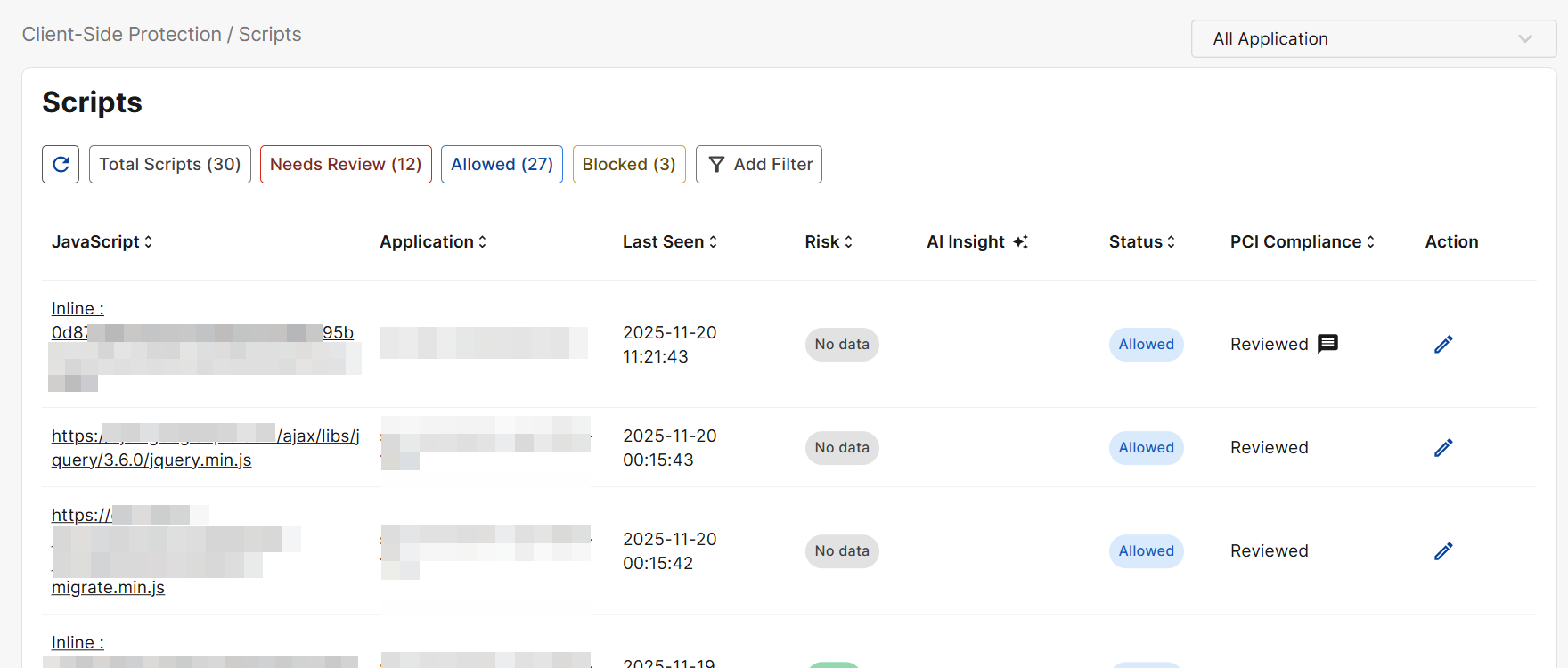
Discover and manage browser-executed scripts, including all first- and third-party scripts, with risk levels, last-seen data, and one-click allow/block controls.

PCI DSS 4.0 requires an inventory and justification for every script that executes on the payment page. Tracking script additions, removals, and modifications ensures only approved, intentional scripts run in the customer’s browser.

Manually reviewing all payment-related scripts is required under PCI DSS. To check the status of the review, see the PCI Compliance column.

Field

Description

Javascript

The javascript detected on your application. Click on this value to see Script Details.

Application

The affected application on which the javascript was detected.

Last Seen

The most recent time this script was observed running on the application.

Risk

The Risk is determined by the Risk Score obtained from FortiGuard's web filtering service.

  • Low: Risk score ≤ 30. Indicates that the script exhibits no suspicious behavior and comes from a source considered safe or commonly used. These scripts typically have a minimal impact on security and require no immediate action.

  • Medium: Risk score between 30 and 60 (inclusive of 30, exclusive of 60). Indicates that the script exhibits behaviors that merit closer review. These domains may not be inherently malicious, but they may introduce potential risk and should be examined.

  • High: Risk score between 60 and 90 (inclusive of 60, exclusive of 90). The script shows strong indicators of malicious or unsafe behavior and may pose a significant security threat; immediate review and action are recommended.

  • Analyzing: Not enough information to conclude the risk level of the domain.

AI Insight

The FortiAI Agent uses the collected telemetry data to provide insights on the script.

Hover over this value to see all assigned malicious labels associated with the javascript.

Status

  • Allowed: This script is permitted to run on your application. It continues to execute normally in users' browsers.

  • Blocked: This script is prevented from running on your application. It will not execute in users’ browsers.

PCI Compliance

Indicates whether the script has been reviewed for PCI DSS 4.0 compliance. Click the edit icon under Action to complete the review.

Please note that reviewing all payment-related scripts is required under PCI DSS.

Action

Click the edit icon to review a script for PCI DSS compliance.

Please note, the Block action is not yet supported.

Script Details

Click on a Javascript value on the Scripts page to view its details.

Field

Description

Javascript

The javascript detected on your application.

Version

When there are multiple varying iterations of the same script, click compare version to view the differences.

Risk

The Risk is determined by the Risk Score obtained from FortiGuard's web filtering service.

  • Analyzing: When risk_score is None (no risk data available). Not enough information to conclude the risk level of the domain.

  • Low: Risk score ≤ 30. Indicates that the script exhibits no suspicious behavior and comes from a source considered safe or commonly used. These domains typically have a minimal impact on security and require no immediate action.

  • Medium: Risk score between 30 and 60 (inclusive of 30, exclusive of 60). Indicates that the domain exhibits behaviors that merit closer review. These domains may not be inherently malicious, but they may introduce potential risk and should be examined.

  • High: Risk score between 60 and 90 (inclusive of 60, exclusive of 90). The domain shows strong indicators of malicious or unsafe behavior and may pose a significant security threat; immediate review and action are recommended.

From Page

The URL of the page on which the script was detected.

Type

  • Inline: Javascript snippets placed directly within the HTML document rather than being loaded from a .js file. For example, this could be code inside <script> tags, or code attached to elements through attributes like onclick or onerror

  • Origin: Javascript that is served from the same domain as your application.

  • 3rd Party: Javascript that is served from a different domain from your application.

Discovered On

The date and time when this script was detected for the first time.

Last Seen

The most recent time this script was observed running on the application.

AI Analysis

A description of the script based on the telemetry data collected by FortiAI.

Malicious Analysis

A description of the malicious effects of the script, as analyzed by FortiAI.

Malicious Indicator

The specific behaviors or attributes that FortiAI determined to be malicious based on its analysis of the script.

Latest Review

Latest manual review of the script. Please note that reviewing all payment-related scripts is required under PCI DSS.

  • Status: Select whether this script is permitted to run on your application and execute in users' browsers.

  • Justification: Leave a comment to describe the rationale behind the Status selection. The justification demonstrates that the item is intentionally allowed, necessary for business or technical operations, and has been evaluated for risk. This information is used as evidence for internal security teams and QSA auditors.

    A complete justification must include:

    • Purpose: Why the script or header is needed.

    • Risk Evaluation: Any associated risks and why those risks are acceptable.

    • Mitigation: Controls that manage or reduce risk (for example, CSP, SRI, or monitoring).

    • When writing justifications, include the following elements. These do not need to be long, but the information must be complete:

    • Business Purpose: What business need does the script or header address?

    • Data/Risk Impact: Does it interact with payment forms or potentially access sensitive data such as PAN, CVV, or cardholder information?

    • Controls/Mitigations: What protections are in place (for example, version locking, domain allowlists, integrity checks, monitoring)?

    • Scope & Ownership: Which URLs does it apply to, and which team is responsible?

    • Exception/Timeline (if applicable): If this is a required relaxation, is it temporary or long-term? What is the remediation plan and timeline?

    Sample justification for a CAPTCHA script on a checkout page: Used to provide bot protection and prevent automated card-testing attacks on the payment form. The acquiring bank requires CAPTCHA as part of its fraud prevention controls.

Scripts

Scripts

Discover and manage browser-executed scripts, including all first- and third-party scripts, with risk levels, last-seen data, and one-click allow/block controls.

PCI DSS 4.0 requires an inventory and justification for every script that executes on the payment page. Tracking script additions, removals, and modifications ensures only approved, intentional scripts run in the customer’s browser.

Manually reviewing all payment-related scripts is required under PCI DSS. To check the status of the review, see the PCI Compliance column.

Field

Description

Javascript

The javascript detected on your application. Click on this value to see Script Details.

Application

The affected application on which the javascript was detected.

Last Seen

The most recent time this script was observed running on the application.

Risk

The Risk is determined by the Risk Score obtained from FortiGuard's web filtering service.

  • Low: Risk score ≤ 30. Indicates that the script exhibits no suspicious behavior and comes from a source considered safe or commonly used. These scripts typically have a minimal impact on security and require no immediate action.

  • Medium: Risk score between 30 and 60 (inclusive of 30, exclusive of 60). Indicates that the script exhibits behaviors that merit closer review. These domains may not be inherently malicious, but they may introduce potential risk and should be examined.

  • High: Risk score between 60 and 90 (inclusive of 60, exclusive of 90). The script shows strong indicators of malicious or unsafe behavior and may pose a significant security threat; immediate review and action are recommended.

  • Analyzing: Not enough information to conclude the risk level of the domain.

AI Insight

The FortiAI Agent uses the collected telemetry data to provide insights on the script.

Hover over this value to see all assigned malicious labels associated with the javascript.

Status

  • Allowed: This script is permitted to run on your application. It continues to execute normally in users' browsers.

  • Blocked: This script is prevented from running on your application. It will not execute in users’ browsers.

PCI Compliance

Indicates whether the script has been reviewed for PCI DSS 4.0 compliance. Click the edit icon under Action to complete the review.

Please note that reviewing all payment-related scripts is required under PCI DSS.

Action

Click the edit icon to review a script for PCI DSS compliance.

Please note, the Block action is not yet supported.

Script Details

Click on a Javascript value on the Scripts page to view its details.

Field

Description

Javascript

The javascript detected on your application.

Version

When there are multiple varying iterations of the same script, click compare version to view the differences.

Risk

The Risk is determined by the Risk Score obtained from FortiGuard's web filtering service.

  • Analyzing: When risk_score is None (no risk data available). Not enough information to conclude the risk level of the domain.

  • Low: Risk score ≤ 30. Indicates that the script exhibits no suspicious behavior and comes from a source considered safe or commonly used. These domains typically have a minimal impact on security and require no immediate action.

  • Medium: Risk score between 30 and 60 (inclusive of 30, exclusive of 60). Indicates that the domain exhibits behaviors that merit closer review. These domains may not be inherently malicious, but they may introduce potential risk and should be examined.

  • High: Risk score between 60 and 90 (inclusive of 60, exclusive of 90). The domain shows strong indicators of malicious or unsafe behavior and may pose a significant security threat; immediate review and action are recommended.

From Page

The URL of the page on which the script was detected.

Type

  • Inline: Javascript snippets placed directly within the HTML document rather than being loaded from a .js file. For example, this could be code inside <script> tags, or code attached to elements through attributes like onclick or onerror

  • Origin: Javascript that is served from the same domain as your application.

  • 3rd Party: Javascript that is served from a different domain from your application.

Discovered On

The date and time when this script was detected for the first time.

Last Seen

The most recent time this script was observed running on the application.

AI Analysis

A description of the script based on the telemetry data collected by FortiAI.

Malicious Analysis

A description of the malicious effects of the script, as analyzed by FortiAI.

Malicious Indicator

The specific behaviors or attributes that FortiAI determined to be malicious based on its analysis of the script.

Latest Review

Latest manual review of the script. Please note that reviewing all payment-related scripts is required under PCI DSS.

  • Status: Select whether this script is permitted to run on your application and execute in users' browsers.

  • Justification: Leave a comment to describe the rationale behind the Status selection. The justification demonstrates that the item is intentionally allowed, necessary for business or technical operations, and has been evaluated for risk. This information is used as evidence for internal security teams and QSA auditors.

    A complete justification must include:

    • Purpose: Why the script or header is needed.

    • Risk Evaluation: Any associated risks and why those risks are acceptable.

    • Mitigation: Controls that manage or reduce risk (for example, CSP, SRI, or monitoring).

    • When writing justifications, include the following elements. These do not need to be long, but the information must be complete:

    • Business Purpose: What business need does the script or header address?

    • Data/Risk Impact: Does it interact with payment forms or potentially access sensitive data such as PAN, CVV, or cardholder information?

    • Controls/Mitigations: What protections are in place (for example, version locking, domain allowlists, integrity checks, monitoring)?

    • Scope & Ownership: Which URLs does it apply to, and which team is responsible?

    • Exception/Timeline (if applicable): If this is a required relaxation, is it temporary or long-term? What is the remediation plan and timeline?

    Sample justification for a CAPTCHA script on a checkout page: Used to provide bot protection and prevent automated card-testing attacks on the payment form. The acquiring bank requires CAPTCHA as part of its fraud prevention controls.