Known Bots
Configuring Known Bots protects your websites, mobile applications, and APIs by blocking known malicious bots (e.g., DoS, Spam, Crawlers) while permitting activity from beneficial bots, such as search engines. This ensures robust security while maintaining the seamless flow of essential traffic.
This feature identifies and manages a wide range of attacks from automated tools no matter where these applications or APIs are deployed.
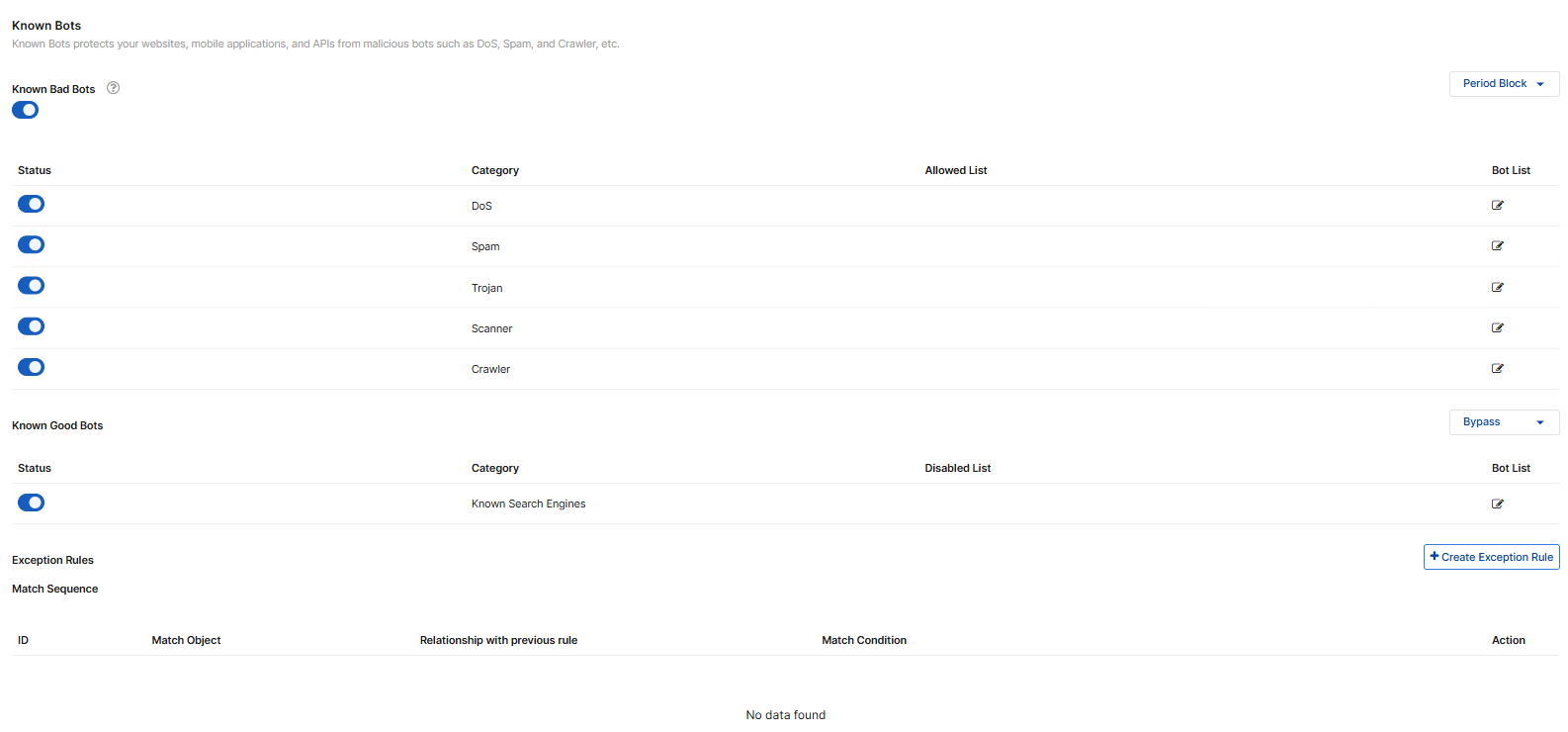
Configure Known Bots settings
- Go to Bot Mitigation> Known Bots.
You must have already enabled this module in Add Modules. See Add and Remove Modules. - Configure these settings.
-
Known Bad Bots
Enable to take the configured action against bad bots using predefined signatures.
Click the Edit icon on each Bot List if you want specific bots to be exempted. The signatures moved to the Allowed List will not be screened against.
Known Good Bots
Enable to take the configured action on known good bots (we recommend configuring bypass or alert for this option). By default, all popular predefined search engines (Google, Bing, Yahoo, etc.) are on the Enabled List.
Click the Edit icon on each Bot List if you want specific bots to be exempted. The search engines moved to the Disabled List will not be screened against.
- Select the action that FortiAppSec Cloud takes when it detects a Known Good or Bad Bot.
Bypass
Accept the request with no generated log or alert.
Alert
Accept the request and generate a log message
Alert & Deny
Block the request (or reset the connection) and generate a log message.
Deny(no log)
Block the request (or reset the connection).
Period Block
Block the current request. Moreover, all the subsequent requests from the same client in the next 10 minutes will also be blocked.
Bypass Accept the request and skip the subsequent scans after known bots in the Sequence of Scans. - Click SAVE.
Configure Exception Policy
Exclude specific parameters or URLs from bot mitigation scans. This is useful when certain elements are known to trigger false positives during normal operations.
For more details, please refer to Exception Policy.