
Fortinet white logo
Fortinet white logo

Administration Guide

Threat Hunting

Threat Hunting

EDR’s Threat Hunting functionality enables you to search for many types of Indicators of Compromise (IOCs) and malware across your entire environment in order to enable enhanced detection. Searching can be based on various attributes of files, registry keys and values, network, processes, event log and activity event types. Search operations apply to both Windows and Linux operating system activity.

Threat Hunting is ideal in situations where you have identified malware on one endpoint and want to search throughout your organization to determine whether this same malware exists on another endpoint, even though it may not be currently running (stealth mode) or in situations where you would like to hunt for the existence of a specific IoC within your organization.

Threat Hunting utilizes activity events, which specify an action taken by an entity. Each type of entity may be involved in a variety of types of actions. An activity event consists of a source (usually a process), an action (the activity event type) and a target (Process, file, Registry key/value, network item(, where the source performs the designated action on the target.

For example, when a process runs, it can perform various actions on files, such as File Open, File Read, File Delete and so on. In this case, the process is the source, and it performs an action such as File Open on a target File.

Note

Activity events are not the same as the security events identified in the Incidents tab. Unlike Incidents tab security events, which are only reported in the Incidents tab as they occur and are detected, activity events are continuously collected based on a wealth of data, activity and actions occurring in your system and the chosen Threat Hunting Profile. See Collection profiles and Collection Exclusions for more information.

EDR categorizes the various actions that can be performed into the following categories:

Action

Description

Registry Key Actions All targets are either registry keys or registry values and all actions are registry-related, such as Key Created, Key Deleted, Value Set and so on.
File Actions All targets identify the target file on which the action was performed and all actions are file-related, such as File Create, File Delete, File Rename and so on.
Process Actions The target is another process and all actions are process related, such as Process Termination, Process Creation, Executable Loaded and so on.
Network Actions The target is a network item (such as connection or URL) and all actions are Network related, such as Socket Connect, Socket Close and Socket Bind.
Event Log Actions The only action is Log Entry Created and relates to the logs of the operating system - Windows and Linux.

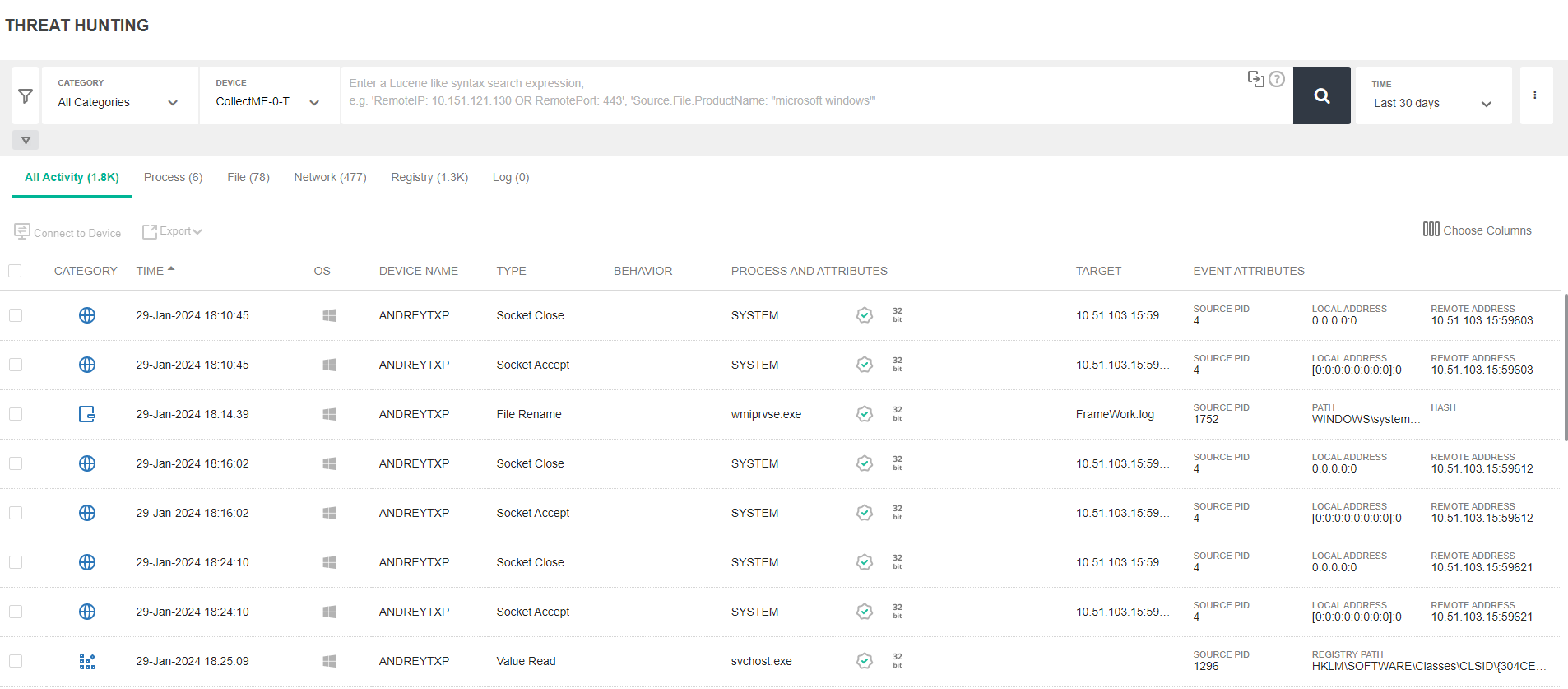
The Threat Hunting page contains the following areas:
To set up Threat Hunting in EDR, configure the following:

Threat Hunting

Threat Hunting

EDR’s Threat Hunting functionality enables you to search for many types of Indicators of Compromise (IOCs) and malware across your entire environment in order to enable enhanced detection. Searching can be based on various attributes of files, registry keys and values, network, processes, event log and activity event types. Search operations apply to both Windows and Linux operating system activity.

Threat Hunting is ideal in situations where you have identified malware on one endpoint and want to search throughout your organization to determine whether this same malware exists on another endpoint, even though it may not be currently running (stealth mode) or in situations where you would like to hunt for the existence of a specific IoC within your organization.

Threat Hunting utilizes activity events, which specify an action taken by an entity. Each type of entity may be involved in a variety of types of actions. An activity event consists of a source (usually a process), an action (the activity event type) and a target (Process, file, Registry key/value, network item(, where the source performs the designated action on the target.

For example, when a process runs, it can perform various actions on files, such as File Open, File Read, File Delete and so on. In this case, the process is the source, and it performs an action such as File Open on a target File.

Note

Activity events are not the same as the security events identified in the Incidents tab. Unlike Incidents tab security events, which are only reported in the Incidents tab as they occur and are detected, activity events are continuously collected based on a wealth of data, activity and actions occurring in your system and the chosen Threat Hunting Profile. See Collection profiles and Collection Exclusions for more information.

EDR categorizes the various actions that can be performed into the following categories:

Action

Description

Registry Key Actions All targets are either registry keys or registry values and all actions are registry-related, such as Key Created, Key Deleted, Value Set and so on.
File Actions All targets identify the target file on which the action was performed and all actions are file-related, such as File Create, File Delete, File Rename and so on.
Process Actions The target is another process and all actions are process related, such as Process Termination, Process Creation, Executable Loaded and so on.
Network Actions The target is a network item (such as connection or URL) and all actions are Network related, such as Socket Connect, Socket Close and Socket Bind.
Event Log Actions The only action is Log Entry Created and relates to the logs of the operating system - Windows and Linux.

The Threat Hunting page contains the following areas:

To set up Threat Hunting in EDR, configure the following: