
Fortinet white logo
Fortinet white logo

Administration Guide

Matched endpoints and resolved addresses

Matched endpoints and resolved addresses

This document clarifies what matched endpoints and resolved addresses are and how they are populated.

Field

Description

How it is populated

Resolved addresses

Dynamic addresses that a FortiGate receives from EMS for tagged endpoints. The endpoints must be connected to a FortiGate directly or via a VPN tunnel. A FortiGate may receive dynamic addresses for endpoints that are not connected to it directly or via VPN if the EMS administrator enables Share all FortiClients. Resolved addresses only applies to IP/MAC access control (zero trust network access (ZTNA) NAC) and does not apply to pure ZTNA.

Endpoint MAC and/or IP addresses shows under Resolved addresses in the FortiOS GUI as a result of /tags API calls that the FortiGate makes towards EMS.

Matched endpoints

List of endpoint information that EMS supplies to FortiOS. Depending on the EMS version, FortiClient Endpoint Sharing configuration, and endpoint location, results can differ. See the different scenarios that this document presents to find out whether to expect matched endpoints to be populated.

Matched endpoints gets populated with EMS's responses to FortiGate's /sysinfo API call.

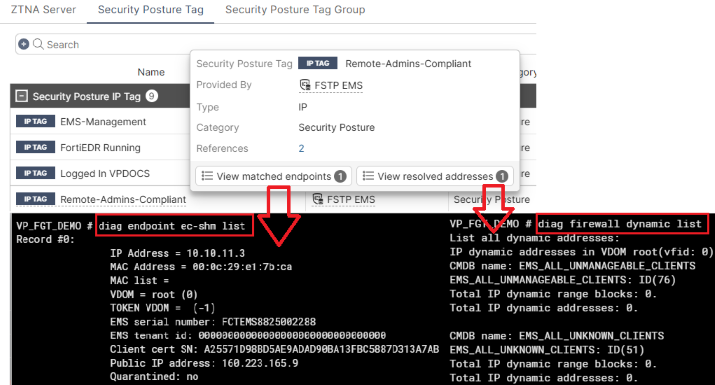
To retrieve resolved addresses and matched endpoints, run the following commands on the FortiGate CLI, respectively:

diagnose firewall dynamic list
diagnose endpoint ec-shm list
ZTNA vs IP/MAC access control

Using ZTNA or IP/MAC access control influences resolved addresses and matched endpoints.

ZTNA

When FortiClient performs ZTNA connection, Resolved addresses is not populated with the endpoint's IP or MAC address.

Resolved addresses only applies to IP/MAC access control as the FortiGate relies on a source address, IP or MAC, to process incoming traffic via firewall policy with security posture tags enforced.

Matched endpoints is populated with the endpoint's information when FortiClient performs ZTNA connection.

IP/MAC access control

When an endpoint's gateway address points to the FortiGate or FortiClient performs direct VPN connection to it, the FortiClient address shows in Resolved addresses. For a directly connected client, the endpoint MAC and IP addresses populate. For a VPN-connected client, only the IP address populates.

FortiGate uses this address to filter incoming traffic and associate it with a tag applied to the firewall policy.

Matched endpoints also populates with directly or VPN-connected FortiClients.

Only share FortiClients connected to this fabric device

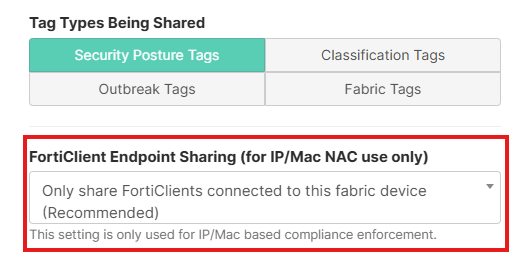
The following sections cover common topological scenarios and how they affect Matched endpoints and Resolved addresses with Only share FortiClients connected to this fabric device selected for FortiClient Endpoint Sharing.
FortiGate as default gateway

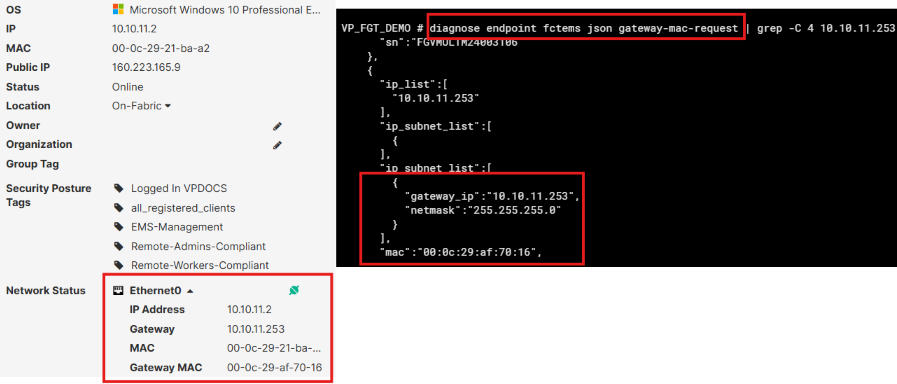
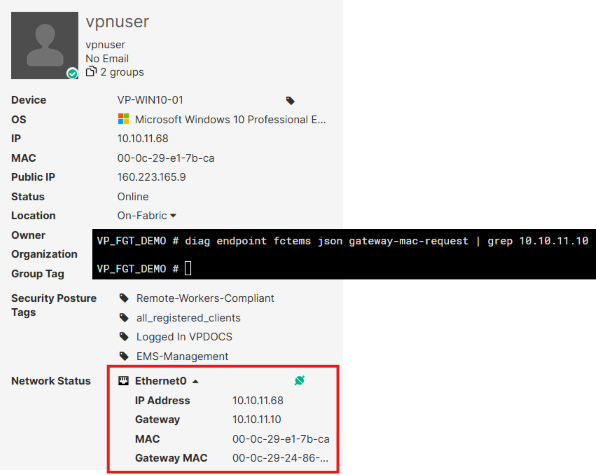
A following contains an endpoint's networking details, including its gateway IP and MAC addresses, which match one of the FortiGate's interfaces as shown in the output of the diagnose endpoint fctems json gateway-mac-request command.
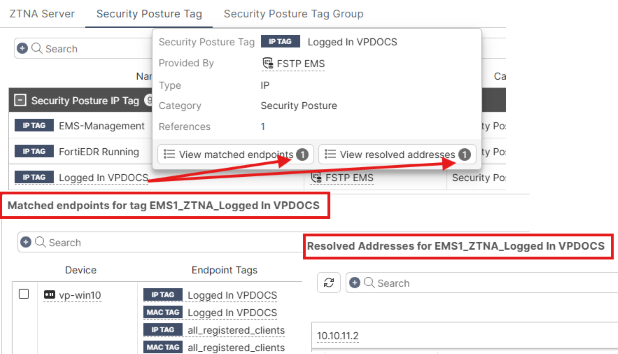
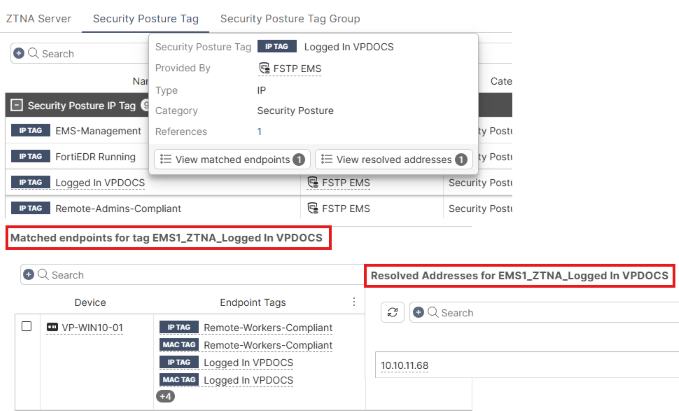
As a result, the endpoint shows under Matched endpoints and Resolved addresses.
FortiGate not as default gateway

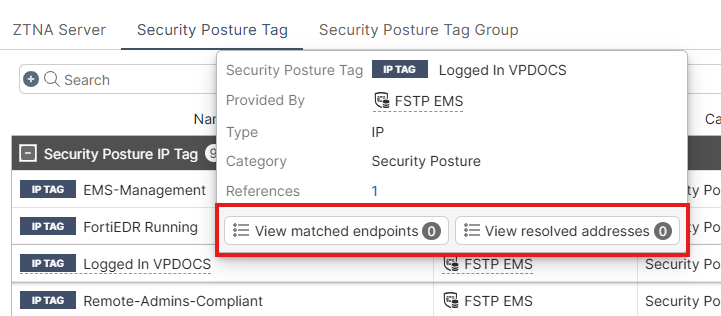
In the following, the FortiClient gateway address does not point to the FortiGate in question.
As a result, the endpoint does not show Matched endpoints or Resolved addresses.
FortiGate as VPN server

This example uses the same endpoint as in FortiGate not as default gateway.

FortiClient is connected to FortiGate VPN.
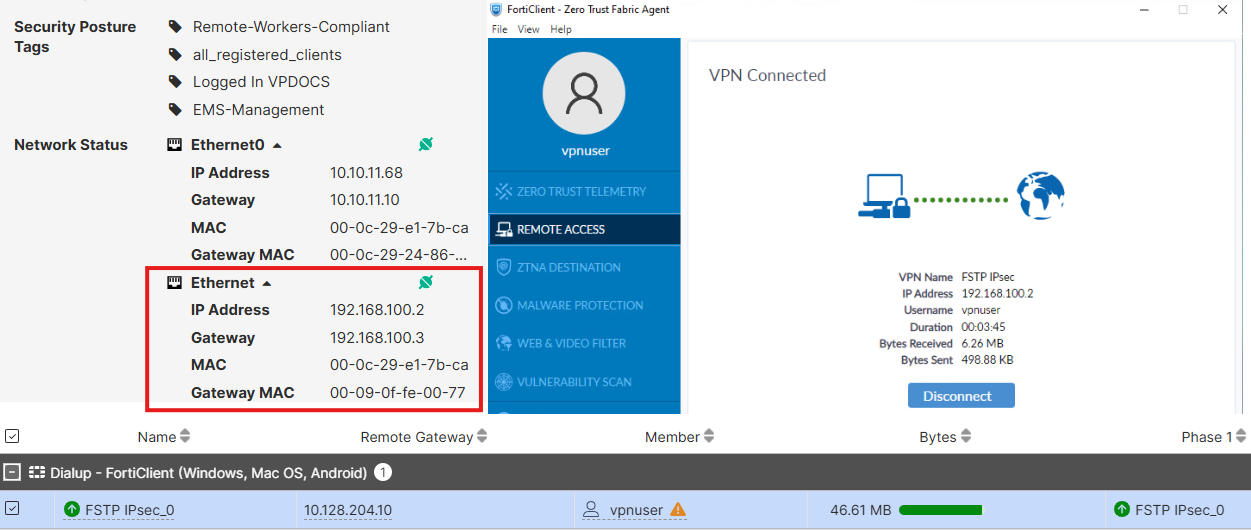
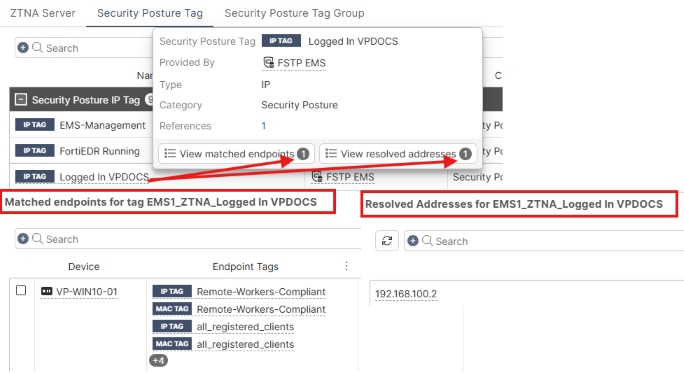
This results in the endpoint showing under both Matched endpoints and Resolved addresses.
Share all FortiClients

You can use Share all FortiClients when the endpoint has no direct connection to FortiGate, neither by having its interface's gateway address pointing to the FortiGate nor having direct VPN connection to it. See Configuring EMS to share tagging information with multiple FortiGates.

Enabling Share all FortiClients results in both Resolved addresses and Matched endpoints being populated for remote FortiClients.
Matched endpoints and resolved addresses

Matched endpoints and resolved addresses

This document clarifies what matched endpoints and resolved addresses are and how they are populated.

Field

Description

How it is populated

Resolved addresses

Dynamic addresses that a FortiGate receives from EMS for tagged endpoints. The endpoints must be connected to a FortiGate directly or via a VPN tunnel. A FortiGate may receive dynamic addresses for endpoints that are not connected to it directly or via VPN if the EMS administrator enables Share all FortiClients. Resolved addresses only applies to IP/MAC access control (zero trust network access (ZTNA) NAC) and does not apply to pure ZTNA.

Endpoint MAC and/or IP addresses shows under Resolved addresses in the FortiOS GUI as a result of /tags API calls that the FortiGate makes towards EMS.

Matched endpoints

List of endpoint information that EMS supplies to FortiOS. Depending on the EMS version, FortiClient Endpoint Sharing configuration, and endpoint location, results can differ. See the different scenarios that this document presents to find out whether to expect matched endpoints to be populated.

Matched endpoints gets populated with EMS's responses to FortiGate's /sysinfo API call.

To retrieve resolved addresses and matched endpoints, run the following commands on the FortiGate CLI, respectively:

diagnose firewall dynamic list
diagnose endpoint ec-shm list

ZTNA vs IP/MAC access control

Using ZTNA or IP/MAC access control influences resolved addresses and matched endpoints.

ZTNA

When FortiClient performs ZTNA connection, Resolved addresses is not populated with the endpoint's IP or MAC address.

Resolved addresses only applies to IP/MAC access control as the FortiGate relies on a source address, IP or MAC, to process incoming traffic via firewall policy with security posture tags enforced.

Matched endpoints is populated with the endpoint's information when FortiClient performs ZTNA connection.

IP/MAC access control

When an endpoint's gateway address points to the FortiGate or FortiClient performs direct VPN connection to it, the FortiClient address shows in Resolved addresses. For a directly connected client, the endpoint MAC and IP addresses populate. For a VPN-connected client, only the IP address populates.

FortiGate uses this address to filter incoming traffic and associate it with a tag applied to the firewall policy.

Matched endpoints also populates with directly or VPN-connected FortiClients.

Only share FortiClients connected to this fabric device

The following sections cover common topological scenarios and how they affect Matched endpoints and Resolved addresses with Only share FortiClients connected to this fabric device selected for FortiClient Endpoint Sharing.

FortiGate as default gateway

A following contains an endpoint's networking details, including its gateway IP and MAC addresses, which match one of the FortiGate's interfaces as shown in the output of the diagnose endpoint fctems json gateway-mac-request command.

As a result, the endpoint shows under Matched endpoints and Resolved addresses.

FortiGate not as default gateway

In the following, the FortiClient gateway address does not point to the FortiGate in question.

As a result, the endpoint does not show Matched endpoints or Resolved addresses.

FortiGate as VPN server

This example uses the same endpoint as in FortiGate not as default gateway.

FortiClient is connected to FortiGate VPN.

This results in the endpoint showing under both Matched endpoints and Resolved addresses.

Share all FortiClients

You can use Share all FortiClients when the endpoint has no direct connection to FortiGate, neither by having its interface's gateway address pointing to the FortiGate nor having direct VPN connection to it. See Configuring EMS to share tagging information with multiple FortiGates.

Enabling Share all FortiClients results in both Resolved addresses and Matched endpoints being populated for remote FortiClients.