

Verified Users
Verified Users shows a list of users who have successfully connected to FortiEndpoint by using an invitation and authenticating using a specified verification method.
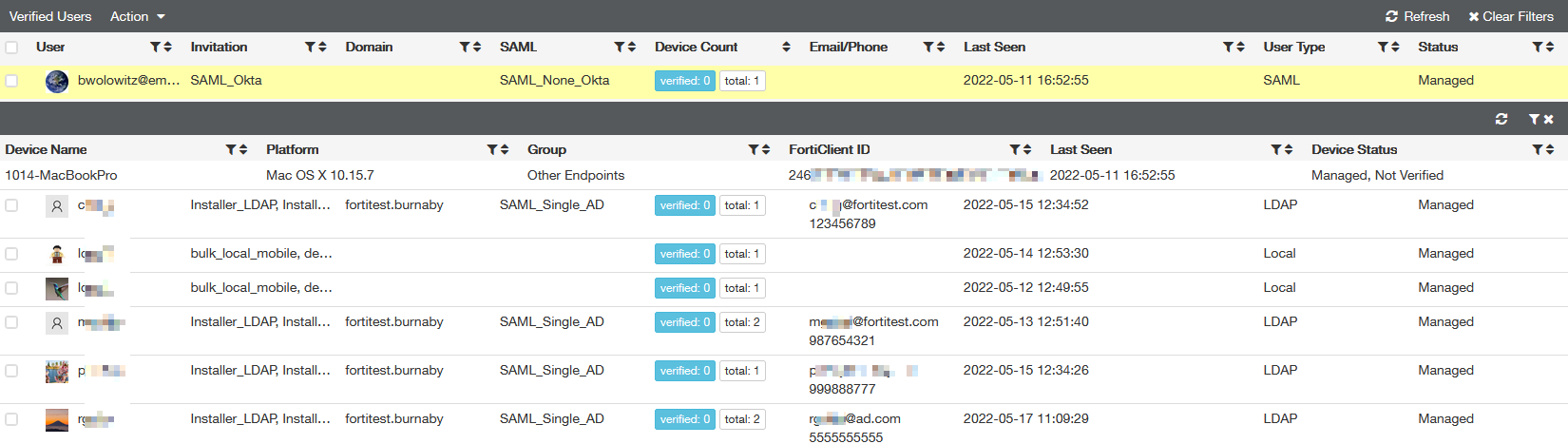
This page displays the following columns of user information:
|
Column |
Description |
|---|---|
|
User |
Username of the connected user. |
|
Invitation |
Names of the invitation(s) that the user received. |
|
Domain |
Domain that the user used to authenticate and connect to EMS, if applicable. |
|
SAML |
SAML server that the user used to authenticate and connect to EMS, if applicable. |
|
Device Count |
Number of devices that the user has connected to EMS. |
|
Email/Phone |
User's email address and phone number. |
|
Last Seen |
Time that the user was last active. |
|
User Type |
Displays the type of authentication the user used to connect to EMS. |
|
Status |
Displays whether the user is currently managed by EMS. |
You can click the user to view the devices that they have currently connected to EMS. The following information displays for devices:
|
Column |
Description |
|---|---|
|
Device Name |
Name of the connected device. |
|
Platform |
Operating system installed on the device. |
|
Group |
Endpoint group that the device belongs to. |
|
FortiClient ID |
ID of the FortiClient instance installed on the device. |
|
Last Seen |
Time that the device was last active. |
|
Device Status |
Displays whether the device is currently managed by EMS and whether the device is licensed. |
You can exclude users from management. This frees up the license seat that the user was consuming.
To exclude users from management:
- Go to User Management > Verified Users.
- Select the desired users.
- From the Action dropdown list, select Exclude from Management.