
Fortinet white logo
Fortinet white logo

What's new

What's new

The following sections describe new features, enhancements, and changes:

Set size limit of ICAP server scan

When creating or editing an ICAP profile under Content Analysis > ICAP Profile, you can now specify the ICAP server scan size limit for a single request within the range of 0-4096 (MB). The default is 0 MB, which means unlimited.
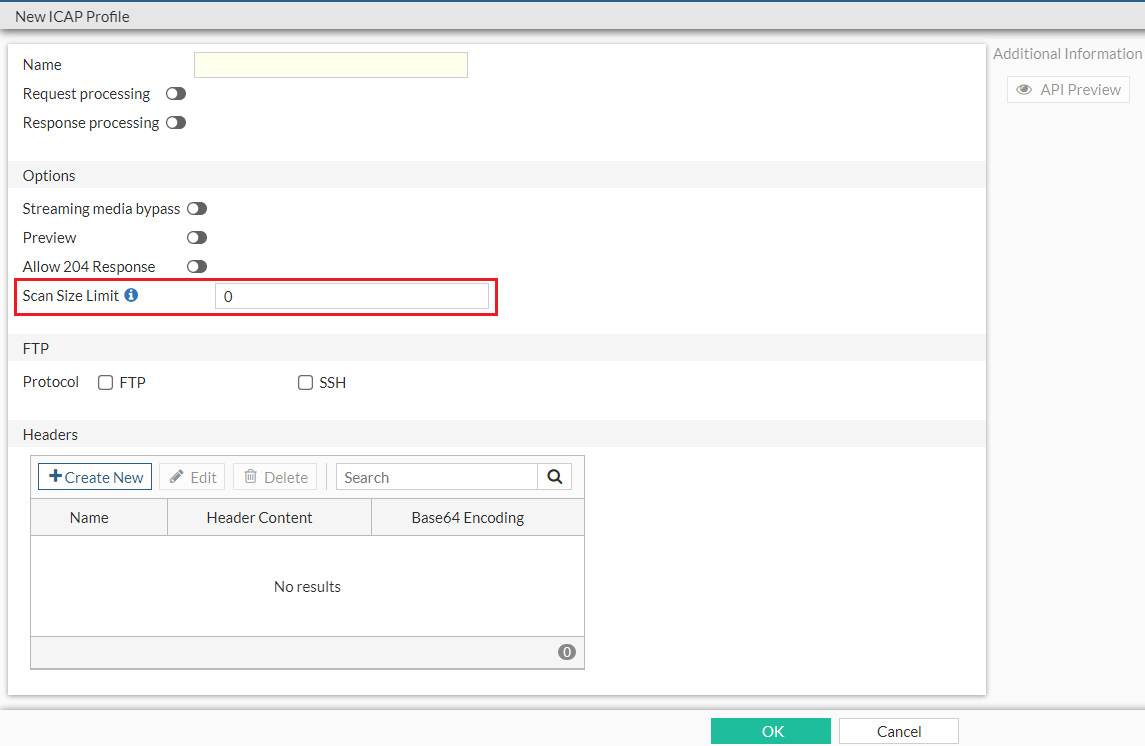
Alternatively, in the CLI, use the set scan-size-limit {integer} option under the config icap profile command to set the ICAP server scan size limit. You can further configure whether to generate an ICAP log for bypassed oversize events using the set scan-oversize-log [disable|enable] option.

Enhancement to forward server monitoring

In Dashboard, the Forward Server Monitor widget includes the new State column to provide more specific state information about the forward server. The state can be one of the following:

  • pending—The forward server is running but pending FQDN resolve. FQDN resolve failure triggers a state change to down.

  • try_once—For forward servers in down state with Health Monitor disabled, FortiProxy periodically switches its state from down to try_once to verify the latest status of the server to avoid situations where a server in down state is ignored in all subsequent health state checks.

  • busy—The forward server is running but unstable.

  • down—The forward server is not running and connections are blocked.

In the CLI, the following enhancements are applied to forward server monitoring:

  • New diagnose command diag wad webproxy forward-server detail to display the state of each worker.

  • New diagnose commands diag debug en and diag wad webproxy forward-server arbiter to list all forward servers known by the arbiter, the status of each server, and the last time when the status of each server was evaluated.

  • The diag wad webproxy forward-server command now displays the following additional information:

    • Number of successful, failed, ongoing, and total traffic through the forward server.

    • Number of blocked connection by that specific forward server.

  • The diag wad webproxy forward-server-group command now displays the following additional information:

    • Number of blocked connections.

    • Number of workers that load the forward server into memory.

Diagnose transceivers of an interface

Under Network > Interfaces, for models that support transceivers, the Transceiver(s) column is available which shows information about transceivers plugged into the FortiProxy, including the vendor name and part number. You can hover over the transceiver to view additional information, such as the type, serial number, and port name.

Alternatively, use the new get system interface transceiver <interface name> command to diagnose interface transceivers. Interface name must be one of the following:

  • port3

  • port4

  • port7

  • port8

Example output:

fortiproxy1-nh # get sys interface transceiver port3

Interface port3 - Transceiver is not detected.

fortiproxy1-nh # get sys interface transceiver

Interface port3 - Transceiver is not detected.

Interface port4 - Transceiver is not detected.

Interface port7 - Transceiver is not detected.

Interface port8 - SFP/SFP+ (10.3G)

Vendor Name : AVAGO

Part No. : AFBR-709ASMZ

Serial No. : AA14393JMGU

Optical Optical Optical

SFP/SFP+ Temperature Voltage Tx Bias Tx Power Rx Power

Interface (Celsius) (Volts) (mA) (dBm) (dBm)

------------ ------------ ------------ ------------ ------------ ------------

port8 29.1 3.34 5.44 -2.3 -6.1

++ : high alarm, + : high warning, - : low warning, -- : low alarm, ? : suspect.

New command to configure trust hosts

Under config system admin, use the new config trusthosts command to configure a list of trust hosts without the limitation of only 10 trust hosts using the existing set trusthostX command:

config trusthosts

Description: Table of trusthosts.

edit <id>

set type [ipv4|ipv6]

set ipv4 {ipv4-classnet}

set ipv6 {ipv6-prefix}

next

end

Add local URL list as data source for firewall

To add local URL list as data source for firewall via CLI:
  1. Define the local URL list in web filter:
    config  webfilter url-list

    edit <name>

    set uuid {uuid}

    set status [enable|disable]

    set comment {var-string}

    config entries

    edit <url>

    next

    end

    next

    end

  2. Configure the firewall proxy or the to use the local URL list:
    config firewall proxy-address

    edit <name>

    set type url-list

    set url-list <External or webfilter URL list>

    next

    end

  3. You can also use the URL list as the source of servers to exempt from SSL inspection under config firewall ssl-ssh-profile:
    config ssl-exempt

    edit <id>

    set type [fortiguard-category|address|...]

    set fortiguard-category {integer}

    set address {string}

    set address6 {string}

    set wildcard-fqdn {string}

    set regex {string}

    set finger-print-category [unknown|firefox|...]

    next

    end

  4. To reference the local URL list as data source of firewall, use the firewall.policy.dstaddr command.

Use existing HTTP header content for ICAP

Under config icap profile, use the config icap-headers command to extract the HTTP header content for use in ICAP:

config icap-headers

Description: Configure ICAP forwarded request headers.

edit <id>

set name {string}

set source [content|http-header|...]

set content {string}

set http-header {string}

set sesson-info-type [client-ip|user|...]

set base64-encoding [disable|enable]

next

end

Parameter

Description

Type

Size

Default

name

HTTP forwarded header name.

string

Maximum length: 79

source

HTTP append header source.

option

-

content

Option

Description

content

Create ICAP header from content.

http-header

Create ICAP header from HTTP header.

session

Create ICAP header from session info.

content

HTTP header content.

string

Maximum length: 255

http-header

HTTP header-field name.

string

Maximum length: 79

sesson-info-type

Session info type.

option

-

client-ip

Option

Description

client-ip

Client ip address.

user

Authentication user name.

upn

Authentication user principal name.

domain

User domain name.

local-grp

Firewall group name.

remote-grp

Group name from authentication server.

proxy-name

Proxy realm name.

auth-user-uri

Authenticated user uri.

auth-group-uri

Authenticated group uri.

base64-encoding

Enable/disable use of base64 encoding of HTTP content.

option

-

disable

Option

Description

disable

Disable use of base64 encoding of HTTP content.

enable

Enable use of base64 encoding of HTTP content.

Changes to forward server masquerade settings

When configuring a forward server under Proxy Settings >> Forwarding Server, the default value of Masquerade is changed from Enabled to Disabled.

The same change is applied to the CLI: under config web-proxy forward-server, the default value of the set masquerade disable/enable option is now disable. When masquerade is set to enable, you can configure IP pools for the forward server using the set ippool <name1>, <name2>, ... option.

Changes to config firewall ssl-server command

Under config firewall ssl-server, the default value of the ssl-server cert option is changed from Fortinet_CA_SSL to Fortinet SSL cert.

Changes to config firewall ssl-ssh-profile command

Under config firewall ssl-ssh-profile, when the value of set status [disable|certificate-inspection|...] is disable or certificate-inspection, the min-allowed-ssl-version option is skipped.

Remove Unicast Heartbeat option in HA Config-Sync mode

The Unicast Heartbeat option is no longer available if the Config-Sync mode is selected when you create or edit an HA cluster.

Remove set auth-timeout option for user setting commands

The set auth-timeout option, which is used to configure the time period (in minutes) before the firewall user needs to reauthenticate, is no longer available in the following user setting commands:

What's new

What's new

The following sections describe new features, enhancements, and changes:

Set size limit of ICAP server scan

When creating or editing an ICAP profile under Content Analysis > ICAP Profile, you can now specify the ICAP server scan size limit for a single request within the range of 0-4096 (MB). The default is 0 MB, which means unlimited.

Alternatively, in the CLI, use the set scan-size-limit {integer} option under the config icap profile command to set the ICAP server scan size limit. You can further configure whether to generate an ICAP log for bypassed oversize events using the set scan-oversize-log [disable|enable] option.

Enhancement to forward server monitoring

In Dashboard, the Forward Server Monitor widget includes the new State column to provide more specific state information about the forward server. The state can be one of the following:

  • pending—The forward server is running but pending FQDN resolve. FQDN resolve failure triggers a state change to down.

  • try_once—For forward servers in down state with Health Monitor disabled, FortiProxy periodically switches its state from down to try_once to verify the latest status of the server to avoid situations where a server in down state is ignored in all subsequent health state checks.

  • busy—The forward server is running but unstable.

  • down—The forward server is not running and connections are blocked.

In the CLI, the following enhancements are applied to forward server monitoring:

  • New diagnose command diag wad webproxy forward-server detail to display the state of each worker.

  • New diagnose commands diag debug en and diag wad webproxy forward-server arbiter to list all forward servers known by the arbiter, the status of each server, and the last time when the status of each server was evaluated.

  • The diag wad webproxy forward-server command now displays the following additional information:

    • Number of successful, failed, ongoing, and total traffic through the forward server.

    • Number of blocked connection by that specific forward server.

  • The diag wad webproxy forward-server-group command now displays the following additional information:

    • Number of blocked connections.

    • Number of workers that load the forward server into memory.

Diagnose transceivers of an interface

Under Network > Interfaces, for models that support transceivers, the Transceiver(s) column is available which shows information about transceivers plugged into the FortiProxy, including the vendor name and part number. You can hover over the transceiver to view additional information, such as the type, serial number, and port name.

Alternatively, use the new get system interface transceiver <interface name> command to diagnose interface transceivers. Interface name must be one of the following:

  • port3

  • port4

  • port7

  • port8

Example output:

fortiproxy1-nh # get sys interface transceiver port3

Interface port3 - Transceiver is not detected.

fortiproxy1-nh # get sys interface transceiver

Interface port3 - Transceiver is not detected.

Interface port4 - Transceiver is not detected.

Interface port7 - Transceiver is not detected.

Interface port8 - SFP/SFP+ (10.3G)

Vendor Name : AVAGO

Part No. : AFBR-709ASMZ

Serial No. : AA14393JMGU

Optical Optical Optical

SFP/SFP+ Temperature Voltage Tx Bias Tx Power Rx Power

Interface (Celsius) (Volts) (mA) (dBm) (dBm)

------------ ------------ ------------ ------------ ------------ ------------

port8 29.1 3.34 5.44 -2.3 -6.1

++ : high alarm, + : high warning, - : low warning, -- : low alarm, ? : suspect.

New command to configure trust hosts

Under config system admin, use the new config trusthosts command to configure a list of trust hosts without the limitation of only 10 trust hosts using the existing set trusthostX command:

config trusthosts

Description: Table of trusthosts.

edit <id>

set type [ipv4|ipv6]

set ipv4 {ipv4-classnet}

set ipv6 {ipv6-prefix}

next

end

Add local URL list as data source for firewall

To add local URL list as data source for firewall via CLI:
  1. Define the local URL list in web filter:
    config  webfilter url-list

    edit <name>

    set uuid {uuid}

    set status [enable|disable]

    set comment {var-string}

    config entries

    edit <url>

    next

    end

    next

    end

  2. Configure the firewall proxy or the to use the local URL list:
    config firewall proxy-address

    edit <name>

    set type url-list

    set url-list <External or webfilter URL list>

    next

    end

  3. You can also use the URL list as the source of servers to exempt from SSL inspection under config firewall ssl-ssh-profile:
    config ssl-exempt

    edit <id>

    set type [fortiguard-category|address|...]

    set fortiguard-category {integer}

    set address {string}

    set address6 {string}

    set wildcard-fqdn {string}

    set regex {string}

    set finger-print-category [unknown|firefox|...]

    next

    end

  4. To reference the local URL list as data source of firewall, use the firewall.policy.dstaddr command.

Use existing HTTP header content for ICAP

Under config icap profile, use the config icap-headers command to extract the HTTP header content for use in ICAP:

config icap-headers

Description: Configure ICAP forwarded request headers.

edit <id>

set name {string}

set source [content|http-header|...]

set content {string}

set http-header {string}

set sesson-info-type [client-ip|user|...]

set base64-encoding [disable|enable]

next

end

Parameter

Description

Type

Size

Default

name

HTTP forwarded header name.

string

Maximum length: 79

source

HTTP append header source.

option

-

content

Option

Description

content

Create ICAP header from content.

http-header

Create ICAP header from HTTP header.

session

Create ICAP header from session info.

content

HTTP header content.

string

Maximum length: 255

http-header

HTTP header-field name.

string

Maximum length: 79

sesson-info-type

Session info type.

option

-

client-ip

Option

Description

client-ip

Client ip address.

user

Authentication user name.

upn

Authentication user principal name.

domain

User domain name.

local-grp

Firewall group name.

remote-grp

Group name from authentication server.

proxy-name

Proxy realm name.

auth-user-uri

Authenticated user uri.

auth-group-uri

Authenticated group uri.

base64-encoding

Enable/disable use of base64 encoding of HTTP content.

option

-

disable

Option

Description

disable

Disable use of base64 encoding of HTTP content.

enable

Enable use of base64 encoding of HTTP content.

Changes to forward server masquerade settings

When configuring a forward server under Proxy Settings >> Forwarding Server, the default value of Masquerade is changed from Enabled to Disabled.

The same change is applied to the CLI: under config web-proxy forward-server, the default value of the set masquerade disable/enable option is now disable. When masquerade is set to enable, you can configure IP pools for the forward server using the set ippool <name1>, <name2>, ... option.

Changes to config firewall ssl-server command

Under config firewall ssl-server, the default value of the ssl-server cert option is changed from Fortinet_CA_SSL to Fortinet SSL cert.

Changes to config firewall ssl-ssh-profile command

Under config firewall ssl-ssh-profile, when the value of set status [disable|certificate-inspection|...] is disable or certificate-inspection, the min-allowed-ssl-version option is skipped.

Remove Unicast Heartbeat option in HA Config-Sync mode

The Unicast Heartbeat option is no longer available if the Config-Sync mode is selected when you create or edit an HA cluster.

Remove set auth-timeout option for user setting commands

The set auth-timeout option, which is used to configure the time period (in minutes) before the firewall user needs to reauthenticate, is no longer available in the following user setting commands: