

What's new
The following sections describe new features, enhancements, and changes in FortiProxy 7.6.2:
ZTNA agentless web-based application access
A ZTNA web portal is now available to provide end-user access to applications without FortiClient or client certificate checks. The ZTNA portal handles authentication and authorization of traffic destined for the protected resources. It is implemented entirely in WAD. When end-users connect to the ZTNA web portal, they are directed to a login page. Once logged in, end-users can access bookmarks defined by the administrator. Administrators can define dynamic bookmarks to generate personalized application shortcuts using an LDAP or SAML attribute within the user's LDAP or SAML account so that bookmarks are auto-populated with the values defined in that attribute instead of static pre-defined IP or hostnames.
See ZTNA agentless web-based application access in the Administration Guide for more details.
Authentication with OpenID Connect (OIDC)
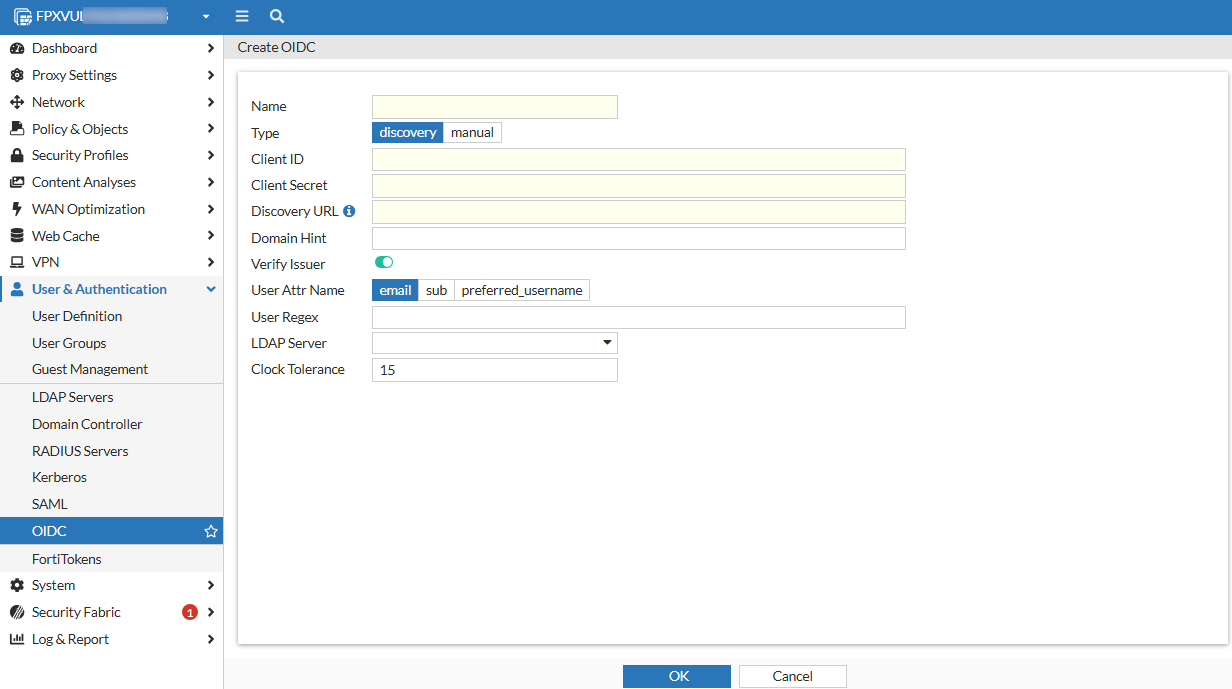
FortiProxy 7.6.2 adds support for authentication with OpenID Connect (OIDC), a widely adopted JSON-based identity layer built on top of the OAuth 2.0 protocol. If you have an Identity Provider (IdP) like Azure AD, Google Identity, or any other service that supports OIDC, you can use it to authenticate users seamlessly across your FortiProxy instance and other integrated systems.
To configure OIDC, go to the User & Authentication > OIDC tab or use the config user oidc command.
Support switching to an alternate FortiSandbox if the main FortiSandbox is unavailable
FolrtiProxy 7.6.2 adds support for switching to an alternate FortiSandbox when the main FortiSandbox is unavailable. Once the connectivity is restored, it will automatically fall back to the primary FortiSandbox. You can configure an alternate FortiSandbox using the new Alt server option when configuring a FortiSandbox connector:
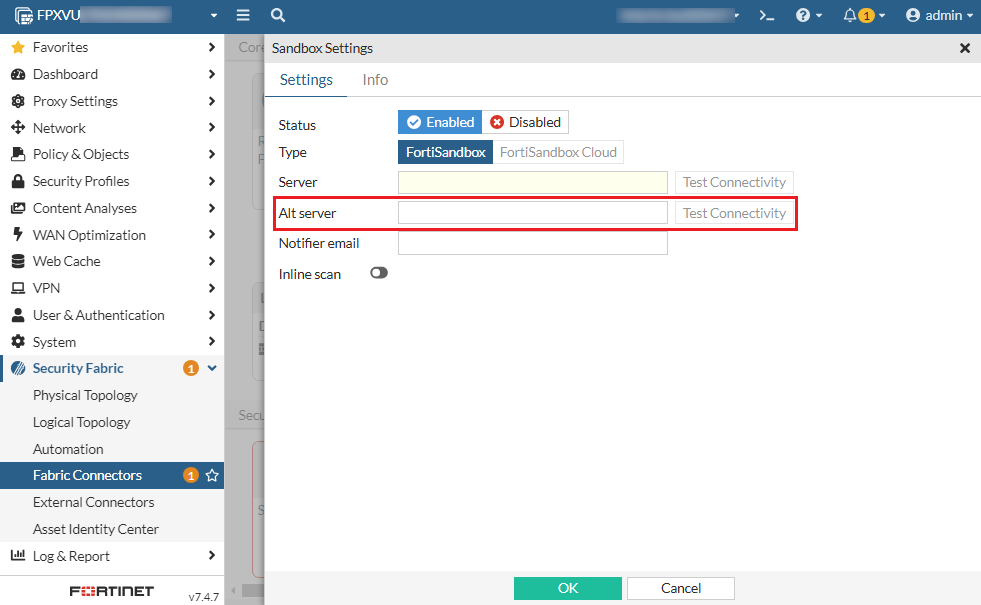
Alternatively, use the new alt-server option under config system fortisandbox. Use the new health-check-interval option to configure the interval of health check for the failover.
Log sample:
1: date=2025-01-09 time=07:15:56 eventtime=1736363756320902685 logid="0100022948"
type="event" subtype="system" level="warning" vd="root" logdesc="FSA failover status warning" name="sandbox" interface="undefined" probeproto="ping" msg="FortiSandbox changed
state from alive to dead, Peer:Primary status Primary:DOWN Alternate:DOWN protocol: ping."
Policy-based service connector traffic forwarding
FortiProxy 7.6.2 adds support for policy-based service connector traffic forwarding. In previous versions, the service connector must be configured within the traffic forward proxy, accessible only through ZTNA proxy.
To configure policy-based service connector traffic forwarding:
config firewall policy
edit 1
set service-connector "fpx166"
next
end
Change to HTTP header content maximum length
In FortiProxy 7.6.2, the HTTP header content maximum length is increased from 1023 to 4000.
New data type support for DLP and file filter
FortiProxy 7.6.2 adds support for .com, .jar, .jnlp, .css, and .dll files for DLP and file filter.
UEFI support for GCP
FortiProxy 7.6.2 adds UEFI support for GCP.
CLI changes
FortiProxy 7.6.2 includes the following CLI changes:
-
config firewall ssl-ssh-profile—Theset client-certificatesubcommand adds the newbypass-on-cert-reqoption to configure FortiProxy to bypass on certificate requests. -
config system fortisandbox—Use the newalt-serveroption to configure an alternate FortiSandbox to be used when the main FortiSandbox is unavailable. Use the newhealth-check-intervaloption to configure the interval of health check for the failover. -
config firewall policy—This command includes the following new options:-
Use the new
set service-connectoroption configure a policy-based service connector for traffic forwarding. -
Use the new
set https-sub-categoryoption to enable or disable HTTPS sub-category policy matching. The default is disable.
-
-
config web-proxy global—Theset policy-category-deep-inspectoption is removed.