

What's new
The following sections describe new features, enhancements, and changes in FortiProxy 7.4.3:
- IPv6 support for explicit FTP and web proxy forwarding server
- Protocol detection of tunneled traffic over SOCKS server
- Reorder server URL by dragging and dropping
-
FortiAnalyzer or Cloud logging is now optional for license sharing
IPv6 support for explicit FTP and web proxy forwarding server
FortiProxy 7.4.3 adds IPv6 support for explicit FTP and web proxy forwarding server.
-
To allow incoming explicit FTP traffic from an IPv6 address, use the new
ipv6-statusoption underconfig ftp-proxy explicit. You can then set the incoming IPv6 address using the newset incoming-ip6option. -
To configure the IPv6 address of a web proxy forwarding server, use the new
set addr-typeoption underconfig web-proxy forward-server. You can then set the IPv6 address using the newset ipv6option. -
The
set srcaddr6andset dstaddr6options underconfig firewall policycan now be used to configure source and destination IPv6 addresses for explicit FTP policies.
Protocol detection of tunneled traffic over SOCKS server
FortiProxy 7.4.3 automatically determines the protocol of tunneled traffic over SOCKS server when the destination port does not match any protocol ports.
Reorder server URL by dragging and dropping
Under Proxy Settings > Server URL, you can now drag and drop the items to quickly reorder them as needed.

Require password to access encrypted archive files
You can now configure FortiProxy to require password for access to encrypted archive files using the new encrypted-file-log option under config firewall profile-protocol-options. The default is disable. When enabled, an HTTP(S) replacement message is displayed to request a password to decrypt and scan the encrypted file. Files failed to decrypt will be blocked.
config firewall profile-protocol-options
edit "decrypt"
config http
set encrypted-file inspect {This option must be set to inspect.}
set encrypted-file-log enable
end
next
end
FortiAnalyzer or Cloud logging is now optional for license sharing
FortiProxy 7.4.3 no longer requires FortiAnalyzer or Cloud Logging to be enabled for security fabric groups for license sharing purposes only. However, you still need to enable FortiAnalyzer or Cloud Logging in order to use any security fabric functionality.
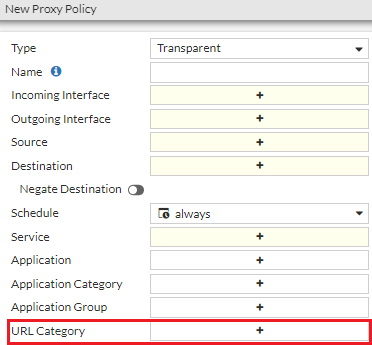
GUI support for URL category parameter for policy matching
FortiProxy now supports policy matching using the URL category parameter when you create or edit a policy in GUI.
Global external resource size limit
FortiProxy 7.4.3 changes the external resource size limit from a per feed limit to a global limit. The limits (listed below) now apply to the total size or total number of lines of all external resources of a given type.
|
File size limit |
16 MB |
|
Line limit |
200K |
See Threat feeds in the Administration Guide for more information.
AWS ARM64 support
You can now deploy the FortiProxy on the AWS ARM64 platform.
CLI changes
FortiProxy 7.4.3 includes the following CLI changes:
-
config dlp exact-data-match—Use this new command to configure exact-data-match template used by DLP scan. -
config ips sensor—Use the newlast-modifiedoption to filter by signatures' last modified date (default = before 00/00/00).The date format is
yyyy/mm/dd. The year range is 2001 - 2050. -
config web-proxy forward-server—You can now set an IPv6 address type using theset addr-typeoption. You can then set the IPv6 address using the newset ipv6option. -
config ftp-proxy explicit—You can now configure FortiProxy to allow incoming explicit FTP traffic from an IPv6 address using the newipv6-statusoption. You can then set the incoming IPv6 address using the newset incoming-ip6option. -
config firewall policy—Theset srcaddr6andset dstaddr6options can now be used to configure source and destination IPv6 addresses for explicit FTP policies. -
diag wad stats—Use the newclearoption to reset all WAD data. This option clears all history data but not the current run-time data. -
diagnose wad memory track—New map information in the mmap_stats section. -
diagnose wad tcp-connection list <worker-index>/all—Use this new command to show the information of the top 10 dynamic TCP connections, which is helpful for troubleshooting.Example output:
diagnose wad tcp-connection list all
===type=worker index=0 pid=1387===
Group by src_ip(only show top 10):
10.5.2.39 count=3160
Group by dst_ip:port(only show top 10):
74.6.160.107:443 count=904
142.251.33.67:80 count=834
Group by dst_port(only show top 10):
443 count=1738
===type=worker index=1 pid=1389===
Group by src_ip(only show top 10):
10.5.2.39 count=3160
Group by dst_ip:port(only show top 10):
74.6.160.107:443 count=904
142.251.33.67:80 count=834
Group by dst_port(only show top 10):
443 count=1738
-
WAD authentication and HTTP engine data is consolidated into shared memory. As a result, the following commands are changed:
-
dia wad stats worker.http_engine—You can now use this command to dump HTTP engine data. -
dia wad stats worker.auth—This command now includes WAD authentication data.
Example output:
# dia wad stats worker.http_engine
http_1way_svr.total_req 0
http_1way_svr.served_req 0
http_1way_svr.total_server 0
http_1way_svr.active_server 0
http.total_req 0
http.total_sessions 0
webcache.total_req 0
webcache.concurrent_req 0
web_proxy.total_req 0
web_proxy.total_sessions 0
web_proxy.concurrent_req 0
web_proxy.concurrent_sessions 0
n_http_reqs 0
n_long_http_reqs 0
n_vary_reqs 0
n_connect_reqs 0
n_ftp_reqs 0
n_req_invalid_url 0
n_req_invalid_header 0
n_req_unexpect_body 0
n_req_child_uci_complex 0
n_req_child_uci_fail 0
n_req_fwd 0
n_req_rspd 0
n_req_errors 0
n_req_error_sp 0
n_req_error_hs 0
n_req_error_act 0
n_req_error_es 0
n_req_add_hdr_error 0
n_req_bad_request 0
n_req_dns_failed 0
n_req_bad_http_ver 0
n_nontp_reqs 0
n_nontp_connect_ok 0
n_connect_req_error 0
n_req_cancel 0
n_http_rsps 0
n_rsp_errors 0
n_rsp_error_info 0
n_rsp_error_1_0 0
n_rsp_error_proc 0
n_rsp_1xx 0
n_connect_rsp 0
n_rsp_from_cache 0
n_rsp_miss_504 0
n_rsp_neg 0
n_rsp_invalidate 0
n_rsp_add_hdr_error 0
n_rsp_invalid_header 0
n_rsp_407_from_fwd_svr 0
n_rsp_malformed_cors_preflight 0
n_warn_wait_dns 0
n_warn_wait_auth 0
n_warn_wait_videofilter 0
n_warn_wait_urlfilter 0
n_warn_wait_msg_proc 0
n_warn_wait_scan 0
n_warn_proc_resp 0
n_warn_wait_antiphish 0
n_icap_req_start 0
n_icap_req_end 0
n_icap_resp_start 0
n_icap_resp_end 0
n_icap_unchanged 0
n_icap_error_client 0
n_icap_error_server 0
n_icap_block 0
n_icap_unblock 0
n_suspend_svr_read 0
n_resume_svr_read 0
n_cvrt_tun_by_non_http_resp_ok 0
n_cvrt_tun_by_non_http_resp_fail0
n_off_ssl_ctx 0
n_unexpected_resp 0
n_rsp_cache_errors 0
n_ce_evading 0
n_ce_utm_skip 0
n_ce_utm_block 0
n_ce_utm_bypass 0
n_ce_utm_inspect 0
n_conserve_drop 0
n_conserve_bypass 0
n_scan_errors 0
n_comfort_unique_req 0
n_total_comfort_fires 0
n_ignoed_reqs_cannot_conn 0
n_unexpected_h2_conn 0
n_ia_bypass 0
n_ia_scan 0
dns_protect.n_total 0
dns_protect.n_valid 0
dns_protect.n_ip 0
dns_protect.n_failure 0
dns_protect.n_now 0
dns_protect.n_max 0
# dia wad stats worker.?
...
worker.http_engine Show http_engine statistics.
worker.auth Show auth statistics.
worker.auth.saml Show auth_saml statistics.
worker.auth.basic Show auth_basic statistics.
worker.auth.cert Show auth_cert statistics.
worker.auth.cookie Show auth_cookie statistics.
worker.auth.digest Show auth_digest statistics.
worker.auth.fsae Show auth_fsae statistics.
worker.auth.krb Show auth_krb statistics.
worker.auth.mix Show auth_mix statistics.
worker.auth.ntlm Show auth_ntlm statistics.
worker.auth.pkey Show auth_pkey statistics.
worker.auth.rsso Show auth_rsso statistics.
worker.auth.user_query Show auth_user_query statistics.
...
# dia wad stats worker.auth
saml.n_saml_req 0
saml.n_saml_resp 0
saml.n_saml_auth_success 0
saml.n_saml_auth_fail 0
saml.n_saml_num_assertion_attr 0
saml.n_saml_num_max_attr 0
saml.n_saml_relay_max_len 0
saml.n_saml_relay_encode_fail 0
saml.n_saml_relay_decode_fail 0
saml.n_saml_relay_over_limit 0
saml.n_grpsid_query_sent 0
saml.n_grpsid_query_fail 0
saml.n_grp_fnbamd_fail 0
saml.n_grp_fail 0
saml.n_dc_query_sent 0
saml.n_dc_cached_hit 0
saml.n_err_queue_ses 0
saml.n_err_clk_skew 0
saml.n_err_assertion_coin 0
saml.n_err_assertion_invl 0
saml.n_err_assertion_audience 0
saml.n_err_assertion_attr 0
saml.n_err_provider 0
saml.n_err_signature 0
saml.n_err_signing_algo 0
saml.n_err_internal 0
saml.n_err_invalid_req 0
saml.n_err_lasso 0
basic.n_basic_req now 0 max 0 total 0
basic.n_basic_auth_success 0
basic.n_basic_auth_fail 0
cert.n_cert_req now 0 max 0 total 0
cert.n_cert_auth_success 0
cert.n_cert_auth_fail 0
cookie.n_cookie_req now 0 max 0 total 0
cookie.n_cookie_auth_success 0
cookie.n_cookie_auth_fail 0
digest.n_digest_req now 0 max 0 total 0
digest.n_digest_auth_success 0
digest.n_digest_auth_fail 0
digest.n_auth_staled 0
digest.n_active_digest_nounce 0
digest.n_digest_nounce 0
fsae.n_fsae_req now 0 max 0 total 0
fsae.n_fsae_auth_success 0
fsae.n_fsae_auth_fail 0
krb.n_krb_req now 0 max 0 total 0
krb.n_krb_auth_success 0
krb.n_krb_auth_fail 0
mix.n_mix_req now 0 max 0 total 0
mix.n_mix_auth_success 0
mix.n_mix_auth_fail 0
ntlm.n_ntlm_req now 0 max 0 total 0
ntlm.n_ntlm_auth_success 0
ntlm.n_ntlm_auth_fail 0
pkey.n_pkey_req now 0 max 0 total 0
pkey.n_pkey_auth_success 0
pkey.n_pkey_auth_fail 0
rsso.n_rsso_req now 0 max 0 total 0
rsso.n_rsso_auth_success 0
rsso.n_rsso_auth_fail 0
user_query.n_user_query_req now 0 max 0 total 0
user_query.n_user_query_auth_success 0
user_query.n_user_query_auth_fail 0
-