

What's new
The following sections describe new features, enhancements, and changes in FortiProxy 7.4.4:
- GUI support for exact data match (EDM) for data loss prevention
- Control TLS connections that utilize Encrypted Client Hello for certificate inspection
-
GUI support for blocking action for FortiSandbox inline scan
- Configure port of data session to connect FTP client in active mode
-
Log client IP from headers without using the IP for policy matching
GUI support for exact data match (EDM) for data loss prevention
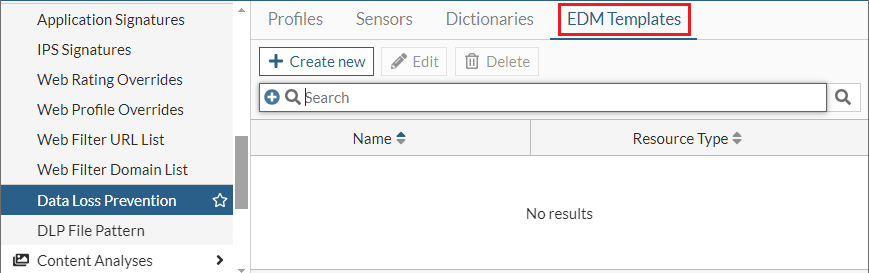
FortiProxy 7.4.4 adds GUI support for exact data match (EDM) for data loss prevention (DLP). To configure EDM in the GUI, you must first create an EDM template using the new EDM Templates tab in the Data Loss Prevention page. You can then apply the EDM template to a DLP sensor and apply the DLP sensor to a DLP profile.
See Configure EDM for data loss prevention in the Administration Guide for an example.
Control TLS connections that utilize Encrypted Client Hello for certificate inspection
In FortiProxy 7.4.4, TLS connections that use Encrypted Client Hello (ECH) can be blocked or allowed, and the client can be forced to switch to a non-ECH TLS connection by modifying the DNS over HTTPS (DoH) responses. This increases control and flexibility when managing TLS connections.
-
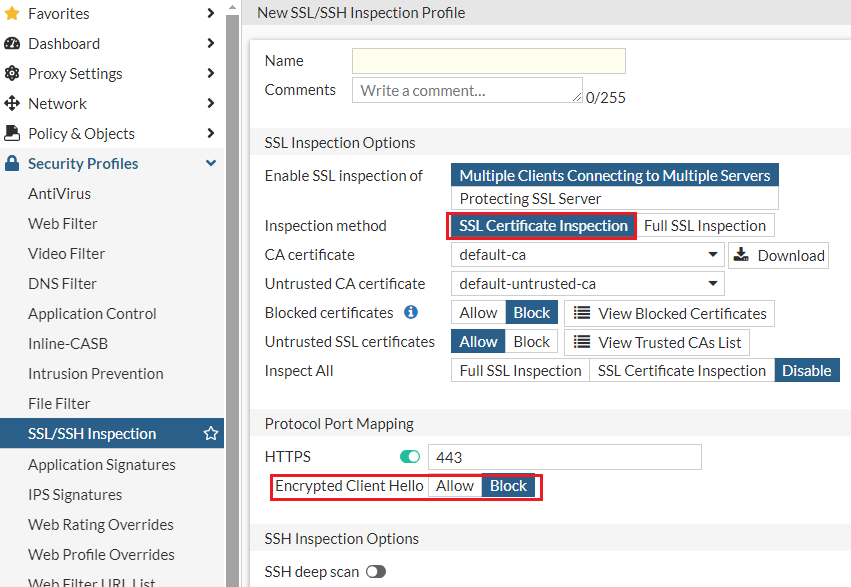
To configure whether to block or allow the session when encrypted-client-hello exists in certificate inspection, use the new Encrypted Client Hello option when you create or edit an SSL/SSH profile:
Alternatively, use the new
set encrypted-client-hellooption underconfig firewall ssl-ssh-profile. -
To configure the ClientHelloOuter SNIs to be blocked during certificate inspection, use the new
config ech-outer-snisubcommand underconfig firewall ssl-ssh-profile. -
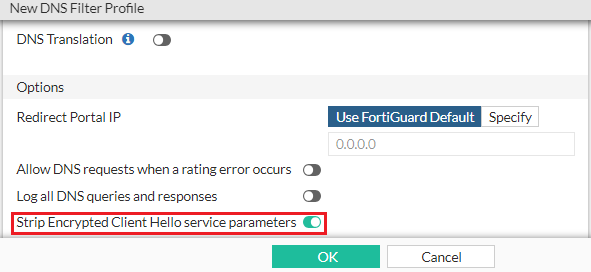
To configure whether to remove the encrypted client hello service parameter from supporting DNS RRs, use the new Strip Encrypted Client Hello service parameters option when you create or edit a DNS filter profile:
Alternatively, use the new
set strip-echoption underconfig dnsfilter profile.
See Control TLS connections that utilize Encrypted Client Hello in the Administration Guide for an example.
Import and export IdP metadata for SAML authentication
In FortiProxy 7.4.4, you can import and export IdP metadata when you create or edit a SAML server:
-
To export the SAML IdP metadata, select the SAML server in the list and click the new Generate Service Provider Metadata button.

-
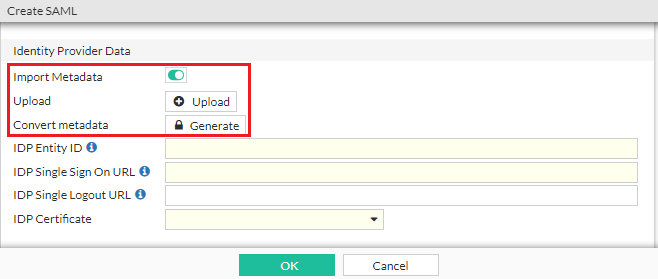
To import SAML IdP metadata from an existing file, in the Identity Provider Data section, enable Import Metadata and click Upload to select the file. You can also use the new Generate button to convert the metadata to a user SAML CLI configuration.
Display CORS content in webpages in explicit proxy
In FortiProxy 7.4.4, you can configure to properly display Cross-Origin Resource Sharing (CORS) content in webpages in explicit proxy when using session-based, cookie-enabled, and captive portal assisted authentication.
config authentication rule
    edit <name>
        set web-auth-cookie enable
        set cors-stateful {enable | disable}
        set cors-depth <integer>
    next
end
See Display CORS content in an explicit proxy environment in the Administration Guide for a configuration example.
New shaper-related fields in traffic logs
FortiProxy 7.4.4 adds the following shaper-related fields to traffic logs:
-
shaperdroprcvdbyte
-
shaperdropsentbyte
-
shaperperipdropbyte
-
shaperperipname
-
shaperrcvdname
-
shapersentname
-
shapingpolicyid
-
shapingpolicyname
Refer to the FortiProxy Log Message Reference Guide for more details.
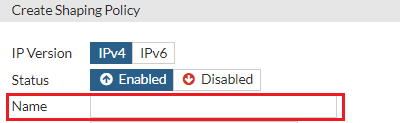
Specify the name for a traffic shaping policy
In FortiProxy 7.4.4, you can specify the policy name when you Create or edit a traffic shaping policy:
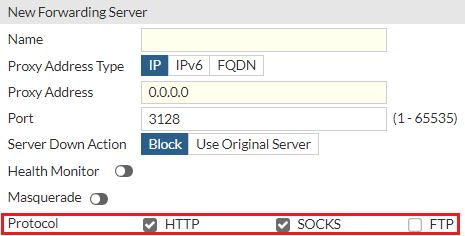
Configure the protocol for forwarding servers in GUI
In FortiProxy 7.4.4, you can configure the protocol when you create or edit a forwarding server in the GUI:
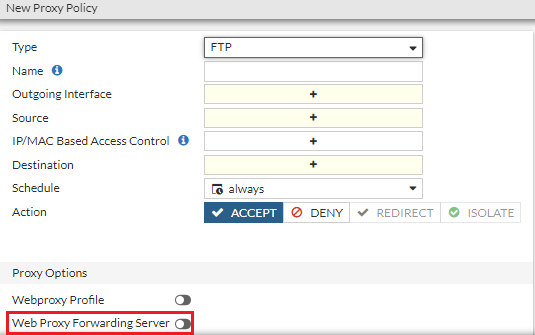
Configure the forwarding server for FTP policies in GUI
In FortiProxy 7.4.4, you can configure the forwarding server when you create or edit an FTP policy in the GUI:
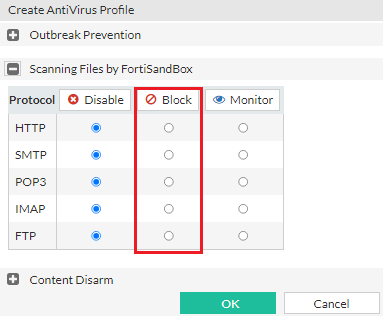
GUI support for blocking action for FortiSandbox inline scan
FortiProxy 7.4.4 adds the Block option for held files when you configure FortiSandbox inline scanning in the GUI:
Configure port of data session to connect FTP client in active mode
You can now configure the port of data session to connect FTP client in active mode using the new set active-src-port subcommand under config ftp-proxy explicit. It can be the incoming port (default) or the same port as FTP server source port. The configuration helps enable compatibility with network devices that must perform deep inspection of FTP proxy data (such as load balancers) where active mode client connections are required.
Log client IP from headers without using the IP for policy matching
In FortiProxy 7.4.4, use the new log-only option of the learn-client-ip subcommand under config web-proxy global to configure the web proxy to log the client's IP address from headers without using the IP for policy matching.
TLS 1.3 support for LDAP connections
FortiProxy 7.4.4 adds support for TLS 1.3 for LDAP connections. Under config user ldap, use the new ssl-max-proto-version subcommand to configure the maximum supported protocol version for SSL/TLS connections. Use the new TLSv1-3 option of ssl-min-proto-version to configure TLS v1.3 as the minimum supported protocol version for SSL/TLS connections.
ZSTD HTTP encoding support for AV scan
FortiProxy 7.4.4 adds support for ZSTD HTTP encoding for AV scan.
"204 allow" and "Preview" headers support for ICAP servers
FortiProxy 7.4.4 adds support for "204 allow" and "Preview" headers for ICAP servers.
For preview headers, the maximum preview data length is 4096 bytes. You can enable or disable message preview using the new set message-preview subcommand under config icap local-server.
Change to default status of fg-fm port
In FortiProxy 7.4.4, the fg-fm port (TCP 541) is disabled on all interfaces by default. To add a FortiProxy to FortiManager for management, you must open the port on the FortiProxy first.
Monitoring the status of the PSUs for FPX-400G
FortiProxy 7.4.4 adds support for PSU monitoring for FPX-400G. A log message is generated if a FPX-400G power supply unit (PSU) loses or regains power.
Panic logging support for FortiProxy G-series
FortiProxy 7.4.4 adds panic logging support for FortiProxy G-series.
No support for SSL VPN
FortiProxy 7.4.4 no longer supports SSL VPN.
CLI changes
FortiProxy 7.4.4 includes the following CLI changes:
-
config user ldap—Use the newssl-max-proto-versionsubcommand to configure the maximum supported protocol version for SSL/TLS connections. Thessl-min-proto-versionsubcommand adds theTLSv1-3option to configure TLS v1.3 as the minimum supported protocol version for SSL/TLS connections. -
config web-proxy global—Thelearn-client-ipsubcommand adds thelog-onlyoption, which allows the web proxy to learn the client's IP address from headers and use it only for logging without using it for policy matching. Meanwhile, the optionenableis renamedtraffic-process, which allows the web proxy to learn the client's IP address from headers and use it for both policy-matching and logging. -
config web-proxy explicit-proxy—Use the newset dns-modeoption to configure the DNS lookup mode for local requests from WAD. The following values are available:Option
Description
recursive (default) Look up local dns-databases of view type "shawdow" and forward the request to upstream DNS server.
non-recursive Look up local dns-databases of view type "public" and DON"T forward the request.
forward-only Do not look up local dns-databases and forward the request. -
config ftp-proxy explicit—Use the newset active-src-portsubcommand to configure the port of data session to connect FTP client in active mode. It can be the incoming port (default) or the same port as FTP server source port. -
config authentication rule—Use the following new options to configure webpages to properly display Cross-Origin Resource Sharing (CORS) content in explicit proxy when using session-based, cookie-enabled, and captive portal assisted authentication:set cors-stateful {enable | disable}set cors-depth <integer>
-
config firewall ssl-ssh-profile—This command includes the following additions when certificate inspection is enabled:-
Use the new
set encrypted-client-hellooption to configure whether to block (default) or allow session when encrypted-client-hello exists. -
Use the new
config ech-outer-snisubcommand to configure the ClientHelloOuter SNIs to be blocked. The following entries are configured by default entries:name
sni
cloudflare
cloudflare-ech.com tls-ech public.tls-ech.dev defo.ie
cover.defo.ie
-
-
config dnsfilter profile—Use the newset strip-echoption to enable (default) or disable the removal of the encrypted client hello service parameter from supporting DNS RRs. -
diagnose firewall fqdn6—Use this new command to retrieve IPv6 FQDN information. The following arguments are supported:Argument
Description
listDisplays the list of IPv6 FQDNs. getDisplays one IPv6 FQDN.
flushFlushes IPv6 information of FQDN.
purgePurges all unused IPv6 FQDNs.
-
diagnose ipsec—This command is now per-VDOM instead of global. See the following table for changes when you diagnose IPSec VPN:7.4.3 and earlier 7.4.4 config global
diagnose ipsec
...
config vd
edit vd_name
diagnose ipsec
...
-
dia sys session6—Use this new command to retrieve information for IPv6 sessions. The following arguments are supported:Argument
Description
listDisplays the list of IPv6 sessions. expectationDisplays a list of IPv6 expectation sessions.
conntrackShows number of conntrack.
clearClears all filtered IPv6 sessions.
filterDefines the filter to use to drill down the IPv6 sessions to display. The following filters are supported:
sintf Source interface.
dintf Destination interface. src Source IP address.
nsrc NAT'd source IP address.
dst Destination IP address.
proto Protocol number.
sport Source port.
dport Destination port.
policy
Policy ID.
clear
Clear IPv6 session filter
-
dia sys session— This command is now IPv4-specific and no longer displays IPv6 session information. To retrieve information for IPv6 sessions, use the newdia sys session6command instead. -
diag wad stats—This command can now show UNIX stream statistics of different WAD daemons.Example output:
dut6 (Interim)# diag wad stats worker.proc_common
worker.proc_common.unix_sock.config.in_buf_len 0
worker.proc_common.unix_sock.config.out_buf_len 0
worker.proc_common.unix_sock.config.n_output 64
worker.proc_common.unix_sock.config.n_input 192
worker.proc_common.unix_sock.config.n_reconnect 2
worker.proc_common.unix_sock.config.n_connect_fails 0
worker.proc_common.unix_sock.config.n_write_block 0
worker.proc_common.unix_sock.config.n_fd 0
worker.proc_common.unix_sock.fast_match.in_buf_len 0
worker.proc_common.unix_sock.fast_match.out_buf_len 0
worker.proc_common.unix_sock.fast_match.n_output 1
worker.proc_common.unix_sock.fast_match.n_input 3
worker.proc_common.unix_sock.fast_match.n_reconnect 1
worker.proc_common.unix_sock.fast_match.n_connect_fails 0
worker.proc_common.unix_sock.fast_match.n_write_block 0
worker.proc_common.unix_sock.fast_match.n_fd 0