

What's new
The following sections describe new features, enhancements, and changes in FortiProxy 7.6.4:
-
New connection policy types Explicit Web Connect and Transparent Connect for HTTPS
-
Multi-condition support for proxy addresses and address groups
New connection policy types Explicit Web Connect and Transparent Connect for HTTPS
FortiProxy 7.6.4 introduces the Explicit Web Connect and Transparent Connectpolicy types to handle forward server and SSL deep inspection in HTTPS CONNECT/SNI state. See Create or edit a policy.
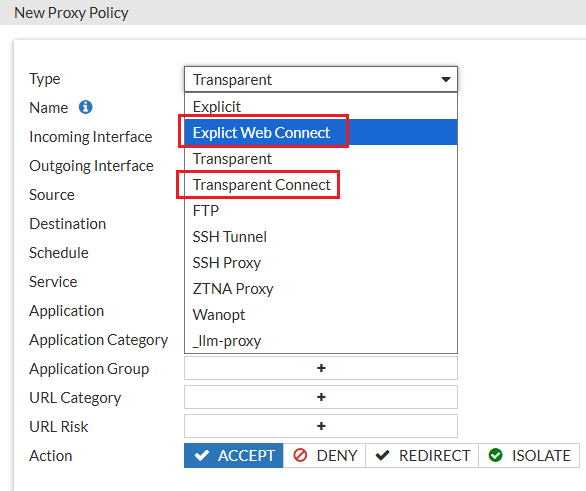
The connection policies have higher priority than regular transparent and explicit policies. When a connection policy is configured, HTTPS requests will first match the connection policy before proceeding to the regular transparent and explicit policies. Content scan related UTM profiles are not available for connection policies.

|
Plain-text HTTP or decrypted HTTPS traffic will only match regular transparent and explicit policies. |
The new policy types are also added to the config firewall policy command:
config firewall policy
edit <id>
set type <explicit-web-connect/transparent-connect>
next
end
LLM security gateway on ZTNA web portal
The FortiProxy LLM gateway securely manages and controls organizational user interactions with Large Language Models (LLMs), such as ChatGPT. Users access LLM services through the FortiProxy ZTNA web portal that dynamically displays links to LLM tools authorized for each user based on their role, credentials, and security posture. Links redirect users to proxy-managed LLM interactions or directly to the LLM service. Gateway-to-LLM authentication is managed using API keys, simplifying implementation while ensuring robust security and compliance.
The following LLMs are supported:
-
ChatGPT (OpenAI)
-
Bard (Google AI)
-
Claude (Anthropic)
-
Bing AI (Microsoft)
-
Llama 2 (Meta)
To configure LLM secure gateway, use the following LLM proxy-related commands:
You can then reference the LLM proxy in an LLM policy and configure forward server using the config firewall policy command. See example below:
edit 15
set type llm-proxy
set name "llmtest"
set uuid ffa2f9e2-29f1-51f0-c076-82c1f20772ab
set srcintf "any"
set dstintf "any"
set srcaddr "all"
set dstaddr "all"
set action accept
set schedule "always"
set service "ALL"
set utm-status enable
set logtraffic all
set webproxy-forward-server "fg2"
set av-profile "g-default"
set llm-profile "llm-profile-2"
next
end
Support SAML users when configuring local users
FortiProxy 7.6.4 now supports SAML users when configuring local users, expanding its ability to define individual remote users for policy enforcement. Administrators can create local entries for SAML users, enabling precise, user-specific control in both policies and VPNs. This streamlines policy management and enhances flexibility for environments using SAML authentication.
A working SAML IdP connection must already be configured.
Chain proxy authentication using client certificates
With client certificate HTTP header (RFC 9440), FortiProxy now supports chain proxy authentication using client certificates. The upstream proxy verifies the client certificate with the HTTPS proxy and forwards the certificate in the HTTP headers if the verification is successful. The downstream proxy then further verifies the certificate (no verification of the key) and maps it to a user.
The downstream proxy should be configured to only accept the HTTP header certificate from the IP of the upstream proxy for security.
To enable authentication with user certificate in Client-Cert HTTP header:
edit "client-cert-scheme"
set method cert
set user-cert enable
set cert-http-header enable
next
end
To configure the action to take on the HTTP Client-Cert/Client-Cert-Chain headers in forwarded responses:
edit "forward-client-cert"
set header-client-cert [pass | add | remove]
next
end
Support captcha in form-based authentication
You can now add captcha in form-based authentication to prevent robot login. The following captcha vendors are supported:
-
Google reCAPTCHA
To use Google reCAPTCHA, you must add a policy to allow
https://www.google.com/recaptcha/api.jsand*.gstatic.com. -
Cloudflare Turnstile
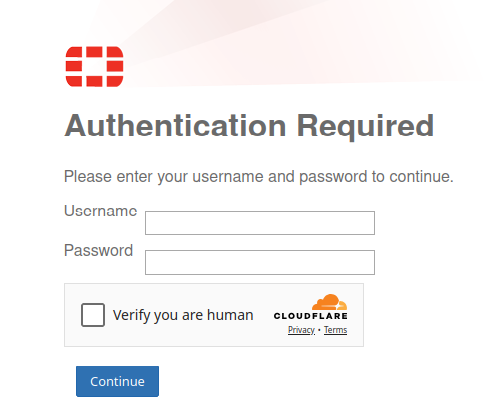
To enable and configure captcha in form-based authentication:
edit "form-scheme"
set method form
set captcha enable
set captcha-vendor google-recaptcha-v3
set captcha-site-key "6LeS3DgrAAAAANTP04tXcclDFdIYRlktzq47WcxR"
set captcha-secret-key "6LeS3DgrAAAAAMfs37y06eXe51e_cFitgm6__-3c"
set user-database "local-user-db"
next
end
Authentication behavior change for SSO_Guest_Users group
The SSO_Guest_Users group now only matches authenticated users and no longer allows unauthenticated users to pass through. See User Groups.
Multi-condition support for proxy addresses and address groups
When configuring proxy addresses and address groups, you can now specify multiple addresses or address groups and configure the AND/OR relationship among them, The addresses or address groups can then be used in firewall policies.
For example, you can now specify multiple addresses: A, B, C, D and configure them as "A AND B) OR (C AND D" using the following:
edit "A_and_B"
set logic-type and
set member "A" "B"
next
edit "C_and_D"
set logic-type and
set member "C" "D"
next
end
config firewall policy
ed 1
set dstaddr A_and_B C_and_D
...
next
end
Enhancements to traffic shaping based on HTTP response
FortiProxy 7.6.4 includes the following enhancements to traffic shaping based on HTTP response:
-
DSCP support
-
Response policy matching based on matched shaping policy
To configure DSCP-related settings and matched shaping policies:
Use the following new fields in the config firewall response-shaping-policy command:
config firewall response-shaping-policy
edit 1
set uuid a0edf572-0378-51f0-f0f6-8f924dccfd53
set dstaddr "resp-content-length"
set class-id 10
set diffserv-forward enable
set diffservcode-forward 000000
set diffserv-reverse enable
set diffservcode-rev 000000
set matched-shaping-policies 2 1 3
set srcaddr "all"
License sharing enhancements
FortiProxy 7.6.4 improves license sharing stability in the following ways:
-
Additional layer of root nodes for better redundancy and recovery
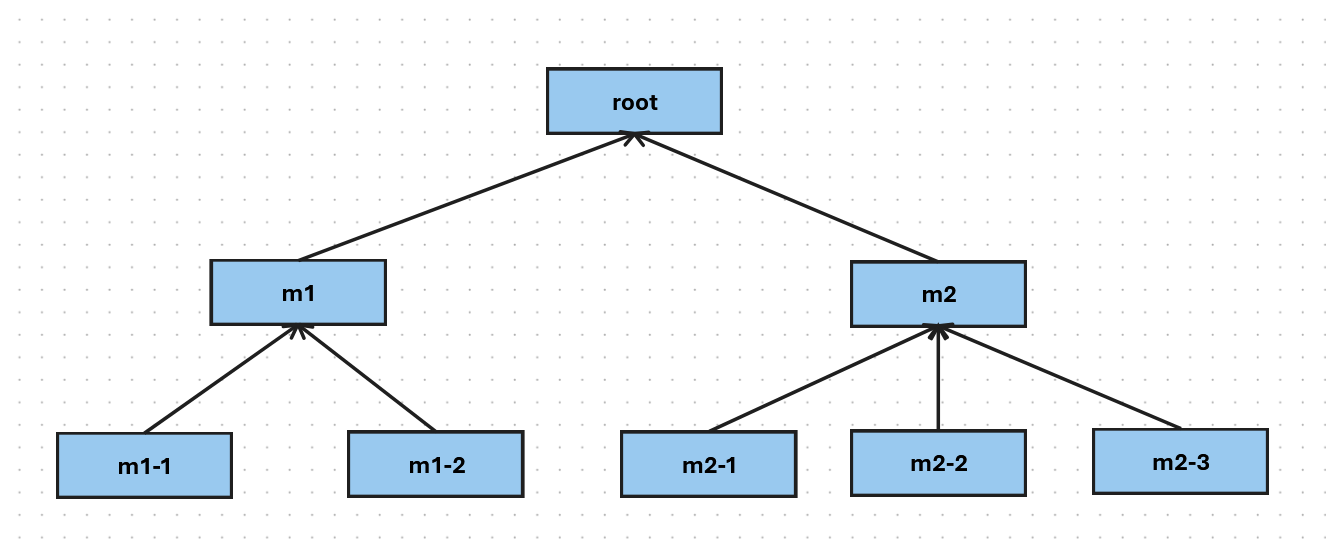
You can now add a layer of child root nodes between the security fabric root node and downstream members. A security fabric root node can have multiple child root nodes, each with a different set of downstream nodes. In the following example, root is the security fabric root. m1 and m2 are the child root nodes with two and three downstream nodes respectively.
-
When the security fabric root is working as expected, the child root nodes act like regular downstream nodes, contributing and claiming licenses from the pool managed by the security fabric root node.
-
When the security fabric root node is down ( e.g., due to a failure or network disconnection) for a specified period of time (10 minutes), the child root nodes take over license sharing responsibilities and coordinate seat allocation for downstream members to ensures the continuity of license sharing.
-
For the first 7 days of grace period, each child root node is entitled to the whole license pool that the security fabric root node used to manage. In the example above, if the purchased seats for each node is 100, both m1 and m2 will have a license pool of 800 during the first 7 days after root becomes available.
-
After 7 days, the license pool of each child root node is limited to licenses from itself and its downstream members. In the example above, if the purchased seats for each node is 100, m1 and m2 will have a license pool of 300 and 400 respectively after 7 days of root being unavailable.
-
-
When the security fabric root is restored, it re-claims license sharing responsibilities from the child root nodes and restores license sharing to the original state where all child root nodes and downstream members contribute and claim licenses from the security fabric root node.
-
-
License sharing grace period for offline operation extended from 8 hours to 7 days
In case of disconnection from the root, a security fabric member node can now retain its eligible seats ( last allocated or locally purchased seats, whichever is greater) for 7 days before falling back to locally purchased seats . The seats are released back into the pool when the connection to the root recovers.
See the License Sharing Deployment Guide for more details.
Negate user group as source in policy match
When creating or editing a user group, you can now configure negate user group as source in policy match using the new negate option:
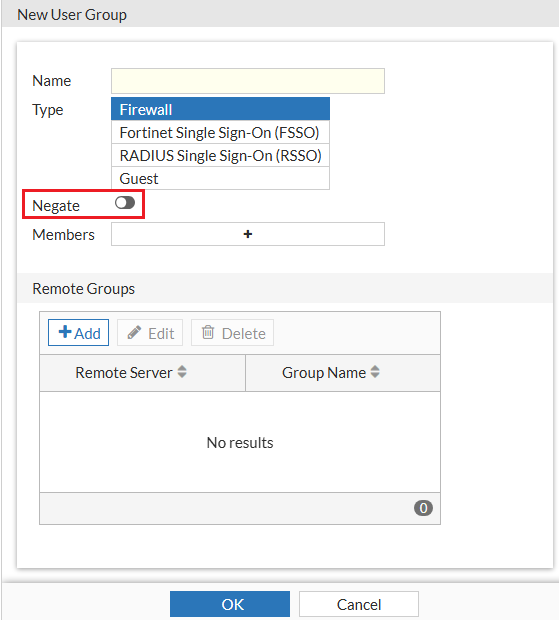
Alternatively use the new negate option in the config user group command:
config user group
edit <name>
set negate <enable/disable>
end
Authentication based on custom HTTP header
In FortiProxy 7.6.4, you can configure authentication based on custom HTTP headers in the authentication scheme if the method is x-auth-user using the new auth-user-header option in the config authentication scheme command:
config authentication scheme
edit "1"
set method x-auth-user
set auth-user-header "custom-header1"
set user-database "ldap1"
next
end
If auth-user-header is not specified, the default value x-authenticated-user is used as the header name instead.
IKEv2 support for IPsec VPN
FortiProxy 7.6.4 adds IKEv2 support for IPsec VPN.
Increase proxy-address configuration limit
FortiProxy 7.6.4 includes the following changes to the proxy-address configuration limit for VM04 and VM08:
|
Proxy address object |
New configuration limit for 7.6.4 |
|---|---|
| Proxy Address Object | 80K |
| Proxy Address Group | 4096 |
| Proxy Address Group Member | 30K |
CLI changes
FortiProxy 7.6.4 includes the following CLI changes:
-
config router static—Use the newset preferred-sourcesubcommand to configure the preferred source IP for the route. -
config authentication rule—Use the newset session-logoutsubcommand to enable/disable logging out users from the current session. -
config web-proxy global—Use the newset policy-partial-matchsubcommand to enable/disable policy partial match. The default is enable. -
diagnose wad user explicit-proxy-users—Use this new command to show the number of active users that have been processed by WAD. -
diag wad user list—This command now also displays dynamic bookmark related information in a the new Dynamic Attributes section. -
diagnose sys filesystem tree—Use this new command to list the top files/folders tree. -
diagnose sys filesystem hash—Use this new command to generate hash for files within the filesystem. See Computing file hashes in the Administration Guide for more details. -
diagnose system filesystem last-modified-files—Use this new command to list the last modified files. -
diagnose sys session list-verbose—Use this new command to list sessions in verbose detail. -
diagnose sys mpstat—Use this new command to diagnose mpstat. -
diag wad user filter—Use this new command to set a filter to query the user by the leading string (case insensitive). You can the use thediag testcommands to check the data in ldap-cache and worker. -
config firewall access-proxy—The default value ofsvr-pool-multiplexis changed from enable to disable.