

What's new
The following sections describe new features, enhancements, and changes in FortiProxy 7.2.11:
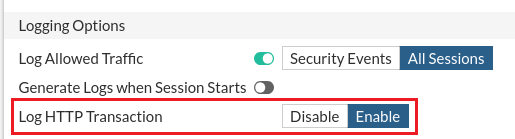
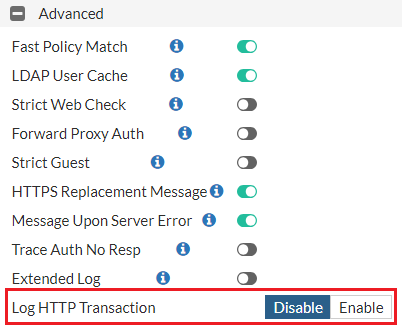
Changed options for Log HTTP Transaction
The options for Log HTTP Transaction changed from All, Security Profiles, Disable to Enable and Disable in the following locations:
Changes to logging behavior for HTTP CONNECT
In FortiProxy 7.2.11, HTTP transaction log no longer exists for HTTP CONNECT. UA, rawdata, and status code information is now merged into the HTTPS log for cert-inspect HTTPS traffic.
"204 allow" and "Preview" headers support for ICAP servers
FortiProxy 7.2.11 adds support for "204 allow" and "Preview" headers for ICAP servers.
For preview headers, the maximum preview data length is 4096 bytes. You can enable or disable message preview using the new set message-preview subcommand under config icap local-server.
FortiNBI enhancement
FortiProxy 7.2.11 automatically installs the FortiNBI application after a new FortiNBI installer is uploaded from the cloud into FortiProxy. You no longer need to manually download or install the FortiNBI application for an upgrade.
CLI changes
FortiProxy 7.2.11 includes the following CLI changes:
-
config system automation-action—Use the newset passwordsubcommand to script password to replace %%PASSWD%% tag in the script. Use cases include replacing a password tag for sftp/ftp server password. -
config authentication setting—Use the newset log-auth-request [enable|disable]subcommand to configure whether to enable logging of authentication requests. -
config firewall policy—The values of theset log-http-transactionoption changed from[all | utm | disable]to[enable | disable]. -
diagnose firewall fqdn6—Use this new command to retrieve IPv6 FQDN information. The following arguments are supported:Argument
Description
listDisplays the list of IPv6 FQDNs. getDisplays one IPv6 FQDN.
flushFlushes IPv6 information of FQDN.
purgePurges all unused IPv6 FQDNs.