

What's new
The following sections describe new features, enhancements, and changes in FortiProxy 7.6.1:
ZTNA support for UDP traffic
ZTNA now supports UDP traffic from FortiClient 7.4.1 and later endpoints. When UDP traffic to a destination is detected, FortiClient forms a UDP connection over QUIC to the FortiProxy ZTNA gateway. After authentication, security posture check, and authorization, FortiProxy forms a connection with the destination and the end-to-end UDP traffic passes through. See ZTNA for UDP traffic in the Administration Guide for an example.
Enhancements to the policy list
FortiProxy 7.6.1 includes the following enhancements to the policy list under Policy and Objects > Policies:
-
Improved performance and reduced time in loading a large number of policies. This is achieved by only loading the necessary data when needed, rather than loading all the data at once.
-
A new layout has been introduced for the policy list which includes several features to enhance user experience. You can choose between the new layout and the old layout. To switch between the classic and new policy list layout, select the style from the dropdown menu. See New layout for policies in the Administration Guide for more details.
-
The Interface Pair View is now available when a policy is configured with multiple interfaces. Previously the Interface Pair View was grayed out when multiple interfaces were set for a policy, and the By Sequence view was displayed. See Policy views in the Administration Guide for more details.
New log fields for long-live sessions
Logging of long-live session statistics can be enabled or disabled in traffic logs.
config log setting
     set long-live-session-stat {enable | disable}
end
When enabled, traffic logs include the following fields of statistics for long-live sessions:
|
Duration delta ( |
Displays the time in seconds between the last session log and the current session log. |
|
Sent packet delta ( |
Displays the number of sent packets. When the number of packets reported in the |
|
Received packet delta ( |
Displays the number of received packets. When the number of packets reported in the |
The long-live session fields enhance the granularity and accuracy of traffic longs to aid troubleshooting and analysis. See Log fields for long-lived sessions in the Administration Guide for an example.
Multiple explicit proxies in a policy
You can now select multiple explicit proxies in a policy:

In the CLI, the explicit-web-proxy option of the config firewall policy command also adds support for multiple explicit web proxies:
config firewall policy
    edit 2
        set type explicit-web
        set uuid c48e0f02-0857-51ef-cfc7-b9e1b79313c3
        set dstintf "port3"
        set srcaddr "all"
        set dstaddr "all"
        set action accept
        set schedule "always"
        set service "webproxy"
        set explicit-web-proxy "web-proxy-8800" "web-proxy-8801"
        set utm-status enable
        set logtraffic all
        set log-http-transaction enable
        set extended-log enable
        set ssl-ssh-profile "custom-deep-inspection"
        set webfilter-profile "my-web-filter"
    next
end
IP based user authentication through portal authentication without HTTP redirection
For IP-based authentication, if negotiate is enabled in its active scheme, the form-auth-fallback command is available. When enabled, if an exception occurs while processing the ticket, the user will be prompted to enter user name and password. Captive portal must be enabled.
By default, form-auth-fallback is disabled.
config authentication rule
    edit "krb-rules"
        set srcintf "any"
        set srcaddr "all"
        set dstaddr "all"
        set active-auth-method "krb-scheme"
        set form-auth-fallback enable
    next
end
Customizable syslog format option
To better support 3rd party integrations, syslog format options can be customized.
config log syslogd setting
    set format custom
    config log-templates
        edit 1
            set category traffic
            set template "$(date) $(time) $(logid)"
        next
    next
end
|
category <category> |
The log category. |
|
template <string> |
The log template string. |
Use a static client certificate for SSL/SSH inspection
When configuring an SSL/SSH inspection profile, you can now configure FortiProxy to use a static client certificate for mTLS authentication on behalf of all users using the new Static option of SSL Client Certificate. You can then select the client certificate to use.
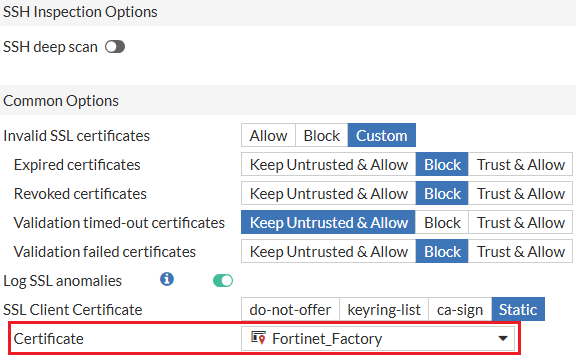
Alternatively use the new static status option of the config ssl-client-certificate subcommand under config firewall ssl-ssh-profile. You can then configure the client certificate using the new set cert subcommand.
Header replacement in web-proxy profile
In web-proxy profiles, the header can be replaced.
config web-proxy profile
    edit my_profile
        config headers
            edit 1
                set name "server"
                set action add-to-response
                set add-option {replace | replace-when-match}
                set content "content_changed"
            next
        end
    next
end
|
replace |
Replace content to existing HTTP header or create new header if HTTP header is not found. |
|
replace-when-match |
Replace content to existing HTTP header. |
Add license information in SNMP
FortiProxy 7.6.1 adds license information to SNMP with the following OIDs:
-
FortiProxy license related: 3.6.1.4.1.12356.101.10.117.*
-
SWG Bundle (FURL): 3.6.1.4.1.12356.101.10.117.1.*
-
Licensed sessions: 3.6.1.4.1.12356.101.10.117.1.1
-
Active sessions (licensing limit): 3.6.1.4.1.12356.101.10.117.1.2
-
Purchased seats: 3.6.1.4.1.12356.101.10.117.1.3
-
-
Browser Isolation (FNBI): 3.6.1.4.1.12356.101.10.117.2.*
-
Content Analysis (FCAS): 3.6.1.4.1.12356.101.10.117.3.*
Support for Google Cloud HSM
FortiProxy 7.6.1 adds support for Google Cloud HSM which allows FortiSASE HSM integration.
Improved certificate management in cloud infrastructure
FortiProxy 7.6.1 introduces the following certificate management improvements in cloud infrastructure to optimize performance:
-
Certificate signing has been changed from synchronous to asynchronous.
-
Certificate caching mechanism has been improved so that local certificate cache is maintained by individual WAD workers while centralized certificate cache is managed by the certificate manager.
SR-IOV support on Hyper-V
FortiProxy 7.6.1 adds support for SR-IOV on Hyper-V to optimize FortiProxy-VM performance.
CLI changes
FortiProxy 7.6.1 includes the following CLI changes:
-
config user radiusset require-message-authenticatoroption to configure whether to require message-authenticator checking.enable
Validation of message authenticator is mandatory in authentication responses.
disable
Validation of message authenticator is optional in authentication responses.
-
diagnose debug kernel log—Use this new command to show or clear kernel log.show
Dump the kernel log.
clear
Clear the kernel log.